Memory cards#
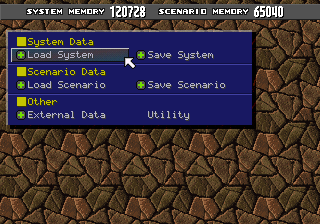
Everything RPG Tsukuru 4 keeps goes on a memory card: your project, the player's saves, and the graphics and songs made with the companion programs. This chapter goes through every card screen, explains how the files on a card find each other, and lists what a player needs on the card to play your game. The screenshots save the sample game to a blank card in slot 1, with an unformatted card in slot 2.
The files#
A card has 15 blocks. RPG Tsukuru 4 writes four kinds of file of its own, each with 15 slots of its own:
| Kind | Holds | Blocks |
|---|---|---|
| System Data | the game's rules and contents: everything under System Data in the editor | 1 for the sample; a large System 2 or more |
| Scenario Data | the events: everything under Scenario Data | 3 for the sample in the original, 2 with the patch; a full original Scenario about 3 to 5 |
| Game Data | a player's save, made at a Save event | 2 in the original, 1 with the patch |
| Test Data | a save made at a Save event in test play | the same as Game Data |
A project is a System and at least one Scenario. Each is saved and loaded on its own, so save both before you switch the console off. The editor's counters at the top of the screen show how much room is left in each (The memory counters).
The Character Tsukuru disc and Music Tsukuru 3 write files of their own, which RT4 reads as external data: hero, monster and magic graphics, faces, slashes, title backgrounds and songs (Using the graphics in RT4).
Where the card screens are#
| Where | Screen | Lists |
|---|---|---|
| The editor's top menu → Memory Card | Load System, Save System, Load Scenario, Save Scenario | System or Scenario Data |
| External Data, Utility | the card file manager (below) | |
| The Game Menu → New Game | the System list; its first Scenario follows by name | System Data |
| The Game Menu → Continue | the save list; the System and Scenario follow by name | Game Data |
| A Save event | the save list | Game Data (Test Data in test play) |
| The field menu → Load | the save list; the Scenario follows by name | Game Data (Test Data in test play) |
| Test Play → Continue | the save list; its System and Scenario replace the project being edited | Test Data |
Saving and loading#
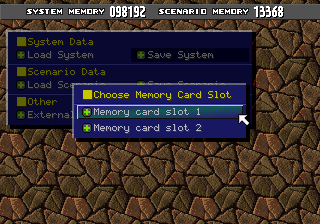
All the save and load screens work the same way. Choose the card slot first, then one of the 15 save slots.
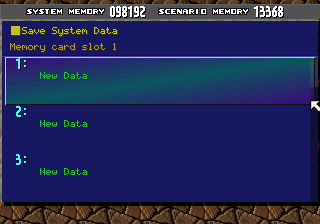
The list shows three slots at a time and scrolls through all 15. It wraps round, so ↑ from slot 1 goes to slot 15. A slot with a file shows:
- for a System or Scenario: its project or Scenario name, by the first name in the System's staff list, the time spent editing it, and its blocks;
- for a game or test save: the project name, the Scenario it was made in, the play time and its blocks.
An empty or unusable slot says why:
| Slot | Means |
|---|---|
| New Data | empty, with room for this save |
| No data. | empty, in a load list |
| Not enough free blocks. | empty, but the card hasn't room for this save |
| Not formatted. | the card has never been formatted. Choosing a slot of a save list offers to format it |
| No memory card. | nothing in that slot |
| Checking... / Detected. | the card is being read. Wait a moment |
When a save list opens, the game first works out how many blocks the save needs, so the slots stay grey for half a second.
Saving#
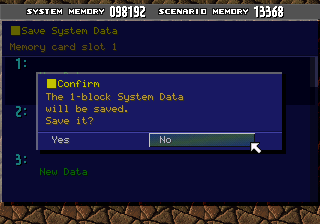
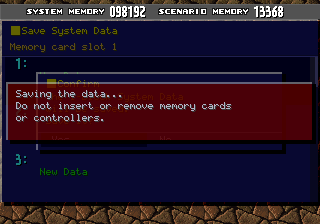
Choosing a slot asks first: The 1-block System Data will be saved. Save it?, or will be overwritten over a file that is already there. The cursor starts on No, so press ← first. Then a red message says it is saving and warns you not to touch the cards or controllers. Save complete. follows, and stays three seconds or until ○.
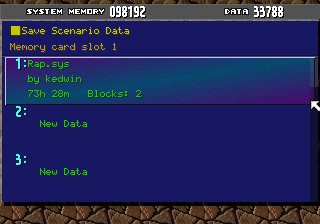
Loading#
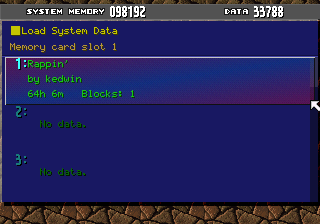
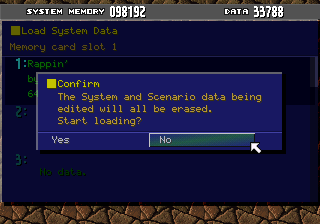
Every load, a game save included, warns that the System and Scenario data being edited will all be erased and asks to start (the cursor on No). Then Load complete., or one of these:
- The data is damaged! The file's checksum is wrong. Nothing is loaded, and what was in memory stays as it was.
- The memory card was removed. A card was pulled out during the load.
- Loading related data. A game save then fetches its System and Scenario from the card by name (below).
A System or Scenario saved with a password asks for it first (Enter Password). A wrong one says Wrong password! and lets you try again. Game saves have no password. New Game asks for the System's password too, but Continue and the Scenarios a game loads by name don't (System settings).
An unformatted card#
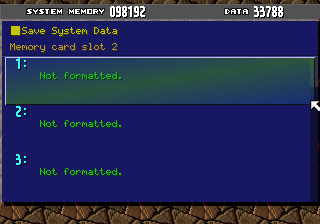
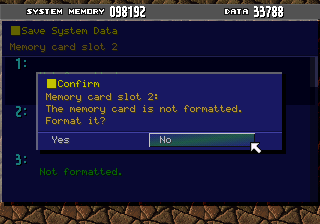
A new card has to be formatted before anything can be saved on it. A save list offers to format it when you choose one of its slots, and the Utility asks as soon as its cursor reaches the card. Formatting wipes the whole card.
File names and titles#
Each file has a name on the card, and a title that the console's own memory card screen, emulators and RT4's Utility show.
| Kind | File name | Title, original | Title, patch |
|---|---|---|---|
| System | BISLPS-02861RY1 … RYF |
RPGツクール4 システム1 + the project name + the editing time | RT4 System 1 + the project name + the time, as 64h6m |
| Scenario | BISLPS-02861RS1 … |
RPGツクール4 シナリオ1 + the Scenario name + the time | RT4 Scenario 1 + … |
| Game | BISLPS-02861RG1 … |
RPGツクール4 ゲーム1 + the project name + the play time | RT4 Game 1 + … |
| Test | BISLPS-02861RT1 … |
RPGツクール4 テスト1 + … | RT4 Test 1 + … |
| Character Tsukuru | BISLPS-02861A… to E…, FXS-… and the like |
キャラツク (short for Character Tsukuru), the kind and the name | the kind and the name, as Char P-001 |
| Art file part (patch only) | BISLPS-02861RA + the game's set + the part, as RAAA, RAAB |
none | RT4 Art A-A, RT4 Art A-B … |
| Music Tsukuru 3 song | BISLPS-02861OTO3CV00 and on |
音楽ツクール3コンバートデータ + the song's name | unchanged |
The slot number ends the file name in hexadecimal (slot 10 is A, slot 15 is F) and the title in decimal.
How the files find each other#
A game is several files, and they find each other by name, not by slot. Both cards are searched, slot 1 first.
| When | What is fetched | By |
|---|---|---|
| New Game | the System's first Scenario | the System Settings' First Scenario Name |
| Continue | the System and the Scenario the save was made with | the project name and Scenario name in the save |
| The field menu's Load | the Scenario the save was made in (the System stays) | the Scenario name in the save |
| Change Scenario | the next Scenario | the name in the command |
| A Character Tsukuru graphic or a card song, each time it is shown or played | its file | the name it was registered under |
So a file can be moved to the other card or to another slot, and the game still finds it. But two files with the same name are a trap: the first one found wins.
When a file can't be found on either card, the game asks you to insert the card that holds it (the cursor on No). Yes searches both cards again, so you can swap cards first. No gives up:
- Continue stops, but what had loaded stays loaded. If the System was found and the Scenario wasn't, the project in memory has already been replaced by that System.
- The field menu's Load puts the game in progress back as it was.
- Change Scenario starts the current Scenario again from its own start point, with the party, the bag, the switches and the variables kept (below).
- A graphic shows a ? in its place.
A file that is found but damaged asks whether to try again.
The Utility#
Memory Card → Utility shows both cards side by side. Each card is a row of 15 blocks, and each file shows its own animated icon once for every block it takes. Free blocks are dark squares. The box at the bottom gives the title of the file under the cursor.
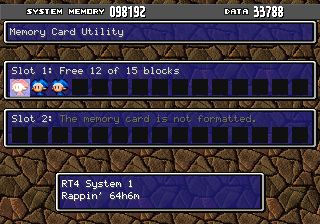
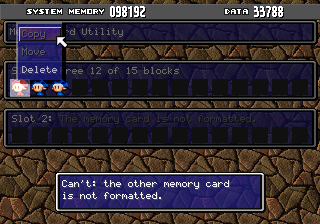
↑ and ↓ choose the card; ← and → step from file to file. ○ on a file offers Copy, Move (copy, then delete the original) and Delete, each with a question first. Copy and Move go to the other card, and are greyed with the reason given when they can't:
- there is no other card;
- the other card isn't formatted;
- the other card hasn't enough free blocks;
- the other card already has a file of the same name.
The Utility works on every file on the card, other games' saves included, so take care with Delete. Moving the cursor onto an unformatted card asks to format it.
An art file part is one file here like any other, copied, moved and deleted whole. The External Data screens use the same layout, with only the files of the kind being registered lit (Using the graphics in RT4).
Sharing a game#
To play your game, a player needs on their cards:
- the System Data;
- every Scenario the game uses: the first one and every one that Change Scenario reaches;
- every Character Tsukuru file and Music Tsukuru 3 song registered as external data. The System holds only their names, so these files must stay on the card for as long as the game is played;
- with the patch, every art file part of the game's (RT4 Art A-A, A-B and so on), when its graphics are in the art.
The files can be spread over both cards, and the slots don't matter. The player chooses the System under New Game, and the game finds the rest.
 System Data  "My Quest"      First Scenario Name: "Chapter 1"
   │  registered: hero graphic "KNIGHT", song "THEME"
   │
   ├─▶ Scenario Data  "Chapter 1"   …Change Scenario "Chapter 2"
   │                                   └─▶ Scenario Data  "Chapter 2"
   ├─▶ Character Tsukuru file  "KNIGHT"
   └─▶ Music Tsukuru 3 song    "THEME"

 Game Data  "My Quest" / "Chapter 2"   (Continue fetches both by name)
A game in several Scenarios#
A game too big for one Scenario can be split into several, joined by Change Scenario (The end of the game). One System serves them all. Fan games of the time filled each Scenario to over 90% of the original's room and chained two to five of them.
- Change Scenario keeps the party, the bag, the switches and the variables, so later Scenarios can test what happened in earlier ones.
- It closes every treasure chest: the chests' opened marks are cleared, so going back to an earlier Scenario fills its chests again. Use a switch for a chest that must stay empty.
- The new Scenario starts at its own start point (its Scenario Settings).
- If the player says No when asked for the card, the current Scenario starts again from its start point, with everything else kept.
- Test play can't change the Scenario: it says so and the event goes on. Test each Scenario on its own, setting the switches and variables it expects with test play's Switches cheat (Testing your game).
Trouble with cards#
- Don't pull a card or switch off while a message says it is saving, loading or formatting. The game warns you every time.
- A full card: the save list says Not enough free blocks. Delete or move something in the Utility, then save.
- Another game's file can fool the free-block count. RT4 counts free blocks from what each file says about itself, not from the card's directory. A file that understates its size makes RT4 offer a slot that isn't there, and the save then ends with Saving failed!. Nothing is lost; save to another card.
- A file damaged on the card is refused as damaged data, and nothing is changed.
Fan-made reference material, one of the Eschaton Games Tsukuru guides. Not affiliated with the publishers of the titles it covers.