The English patch#
RPG Tsukuru 4 was never released outside Japan. The English patch translates both discs: the first disc's program and the sample game, with every menu, editor, message, help line and button hint, and the second disc's graphics maker, Character Tsukuru. It also changes what an English game needs, raises the limits on how big a game can be, and fixes bugs in the original. This chapter shows the changes screen by screen, with the original Japanese screen beside the patched one. What the patch adds sums up the changes beyond the translation on one page.
The screenshots come from the patch's release build and are retaken whenever it changes.
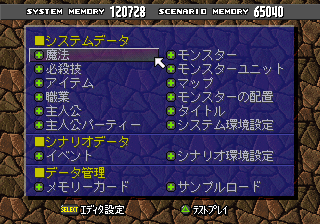 Original (Japanese)
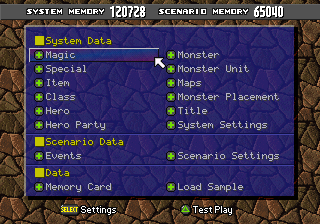 English patch
The font#
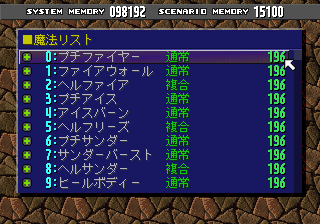
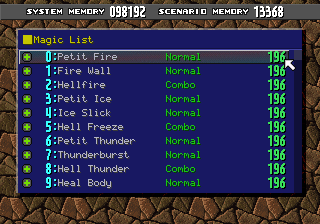
The original draws every character in a 12-pixel-wide cell, sized for Japanese. English set in those cells would be wide and gappy, and most labels wouldn't fit. The patch draws Latin letters at half width, two to a cell, in a 6-pixel font made for it. A label written in two kanji becomes an English word of ten letters in about the same space.
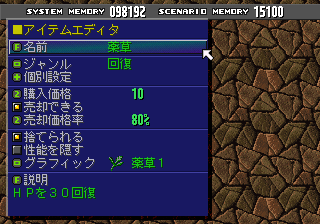 Original (Japanese)
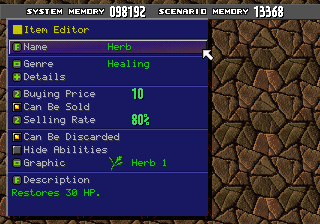 English patch
The patch drops the Japanese font altogether, along with the kana keyboards and the kanji dictionary. That frees room for the English font, the translated text and the new features below. The game's symbols and icons stay. The result is that Japanese text in a game's own data draws as boxes, as in a Japanese game loaded from an old memory card. The patch is meant for making new games in English, not for playing Japanese fan games.
 Original (Japanese)
 English patch
Typing in English#
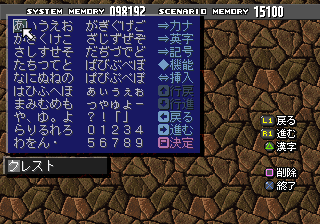
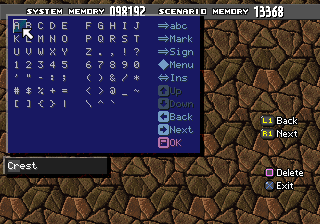
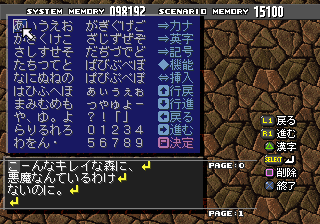
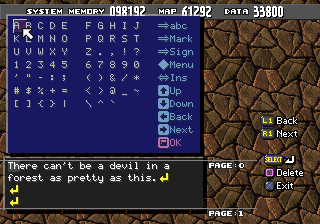
The editors have one text-entry screen, used for every name and message. The original offered kana tables and a kanji dictionary; the patch replaces them with an English keyboard. Capitals, small letters, digits and all of ASCII's punctuation are laid out in rows, and L2 works as shift. The symbol page keeps the game's own signs: ♡, ♥, ☆, ★, ♪, the sword, the shield and the rest. The Roman numerals Ⅰ–Ⅹ are gone: the patch's font no longer has them. Typing, moving the cursor and deleting step one letter at a time.
 Original (Japanese)
 English patch
Two other places take typed text, and both are patched to match:
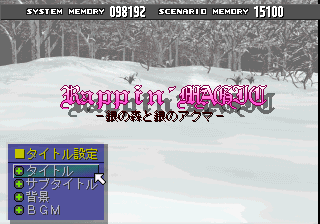
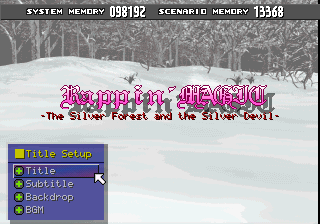
- The title name is drawn in the large title font. It has only 100 characters, and no kana or kanji: letters, digits, Roman numerals and some signs, which the original typed as full-width characters. The patch maps the keyboard's letters, digits and signs onto them and allows 18 characters.
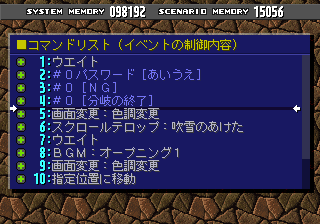
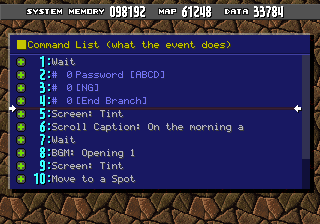
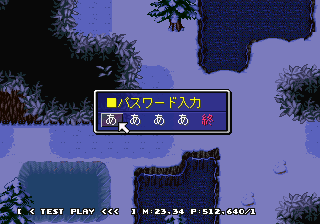
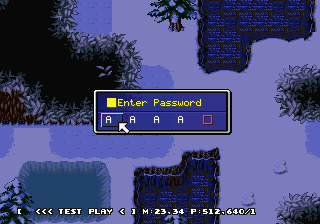
- The password window (an event command that asks the player for a password) now cycles through English letters, and the editor's password field accepts the same set.
 Original (Japanese)
 English patch
 Original (Japanese)
 English patch
 Original (Japanese)
 English patch
Word wrap#
The original breaks a message wherever a line runs out of room, which is fine for Japanese and wrong for English. The patch wraps at spaces, in the game and in the editor's text pane alike, so a message looks the same while you write it as it will in the game.
 Original (Japanese)
 English patch
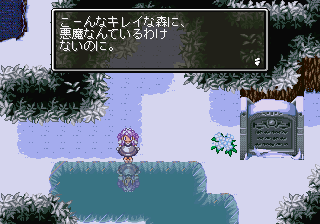 Original (Japanese)
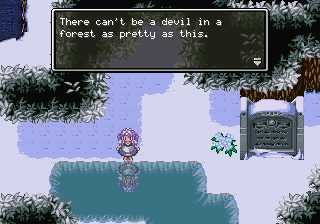 English patch
What is translated#
| Area | Strings | State |
|---|---|---|
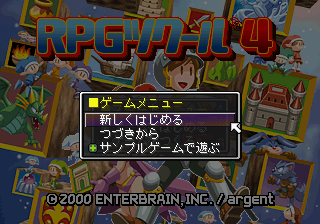
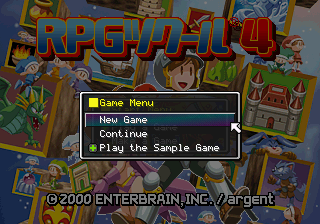
| Title, Start Menu and Game Menu | 24 | Done |
| Memory card screens (save, load, the file manager) | 128 | Done |
| The player: field menu, status, equipment, shops, inns, test play | 106 | Done |
| The editors' shared screens: text entry, record lists, pickers | 355 | Done |
| The editors: top menu, System Data editors, map and event editor, every command window | 1,701 | Done, and every screen checked on screen |
| Battle: commands, messages, the results | 93 | Done |
| Button hints drawn as pictures | 15 | Done, redrawn in English |
| The staff roll | 118 | Done |
| The sample game's own data: its story, names, messages, items and monsters | 630 fields | Done |
| Character Tsukuru (disc 2): menu, help, questions, card screens, poses | 353 | Done, the pose headings redrawn in English |
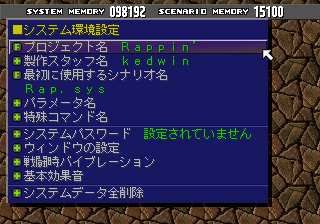 Original (Japanese)
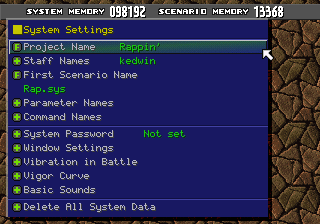 English patch
 Original (Japanese)
 English patch
The staff roll's names are given in rōmaji, family name first, as the credits list them.
Still in Japanese#
- Character Tsukuru's name and logo, on its title screen, as the original has them.
Character Tsukuru#
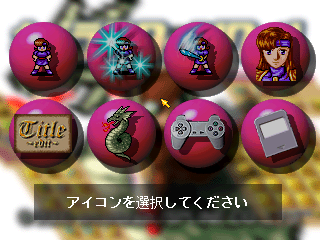
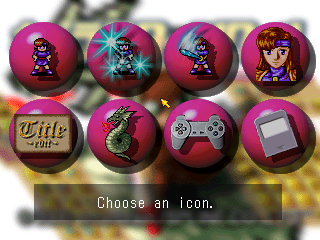
The second disc's program is translated in full: the menu, the 191 help texts, the questions, the memory card screens, the 26 pose names (the LIST screen's headings are pictures, redrawn in English) and the monster frames' names. Its font gains the twelve characters it lacked, among them the apostrophe, quotes and &. Character Tsukuru shows every screen.
 Original (Japanese)
 English patch
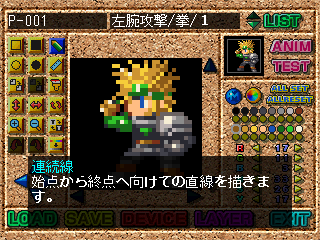 Original (Japanese)
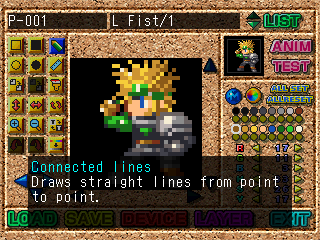 English patch
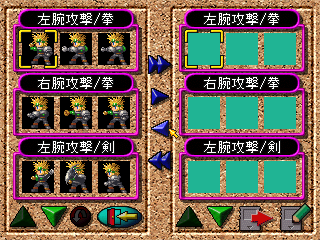 Original (Japanese)
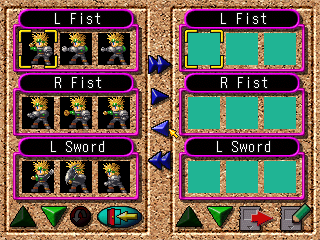 English patch
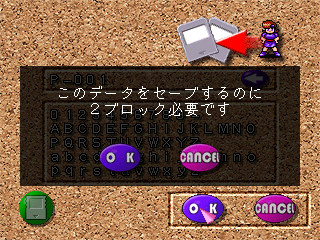 Original (Japanese)
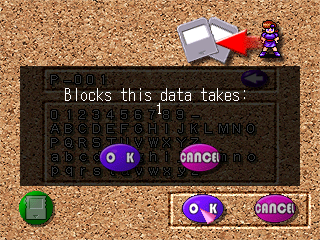 English patch
Its saves are titled in English, by kind and name: Char P-001, Monster LL-105. The patched RT4 finds them by their file names, so it takes the original disc's saves as well. The patched disc 2 still loads the original's saves and the CD-ROM's samples.
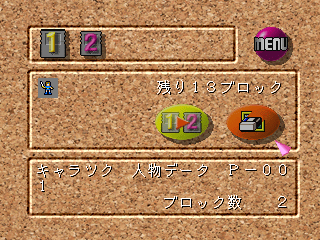 Original (Japanese)
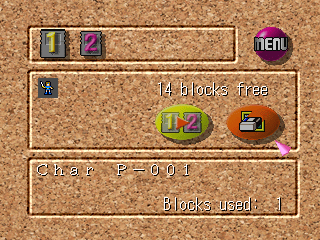 English patch
Room for bigger games#
Players of RPG Tsukuru 4 remember its limits as much tighter than RPG Tsukuru 3's, and they are right. The Scenario's room is 65,040 bytes, and every event, page and command is stored in it with some overhead. A full RPG Tsukuru 4 Scenario holds roughly a sixteenth of the event pages a full RPG Tsukuru 3 Scenario could.
The patch keeps the original's rules but moves where the events live. Only the map being edited or played sits in the original room; every other map's events are packed and kept in memory that the original left unused, or used for the Japanese font. Maps are packed and unpacked as you move between them, which you don't notice in play. A Scenario can then hold about four times as much as the original allows, and the limit becomes the memory card: a save may take up to the whole card's 15 blocks.
The bar at the top of the editor shows the new room. Once you have opened the event editor, the Scenario's figure is replaced by two:
- MAP: the room left on the map you are editing (shown only while a map is open).
- DATA: the room left for the whole Scenario's packed maps. It moves as you edit, and is exact again when you leave the map.
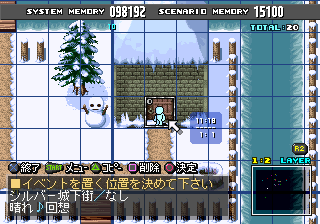 Original (Japanese)
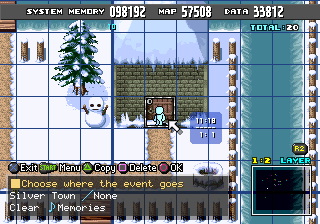 English patch
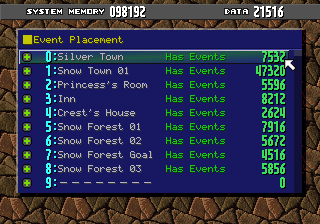
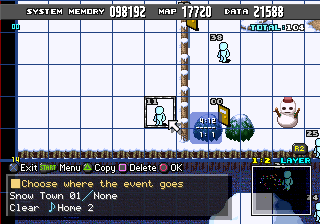
A Scenario too big for the original loads, edits and saves like any other. The one below is the sample's, with one town given six copies of other maps' events: 99,164 bytes in all, half as much again as the original's whole room.
Larger limits#
The patch also raises the limits on how many of some things a game can have:
| Original | Patched | |
|---|---|---|
| Switches | 500 | 2,048 |
| Variables | 256 | 1,024 |
| Items | 200 | 255 |
| Special moves | 50 | 100 |
| Maps and monster placements | 250 | 255 |
| Pages an event | 30 | 90 |
| Commands a page | 250 | 1,000 |
Monsters, spells and items are also stored more compactly, so a System with every kind of record at its old maximum still fits the original room (System Data).
More in events#
Many commands do more, each through new rows in its own dialog; The Scenario has the details.
- Variable has three more operations: multiply, divide (rounding toward zero) and remainder. Dividing by zero leaves the variable as it was. A random value can be given its own range (0 to a number you choose; without one it is 0–999, which the original promised but didn't give, see Bugs fixed), and a variable can be set from 27 more things in the game, such as a hero's stats, the party's money or the play time.
- Call Event can run another event as a subroutine: its page runs at once, and the calling event goes on with its next command when that page ends. Calls can nest up to eight deep.
- Common events: up to 120 events that any map's events can call, kept with the System Data. They are edited as the event editor's last map, Common events, and called with Call Event (Common events).
- Change Items gives or takes a Count of an item (up to 99), or as many as a variable holds.
- Change Map can take the map and the cell from three variables (By Variables), so one command serves a door whose destination the events work out.
- Move to a Spot (in Move Party and Event State) can take the cell from two variables, and can place the party or the event there At Once instead of walking.
- Hero Stats and Hero Condition can set a stat or points instead of adding to them, and take the amount from a variable. Hero Stats can also change a hero's Level.
- Fight Monsters with Random Battles ticked doesn't fight: it sets the random battles' background, music and how many steps come between them, until another such command changes them.
- Show Timer with Show Variable ticked shows a variable's value at the top left of the screen instead of counting down, in one of two slots, with an item's name before it if you like.
- The Has Hero page condition can ask for the hero's Class as well.
Event recipes puts several of them to work: a count on screen, a shared innkeeper, a waystone and a hero who joins at the party's level.
Old commands do exactly what they did. A game that uses the new forms needs the patch to play: the original reads each as an older form of its command, so it gives one item instead of a count, starts a battle instead of setting the random battles, counts down instead of showing a variable, and so on.
Saves#
Everything the patched game saves is in its own, more compact format: a game save takes one block of the memory card instead of two. The patch still loads saves made by the original game. The original game can't load the patch's saves: it reports them as broken data, and nothing is lost.
Files on the memory card are titled in English (RT4 System 1, RT4 Game 2, and so on), with the project's name and the play time. Memory cards lists them beside the original's.
Character Tsukuru's saves are packed more tightly too: of the 135 sample characters, 86 save in one block instead of two, and the 448 samples together take 589 blocks instead of 694. A CD-ROM sample you change is saved as its changes, in one block whatever its kind (but for an LL monster), and read back against the sample on the disc (Saving and loading). Only the patched discs read these saves: the original disc 2 reports them as damaged, and the original RT4 can't import any save made by the patched disc 2.
The art file. The patched RT4 can gather a game's Character Tsukuru graphics into card files of its own, where each graphic takes only the room its picture needs instead of a block and a file: 27 faces, magic effects and slashes fit in about 2½ blocks instead of 27. Add a save from the External Data screens and delete it afterwards; the System doesn't change (The art file). The original RT4 doesn't see the art, so a game that uses it needs the patch to play.
New in play and in the editor#
These change nothing a game already does, unless its author or its player turns them on, with one exception: the music.
- The music keeps playing. A change of place, or a BGM command, that asks for the song already playing (at the same volume and tempo) lets it play on instead of starting it again from the top. A card song is then not read from the card again either. A different song, or the same one at another volume or tempo, starts as in the original, and so does a song that played once and has ended, such as a fanfare.
- Naming a hero in play. Rename Hero with a name that starts with
?lets the player type the name (Rename Hero). - Order and Save in the field menu. Order swaps two party members, and Save opens the save screen anywhere, as a Save event does (The field menu). Order is there unless the author turns switch 2045 on; Save is there only while the author has switch 2046 on, so a game keeps its save points unless its author chooses otherwise.
- Two battle options, each off unless its switch is on: switch 2047 makes physical damage vary by up to a tenth either way, as in RPG Maker 1; switch 2048 gives every hero still standing the battle's whole EXP and class points instead of an even share (Winning and losing).
- Use × to Confirm: a row in the field menu's Settings and in the Editor Settings that swaps ○ and ×, so × confirms and ○ cancels, as in Western PlayStation games. The field menu's is kept in the game save, and the Editor Settings' with the System Data, for the editors, test play and test battles. The editors' button hints swap with it.
- The command clipboard lasts. Commands copied or cut in the command list can be pasted on any page of any event or map until the console is switched off, not only on the page they came from (The commands). And a branch with another branch inside it now pastes cleanly: each pasted branch gets its own new number.
| Switch | While it is ON |
|---|---|
| 2045 | The field menu has no Order row |
| 2046 | The field menu has a Save row |
| 2047 | Physical damage varies by up to ±10% |
| 2048 | Each hero standing gets the whole EXP and class points |
So keep switches 2045 to 2048 for these, and give them names in the Switches list. They are tested as they stand, in test play and in test battles too.
Bugs fixed#
The patch fixes bugs in the original where the fix is small and safe. Each one was found while studying the game's code and was checked in play, before and after.
| Where | The original | With the patch |
|---|---|---|
| Music | A memory-card song that fades a part out (MIDI controller 11) leaves that instrument silent: on the song's next loop and in every later song, until a disc song happens to restore it or the console is switched off | Each song starts, and each loop begins again, with every instrument at its full volume |
| Battle | A hero or monster with the Forced AI capacity never runs its healing orders (Always Heal, Stay Alive): the game compares HP with a fifth of HP, not of max HP | At a fifth of max HP or less, the healing orders run as the book describes |
| Battle | An effect that cancels support also rebuilds the monster it hits, refilling its HP, MP and AP, and gives a hero using Restore 30% HP or MP the 30% again | The battler keeps what it had, capped at its rebuilt maximum |
| Battle | The results list a dropped item twice: the last line of one monster's drops comes again at the head of the next one's | Each drop is listed once |
| Events | Screen: Widescreen and Widescreen Off move the bars only while a fade or tint is running, so on their own they barely move | The bars slide in and out on their own |
| Events | A Change Map taken while an event waits for the other events to finish leaves the wait counting on the new map, and no event there can start | The wait is cleared when the transfer fires |
| Events | The Random operand of a variable command gives the generator's raw number, not 0–999 as the book says | 0–999 |
| Events | A <Torch> or <Circle> effect that was cleared comes back after a place change, or after loading from the field menu | A cleared effect stays cleared |
| Events | An event that moves by Approach or Flee walks at random: the step toward or away from the hero is never taken | It walks toward the hero (Approach) or away from him (Flee), along the farther direction first, and an Approach event stands still once it reaches him |
| Maps | Wavy BG: the strips at the screen's left and right edges show the wrong slice of the picture as it sways, and on a map full of parts the wave can overrun the memory a frame is drawn in | The picture wraps cleanly at the edges, and the wave takes a third of the room; a frame still too full shows the picture still for that frame |
| Editors | The attribute view (L2) on a map with stair-type parts on many cells needs more drawing memory than the console has, and the editor hangs | The marks take less room, the same picture, and a frame short of room leaves its last cells unmarked. The Paste preview is bounded the same way |
| Editors | Saving any change to an item takes it off every monster that has it as its Stealable Item | Only deleting the item takes it off |
| Editors | Editing or deleting a special move fixes up the other records' references as if it were a spell, so the wrong references change | Special moves fix up special-move references |
| Editors | A Name typed for an event is lost when you then pick its Destination on another map | The name is kept |
Two of them show on screen:
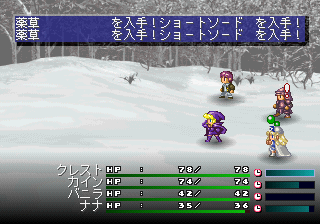 Original (Japanese)
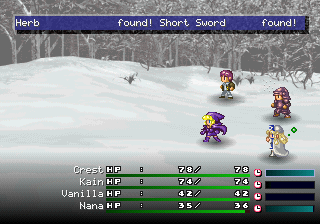 English patch
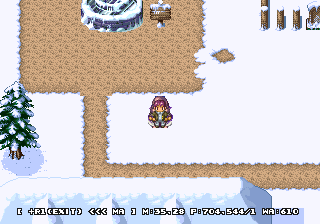 Original (Japanese)
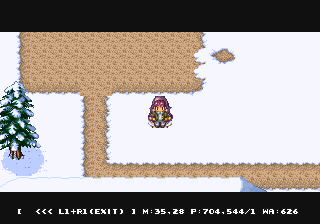 English patch
One more is known and not fixed: a failed re-import of external data that loses the old one. The original's class page condition, which no editor row can set and the game never tests, is left as it was; the patch adds a class to Has Hero instead (More in events).
Getting the patch#
The patch is two xdelta3 files, the usual format for translation patches, one for each disc, to apply to your own images of the discs. Disc 2's is about 40 KB. Disc 1's is about 3 MB, because it carries a packed copy of the second disc's 448 samples, which the patched RT4 reads an edited sample's changes against (Saving and loading). Neither is of any use without your own discs. The readme gives the steps and the checksums.
- What you need: each disc as a single-track BIN/CUE. A different dump won't patch.
- Disc 1: the BIN must be 253,557,360 bytes, CRC32
69703212, SHA-156223104e92b6251f0e2f470bf22cbb8ba649481. - Disc 2: 57,245,328 bytes, CRC32
9157ba73, SHA-1499ac1c2fdac7522fe5e88bd8da258fe4a312e9b. - To apply them: xdelta3 itself, or a front end for it such as Delta Patcher. Then make a
.cuefile for each patched BIN, as the readme shows. - The two discs go together. The patched disc 1 takes the original disc 2's saves too, but the patched disc 2's saves need the patched disc 1.
Fan-made reference material, one of the Eschaton Games Tsukuru guides. Not affiliated with the publishers of the titles it covers.