Playing a game#
This chapter is about the player's side: what someone who plays your game sees and can do, from power-on to the end. Read it to learn how a finished RPG Tsukuru 4 game plays, and to know what the player will get when you set something in the editor. The screenshots are from the sample game. In English it is a party of four in the town, after the travelling act has joined. The stock disc's shots, behind the button under each one, are from the same point in the Japanese sample.
Power-on and the title#
The game opens with two logos on white, enterbrain's and then argent's, each about a second long. ○ skips either one. They show once per power-on: after a game over, or after leaving the editor, the title comes straight back.
The title builds up in steps. The collage behind it fades in and the title music starts. The artwork then flashes white and settles, a glow flares over it, and the logo appears and lifts off its shadow. PRESS BUTTON bobs up and down; it doesn't blink. Any button except the d-pad skips the build-up, and a second press opens the Start Menu (Getting started).
Walking#
The d-pad walks the leader one way at a time. There are no diagonals. When two directions are held, up wins over down, down over left and left over right. A tap is enough to walk a whole step, which is half a map cell, and there is no delay for turning.
| Button | On the field |
|---|---|
| ○ | Examine or talk to what is in front of the leader. It works only when ○ is the only new press and he is standing still |
| × held | Dash at double speed. The game decides step by step, so letting go slows down at the next step |
| △ | The field menu |
| L1 + R1 | In test play only: end the test (GAME OVER, then the editor) |
The other heroes follow the leader's footsteps: walking, the first one is a cell behind, and dashing, two cells. They never block anything, and the leader can walk straight back through them. The Hero Party setting can show the leader alone instead (Heroes and the party).
Walking into a wall plays the System's wall sound once. It plays again only after the leader has moved or turned. The camera doesn't stop at a map's edge: past it the screen shows the map's background, or black if it has none (The map editor).
The field menu#
△ opens the field menu. Beside it is the party: each hero's picture, name, class, HP and MP, level and EXP. The money is below it.
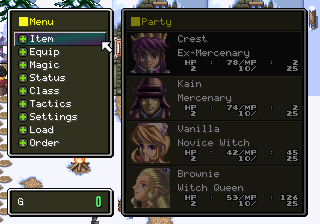
The menu has eight rows: Item, Equip, Magic, Status, Class, Tactics, Settings and Load. The first three take their names from the System's parameter names, so a game can call them something else (a card game might call its items a deck). The rest are fixed.
There is no Save and no party-order screen. A game is saved only at a Save event (below). Only events change the party's order.
The System command's game-wide rules grey out rows: with equipment off, Equip is grey, and the same goes for Magic and Class (System Data). In test play the menu also has Quick Save and End Test, and Settings has the test-play cheats (Testing your game).
Item#
Use, Sort and Discard, beside the list of everything in the bag.
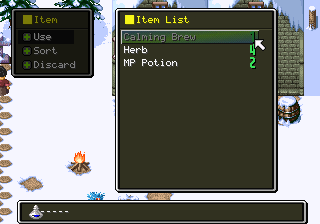
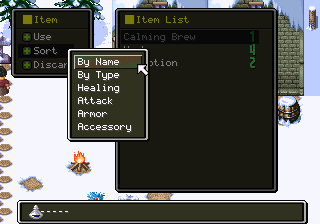
- Use shows only what works outside battle in white. That covers:
- items that restore HP or MP, or cure poison, paralysis, petrification or every ailment;
- items that lift curses, revive, or restore everything;
- teleport, escape, fewer encounters and identify;
- seeds;
- items of the Other kind.
Weapons, armour and accessories are never usable here. Nor are cures for silence, sleep and confusion, which end with the battle anyway, or items that restore AP. - An item for a hero asks Target?. The window stays open, so you can use another on someone else. - An Other item is used on the event in front of the leader. If that event starts on Use Item with this item, the menu closes and the event runs. Otherwise the item is "used" and nothing happens. This is how keys work (A locked door and its key). - Sort changes only the order the list is shown in: By Name, By Type, or with healing items, weapons, armour or accessories first. The bag itself isn't changed, and the order isn't saved: after power-on the list is in name order again. - Discard throws away one at a time, after asking (the cursor starts on No). Items without Can Be Discarded in the item editor are grey. - An item with Hide Abilities set shows ????? for a description until a spell or item of the identify kind is used on it. It works all the same, and a shop's help bar shows the real description.
A teleport, escape, fewer-encounters or identify item is never used up from the menu, whatever its breaking setting. Items of the Other kind never break from the menu either: the editor stores their breaking setting where this code doesn't look. The patch leaves both as they are.
Equip#
Choose a hero, then one of his seven slots: Head, Body, R.Hand, L.Hand, Feet, Acc. 1 and Acc. 2. The list offers None (take it off), then everything in the bag that fits the slot. Items he may not wear are grey: an item must allow the hero, and if he has a class, the class must allow it at a class level he has reached.
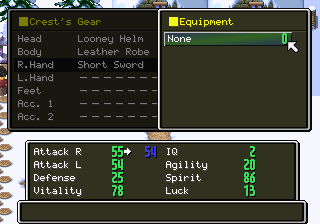
Moving the cursor tries the item on, so the panel below shows the real result: attack in each hand, defence, vitality, wisdom (the sample calls it IQ), agility, vigor and luck. ○ keeps it, × puts back what he had. A shield goes in the hand he doesn't fight with (the hero editor's Hand), and a hero set to Both can put it in either hand. An item cursed so it can't be removed says so, and its slot can't be opened.
Magic#
Choose the caster, then a spell. A hero who is paralysed, petrified or down can't cast. The list gives each spell's MP cost after his capacities. Spells that work outside battle are white: the same kinds of effect as for items.
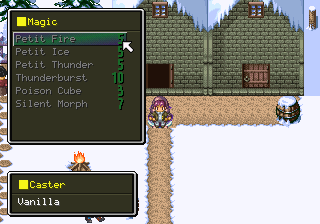
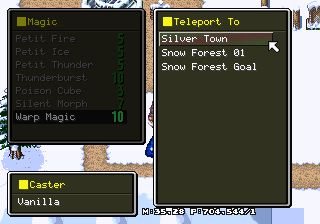
- A summon is never usable here, whatever it does.
- A spell taken away by the event command Hero Condition (Forget Magic) is grey until the same command gives it back.
- A spell cast from the menu gets the caster's level bonus, as in battle; a magic item doesn't.
- With too little MP, choosing a spell does nothing and gives no message.
Status#
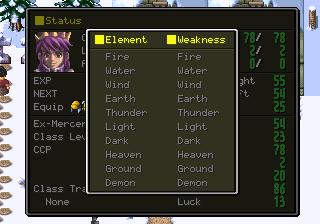
Everything about one hero. ○ shows his elements and weak elements.
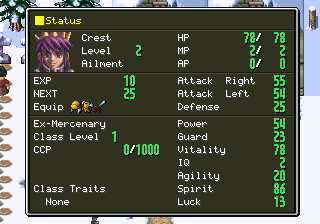
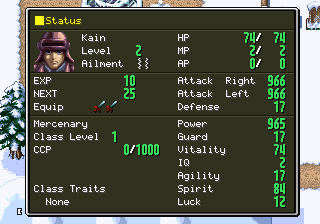
- NEXT is the total EXP the next level needs, not what is still to go: Crest has 10 and needs 25 for level 3.
- Ailment shows icons for poison, paralysis and petrification, and for a curse on anything he wears.
- Class Level is his class points ÷ 1,000 + 1, at most 10. CCP shows what he has against what the next class level needs.
- Class Traits is the capacity he has chosen in Class (below), or None.
- The stat names are the System's parameter names.
Class#
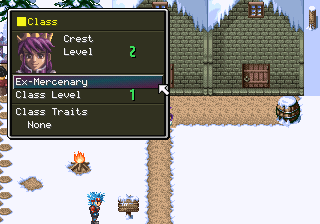
- The class row lists No Class and the classes the hero has already held. He can switch freely among those. Gaining a new class is an event's job (Add Class, The party and the heroes). Changing class takes off anything the new class doesn't allow.
- Class Traits picks one of the capacities his class has taught so far, or None. Only that one works (Capacities).
- The event command Force Class (Bar Changes) greys the list.
Tactics#
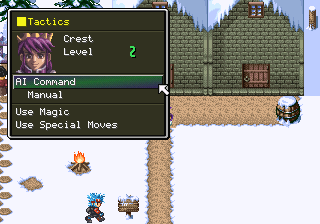
- AI Command gives the hero one of the 12 orders, or Manual (Orders). Every hero starts a battle on Manual unless AI from Battle Start is on (Settings) or the player chooses AI in battle. So the order matters only then.
- Use Magic and Use Special Moves list the spells and special moves the hero knows, each with a tick. ○ turns a tick on or off. The ticks bind only the hero's order: an AI hero never chooses an unticked spell or move, and attacks instead when nothing his order wants is left. The player can still pick an unticked one from MAGIC or SPECIAL.
Settings#
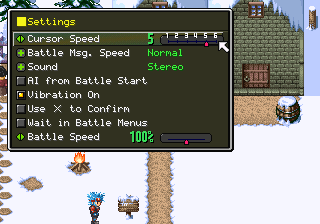
| Setting | Choices |
|---|---|
| Cursor Speed | 1 to 6 |
| Battle Msg. Speed | how long each battle message stays: Slow (1.5 s), Normal (0.75 s), Fast (0.37 s), Don't Show, or On Button (until ○) |
| Sound | Stereo or Mono |
| AI from Battle Start | heroes start each battle on their orders, not on Manual |
| Vibration On | the controller's rumble |
The settings are part of the game, so a save keeps them.
Load#
Load loads a game save from the memory card. It asks first, since the game in progress is lost. The System stays as it is, and the Scenario the save names is fetched from the card. The game then carries on where it was saved, including the event that was running.
Battles#
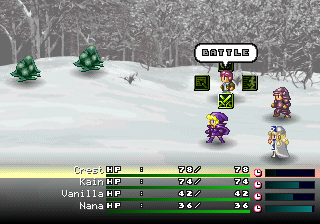
A battle starts from a random encounter on a map, or from an event's Fight Monsters. The party lines up on the right, the monsters on the left, and the party bar runs along the bottom.
The party bar#
Each row of the party bar shows a hero's name (in the System's name colour), his HP over his maximum, a green bar and his gauge.
- The HP turns red at a tenth of his maximum or below.
- While a hero picks a spell, the bar shows MP instead. While he picks a special move that costs AP, it shows AP.
- When a gauge is full it pulses and its frame turns light blue, and a sound plays: that hero's turn has come.
The clock#
Every fighter's gauge fills on its own, at a speed set by vigor, and he acts when it is full (Speed and the turn). Monsters don't wait for you. With the patch, Battle Speed in Settings makes every gauge fill faster or slower, and a game can set its own curve for how much vigor counts (The Vigor curve).
The clock stops only while a hero has the party ring up, and while an action is playing out. It keeps running while you turn the command ring, browse a spell or item list, or pick a target. In the sample's forest, a slime attacked while the item list was open. MEETING pauses everything.
The two rings#
A hero whose turn comes gets a ring of icons around him, with the chosen one's name in a balloon. Turn it with ← and →, and choose with ○.
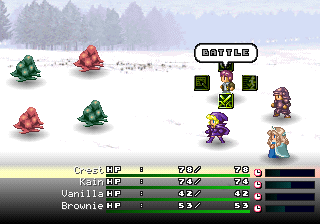
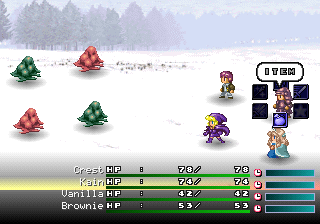
The party ring: decisions for the whole party.
- BATTLE goes to the command ring.
- ESCAPE tries to run away (below).
- AI puts every hero on his order from Tactics.
- MEETING opens the orders (below).
The command ring: what this hero does.
- ATTACK with his weapons.
- GUARD to take less damage.
- MAGIC and SPECIAL: a spell or a special move.
- ITEM from the bag.
- EXTRA: his command capacities, such as Steal (Capacities).
A command he can't use is dimmed. △ goes back from the command ring to the party ring. When several heroes are ready, × passes the turn to the next one.
Every battle opens on the party ring, with the clock stopped. BATTLE then takes you to the command ring of the first hero whose gauge is full. On the first turn a hero whose gauge isn't full yet waits for it.
Lists and targets#
MAGIC, SPECIAL, ITEM and EXTRA open one window. Its title is the System's name for the thing, and each row shows the cost or the number left. Rows that can't be used are grey.
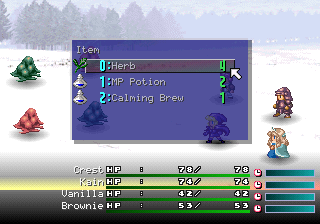
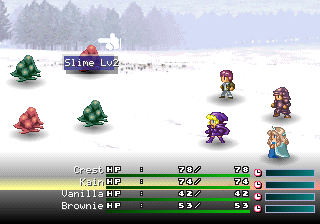
To choose a target, ↑ and ↓ step through every fighter on both sides, the party's included. What is hit depends on the range:
- one fighter;
- all of one side;
- a group: every monster of the same kind, or the whole party.
GUARD has no target. × goes back to the ring.
MEETING and orders#
MEETING lists the party with each hero's order. It pauses the battle: nothing moves and the screen dims. ○ on a hero gives him another order.
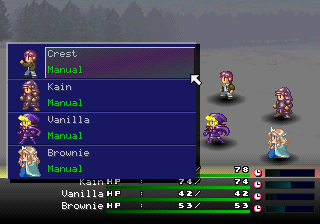
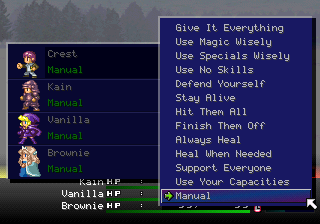
A hero on an order takes his turns himself (Orders). Holding × as such a hero's turn comes puts the whole party back on Manual. Heroes with the capacity Random Action or Forced AI ignore both: they always choose for themselves.
What the screen shows#
- Numbers over a fighter: white for damage, green for healing, MISS! for a miss. A raised or lowered stat shows a small icon with the number.
- A critical hit flashes the backdrop grey.
- Status icons circle over a fighter's head, one at a time, the worst one shown (see the table below). A small white ghost at his top right means a curse. Death in 30 Seconds shows the seconds left in red.
- Messages appear in a line at the top: who did what, the ailments, and what was found. They stay as long as Battle Msg. Speed says.
Running away#
ESCAPE sets every hero who can act to flee. The attempt waits until every one of them has a full gauge; meanwhile their turns are skipped. Then one roll decides for the whole party (Speed and the turn gives the odds).
- A fighter with any ailment other than poison doesn't count in either side's agility.
- The capacity Run Away always escapes.
- A battle started by Fight Monsters can never be escaped: Can't escape!
- A failed attempt costs the fleeing heroes their turn: their gauges start again from empty.
A battle can also open with Initiative! (the party's gauges start full) or Ambushed! (the monsters' do).
Winning and losing#
When the last monster falls, the results come one message at a time:
- the EXP, split evenly among the heroes still standing;
- the class points;
- a line for each hero who went up a level, however many levels, with each spell or special move he learnt;
- each class level reached, with what it teaches;
- the items found, four to a line;
- the gold.
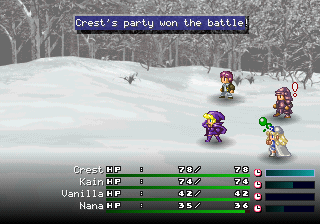
When the whole party falls, the Hero Party setting On Death decides what happens. With Revive, the default and the sample's setting, the message reads Crest's party lost the battle.... Everyone gets up with 1 HP and the game goes on from where the battle started; an event that started the battle goes on into its Lost branch (A battle you can lose). With No Revive, it is game over. Under Revive, heroes who fell in a battle the party won also get up with 1 HP (read from the code, not tried).
Status ailments#
Effects and monster attacks can give six ailments. Whether one lands depends on the target's rate for it (Effects).
| Ailment | Icon | In battle | Wears off in battle | After the battle | On the field |
|---|---|---|---|---|---|
| Poison | green bubbles | loses a twentieth of max HP each time his gauge starts again | never | stays | loses a twentieth of max HP at every step, with a sound; field poison never takes HP below 1. The menu can cure it |
| Silence | a "…" speech bubble | can't cast; the turn is lost, but no MP is spent | never | ends | — |
| Sleep | a yellow moon | loses his turns and can't dodge | a 1 in 4 chance each time his gauge fills | ends | — |
| Confusion | a star on an orbit | acts at random (below) | a 1 in 4 chance each time his gauge fills | ends | — |
| Paralysis | small white sparks | loses his turns and can't dodge | a 1 in 4 chance each time his gauge fills | stays | can't cast from the menu. The menu can cure it |
| Petrify | a grey rock | loses his turns and can't dodge | never | stays | can't cast from the menu. The menu can cure it |
A hero at 0 HP is down. He has no icon, can't be chosen as a target by most effects, and gets no EXP. A revive used from the field menu brings him back with a tenth of his max HP. After a battle, the On Death setting decides.
A confused fighter, hero or monster, does one of four things at random each turn: attacks someone on either side, casts one of his spells, uses one of his special moves, or uses a random item from the bag. Each of these uses up what it uses, so a confused hero can waste your best items.
Saving#
A game is saved only at a Save event, which puts up the save screen. Choose the card slot, then one of the 15 save slots; it asks before writing. The field menu has no save, so a game without Save events can't be saved at all. The sample game has none.
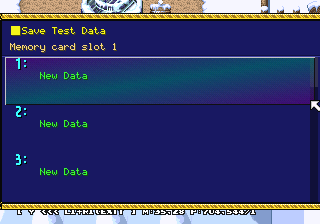
- A save holds the whole game in progress: the party, the bag, the switches and variables, the map and where everyone stands, the settings and the play time.
- The save names the System and the Scenario it belongs to. Continue on the Game Menu, and the field menu's Load, fetch them from the card by those names. A game in several Scenarios saves whichever one it is in.
- The event that opened the save screen carries on from its next command after a load.
- Play time counts everything, menus and battles included, and stops at 99:59:59.
Game over#

The game over screen is silent: GAME OVER and a small sleeping moon on black. It stays for four seconds, or until ○, then goes back to the title without the logos. There are three ways to reach it:
- the whole party falls with On Death set to No Revive;
- the staff roll of an Ending ends, unless the Ending is set to Keep Playing (The end of the game). A finished game shows GAME OVER before the title;
- in test play, L1 + R1 (then back to the editor).
A Scenario that wants a game over of its own, after a lost event battle with Revive set, has to build one from events. The sample's last boss does this with a GAME OVER caption, then puts the party back at the map's entrance to try again.
The sample game, walked through#
The sample, Rappin' MAGIC, takes about an hour (The sample game). Here is its route, for a player who gets stuck and for a maker who wants to see how each part is done.
The whole route (spoilers)
- The opening. On the morning after a blizzard, Princess Pearl finds a flower in the snowy forest and is struck down. A scrolling caption tells of her disappearance, and the title follows.
- Crest's house. Crest and Kain hear that the princess, found again, sleeps and can't be woken. They go to see the royal notice in Silver Town.
- The notice in the town square: whoever brings back the treasure that wakes her may marry her. The town's exit now offers Blackmile Forest; before reading the notice, Kain turns the party back.
- The inn. Once the forest has been visited, a travelling act of a mother and daughter, Vanilla and Brownie, is staying at the inn. Vanilla offers to help for a fee picked by a slot roulette: 10, 20, 30 or 400 G, or free. Press ○ wherever you like: even a fee the party can't pay doesn't stop them joining. They bring two MP potions.
- Snow Forest 01 and 02. Random battles from here on.
- The rival suitor blocks the way in forest 02. Fighting him without the two magic users is hopeless. If he wins, the party is sent back to the forest's entrance; if he loses, everyone is healed.
- Nana, Kain's sister, brings a summons from the castle: Kain leaves, and Nana joins.
- The slide and the cubes. Forest 02 is cut in two; a slide joins its north and south. Forest 03 is a block-pushing puzzle, the Magical Cube, and a switch at its end opens the way to the goal.
- The goal. The Sword of God lies there. The Snow Herb, which cures any illness, grows where the princess fell. Touching it brings out Rubber Soul, the demon whose silver arrow put her to sleep: 2,001 HP and an attack of 110. If the party loses, a GAME OVER caption shows, the herb goes back, and the party is put at the entrance to try again. Nana's magic wins it, even without levelling up.
- The epilogue. The herb lifts the sleep. The princess wakes to be told she's engaged, nearly faints again, and is told to mind her mother from now on. Her answer: "No way!" Then the staff roll, GAME OVER and the title.
The sample has two small slips of its own. The notice's second page has a typo in the Japanese. The inn's stay cures Vanilla's ailments twice and Brownie's never, so a poisoned Brownie leaves the inn still poisoned.
Fan-made reference material, one of the Eschaton Games Tsukuru guides. Not affiliated with the publishers of the titles it covers.