Covers the guidebook's pages 85–110.
Event recipes#
Worked examples of events most games need. The examples here are this guide's own; the guidebook's chapter 3 has its own set.
Every recipe below was built on the sample game's town (a few also use its forest battles, a field map drawn for the ship, or the next town) and played through in test play on the patched disc, and the shots are from those runs. They use the sample's System Data, so the items, heroes and monsters are the sample's. Each lists its pages as the page screen sets them, then the commands as the command list shows them. Where a recipe needs a switch, pick any free one: the numbers here are only the ones the test used.
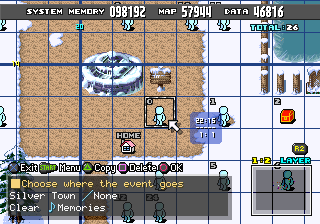
A shopkeeper#
A person who talks, then opens the shop.
SHOP, Normal Event, one page: graphic a Person, trigger Examined.
- Dialogue: "Welcome! Have a look."
- Shop / Inn, Shop: Herb, MP Potion, Short Sword, Iron Armor.
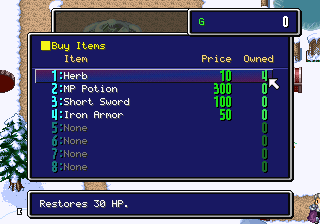
A shop holds up to eight goods and lists all eight slots in order, the empty ones as None. It sells one at a time, at the price set in the Item Editor, and buys anything the party carries that can be sold, at the item's price × its sell rate. Its window says nothing of its own, so the shopkeeper's greeting is a Dialogue before it.
To give several clerks the same lines, put the greeting and the Shop on a page of their own and end each clerk with a Call Event to it (see Reusable events). Each clerk can still have its own goods: then share only the greeting, with Call (return).
An inn#
INN, Normal Event, one page: a Person, Examined.
- Dialogue: "Tired? A bed is 10 gold."
- Shop / Inn, Inn: price 10.
The Inn window asks by itself (Stay or Leave, with the price), refuses if the money is short, takes the money and fades the screen out and in. Every member who is standing gets back all HP, MP and AP. A fallen member stays fallen, and the full price is still paid: reviving is for items and spells.
A treasure chest#
CHEST, Chest Event: graphic Before object 5 (a closed chest), After object 6 (an open one), trigger Examined.
- SE: any short sound.
- Change Items, Gain Item: the treasure (here the key for the next recipe).
- Dialogue: "Found the Old Key!"
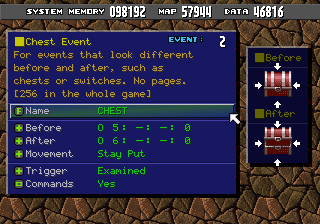
Once the page has run, the game remembers the chest: it shows the After graphic from then on and never runs again, also after a save and a load. A Scenario holds up to 256 chests. The same kind of event makes a lever that stays pulled or a sign that changes once read.
A locked door and its key#
The key is an item. Make it in the Item Editor: genre Other, not for sale, not discardable. (The test used the sample's Snow Herb, which can't be sold or used up, in its place; that is the name in the shot.) The chest above gives it.
DOOR, Normal Event, three pages:
| Page | Condition | Graphic | Trigger | Commands |
|---|---|---|---|---|
| 1 | — | Object 14 (a door) | Examined | Dialogue: "It's locked." |
| 2 | Has Item: the key | Object 14 | Examined | below |
| 3 | Switch 21 ON | None | Never | none |
Page 2:
- SE: a door sound.
- Dialogue: "The Old Key fits!"
- Change Items, Lose Item: the key.
- Switch: 21 ON.
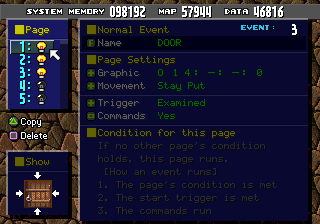
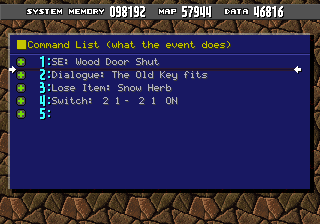
The game picks the page from the last one back, so page 3 wins as soon as the switch is on, whether or not the key is still held. A page with no graphic can be walked through, so the open door is just an empty page. A key held equipped also counts for Has Item.
Two other ways to do it:
- With the trigger Item Used on page 2 instead of the Has Item condition, the player has to choose the key in the field menu while facing the door. Only items of genre Other can be chosen there, and using one doesn't use it up, so take it with Lose Item if the key should go.
- For a door to another map, make page 3 a Change Map with trigger Touches the Hero, or put a Transfer Event on the doorway with a page whose condition is switch 21.
A story beat behind a switch#
One event leaves word for another: the guard won't let the party by until the mayor has spoken.
MAYOR, Normal Event, one page: a Person, Examined.
- Dialogue: "Tell the guard I sent you."
- Switch: 22 ON.
GUARD, Normal Event, two pages:
| Page | Condition | Commands |
|---|---|---|
| 1 | — | Dialogue: "No one passes without the mayor's word." |
| 2 | Switch 22 ON | Dialogue: "The mayor sent you? Go ahead." |
Talked to before the mayor, the guard says page 1's line; after, page 2's. Every event on every map sees the same switches, so the mayor can be anywhere in the game. To have the guard step aside, give page 2 an Event State move after its line, or leave page 2's graphic empty so the guard is simply gone. For a story that runs through many steps, use one variable as the chapter counter in place of many switches, and Variable conditions (as "Variable 1 ≥ 30").
A battle you can lose#
A rival who offers a fight, with a branch for each outcome.
RIVAL, Normal Event, two pages. Page 1: a Person, Examined:
- 2-Way Branch, Yes / No (the question is the Dialogue before it, or none)
- Yes: Fight Monsters: the rival's unit.
- 2-Way Branch, Battle Won / Lost
- Won: Dialogue: "You win. I yield!" and Switch 23 ON.
- Lost: Dialogue: "Ha! Come back stronger."
- No: Dialogue: "Coward."
Page 2: condition Switch 23 ON, no graphic, trigger Never: the rival is gone once beaten.
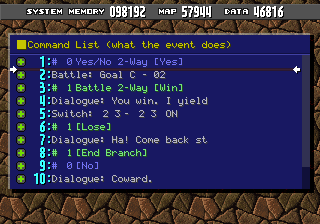
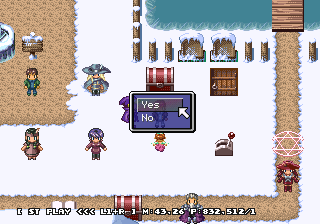
Battle Won / Lost tests the last Fight Monsters, so put it straight after. Whether a lost battle goes on to the Lost branch depends on the Hero Party setting On Death: with Revive (the sample's) the battle ends, every fallen hero gets up with 1 HP, and the event goes on into the Lost branch; with No Revive a lost battle is game over and the branch never runs. In the test the party lost to the sample's Succubus, came back at 1 HP, and the rival said his line.
The party can't run from a battle started by Fight Monsters. The command can also end the battle early: after a number of turns, or when one hero falls. Either counts as lost, so a "survive three turns" battle is a Fight Monsters with that end condition, whose Lost branch is the story's way on.
A timed escape#
A lever starts a countdown; the party must reach the circle before it runs out.
LEVER, Normal Event, two pages. Page 1: an object, Examined:
- Dialogue: "The floor shakes! Reach the circle in 20 s!"
- Show Timer: 0 minutes 20 seconds.
- Dialogue: "Too late!"
- Change Map: back to the spot in front of the lever.
Page 2: Switch 24 ON, the lever's other graphic, Never.
GOAL, Normal Event, two pages. Page 1: an object (the magic circle), trigger Touches the Hero:
- Stop Timer.
- Switch: 24 ON.
- Dialogue: "Made it!"
Page 2: Switch 24 ON, the same graphic, Never.
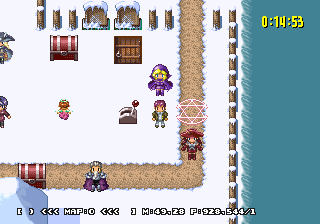
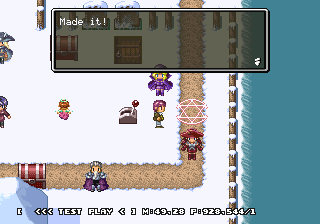
Show Timer holds its event until the count reaches zero, while the player walks about and other events run. Then the event goes on to "Too late!". If the goal is reached first, its Stop Timer ends the count, and the lever's waiting commands never run: in the test nothing more happened in the following 40 seconds. The Change Map back puts the party in front of the lever to try again.
Keep the escape on one map. The guidebook says a count's follow-up won't run once the party has left the map it was started on, since the waiting event belongs to that map.
A block puzzle#
Push the rock onto the plate.
ROCK, Normal Event, one page: object 7 (a rock), Pushable, trigger Never.
PLATE, Normal Event, two pages. Page 1: no graphic, trigger Touches an Event: ROCK.
- SE: a click.
- Dialogue: "Click! Something opened."
- Switch: 25 ON.
Page 2: Switch 25 ON, Never.
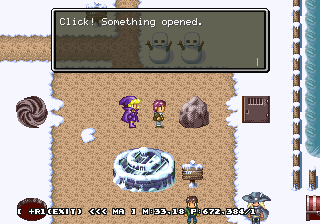
The party pushes a Pushable object by walking into it: hold the direction, and it moves half a cell a push. The rock can't go into another event's cell, even one with no graphic, so it stops in front of the plate, and pushing it on starts the plate. Lay the puzzle out so the rock's last push is into the plate.
A rock that sticks in a corner stays there until the map is loaded again: every event on a map starts afresh at its place when the party arrives. Give the player a way out and back in: the sample's push puzzle, in its third forest, says so in a caption.
A password door#
VAULT, Normal Event, two pages. Page 1: object 16 (an iron door), Examined:
- Dialogue: 'A voice: "The password?"'
- Password: OPEN
- Right: Dialogue: "The vault opens." and Switch 26 ON.
- Wrong: Dialogue: "Wrong."
Page 2: Switch 26 ON, no graphic, Never.
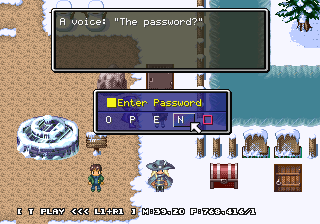
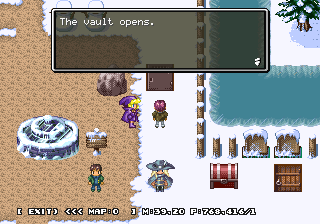
The window can't be cancelled, so a player who doesn't know the word types anything and gets the Wrong branch. There's no limit on tries.
A save point#
SAVE, Normal Event, one page: object 61 (an open book), Examined.
- Dialogue: "A travel journal. Write in it?"
- 2-Way Branch, Yes / No
- Yes: Save.
- No: nothing.
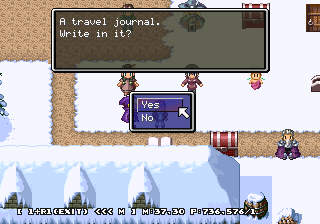
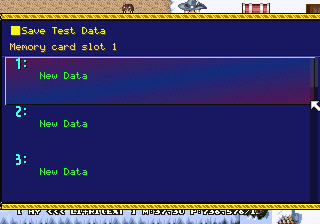
Save is the only way a game can be saved: the field menu has no Save row (Saving), so a game without a Save event can't be saved at all. The command puts up the save screen: the player chooses the card slot, then a save slot, and × backs out of each without saving. In test play the same screen writes Test Data (Memory cards). When a save is loaded, the event that opened the save screen goes on from its next command, so put nothing after Save that shouldn't happen again on loading.
Give the save point a look the player learns to spot (a book, a crystal, a glowing circle) and use it the same way all through the game. Put one before every hard fight and at the start of every long dungeon. The guidebook has its own version Guidebook p. 89.
A warp#
Two circles that send the party to each other.
WARP A and WARP B, Normal Events, one page each: object 80 (a swirl, animated), trigger Touches the Hero.
- SE: Warp.
- Change Map: the cell beside the other circle, with the fade White Fade + Melt.
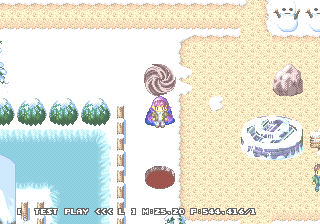
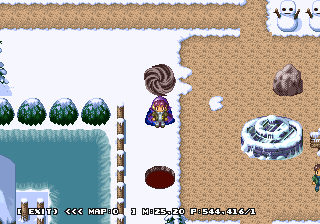
A warp is a door with a different look: Change Map can take the party to any cell of any map, on either layer, and its four fades (Black Fade Out, White Fade Out, Black Fade + Melt, White Fade + Melt) set the mood. Land the party beside the other circle rather than on it, and on a cell it can walk off. For a one-way warp, leave out the second circle; for a pitfall, give a page no graphic, so the party walks onto it unawares, and send it to the floor below. A warp from the depths of a dungeon back to its entrance is a kindness after the boss Guidebook p. 92.
A dungeon where magic is off#
A hole into the forest, where no spells work until the party comes out.
HOLE, Normal Event in the town, one page: object 17 (a hole), Touches the Hero.
- SE: Stairs Down.
- Change Map: Snow Forest 01.
The forest's Setup Event:
- System: Magic OFF.
EXIT, Normal Event at the forest's way out, one page: no graphic, Touches the Hero.
- System: Magic ON.
- Change Map: back to the town, beside the hole.
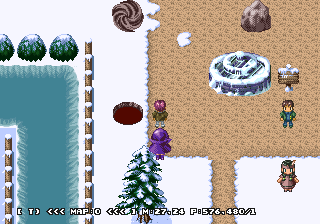
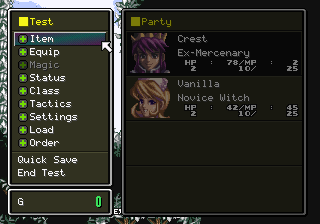
The Setup Event runs every time the party enters the map, however it gets there, so magic is off from the first step. The System command's rules (magic, levels, equipment, classes, gold and encounters) are game-wide and stay as they are set: leaving the map doesn't put magic back. So every way out must turn it on again, or each map around the dungeon can turn it on in its own Setup Event. With magic off, Magic is greyed in the field menu, and battles in the forest have no spells either: the heroes' MAGIC is grey on the command ring, and a monster that would cast loses its turn instead. With equipment or classes off, Equip or Class is. In test play, Settings → System Check shows which rules are on. The same pattern makes a town with no random battles (Encounters OFF) or a stretch where the money doesn't change (Gold OFF) Guidebook p. 91.
Recruiting a monster#
A slime that joins the party once it has been beaten.
SLIME, Normal Event, two pages. Page 1: person 106 (a slime), Examined:
- Dialogue: "Blub blub! (The slime wants a fight.)"
- Fight Monsters: a unit of slimes.
- 2-Way Branch, Battle Won / Lost
- Won: Dialogue: "The slime wants to come along!", Party Members, Add a Hero: the slime's hero, and Switch 31 ON.
- Lost: Dialogue: "The slime bounces away, laughing."
Page 2: Switch 31 ON, no graphic, Never.
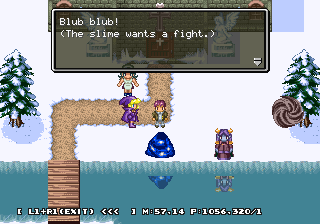
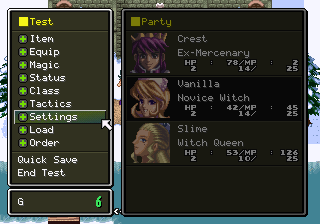
The monster that joins is a hero: make one in the Hero Editor with the monster's name, one of the monster-like hero graphics (Hero graphics), a face and stats of its own. Add a Hero puts him in the first empty place in the party. It does nothing if he is already in, if the party already has four, or if the hero doesn't exist. The sample has no such hero, so the test used its spare Brownie and dressed her up first: Rename Hero to Slime and Party Display → Change Hero Graphic to 106, just before Add a Hero. Her face stayed Brownie's, as the shot shows; Change Hero Face would change that too.
Keep the hero's stats close to what the monster had in the fight, so the player gets the friend he beat. For a choice of who comes along, give an event a page with the Has Hero condition and swap members with Add a Hero and Remove a Hero Guidebook p. 96.
A boss that changes after it falls#
BOSS, Normal Event, two pages. Page 1: person 125, Examined:
- Dialogue: "So you made it this far."
- Fight Monsters: the first form's unit.
- 2-Way Branch, Battle Won / Lost
- Won:
- Dialogue: "Heh heh... Did you think that was all?"
- SE: Explosion: L, and Screen Effect: Flash.
- Event State: Graphic, person 126.
- Dialogue: "Now see my true form!"
- Fight Monsters: the second form's unit.
- 2-Way Branch, Battle Won / Lost: Won, Dialogue "Impossible...!" and Switch 32 ON; Lost, Dialogue "Come back when you are stronger."
- Lost: Dialogue: "Come back when you are stronger."
Page 2: Switch 32 ON, no graphic, Never.
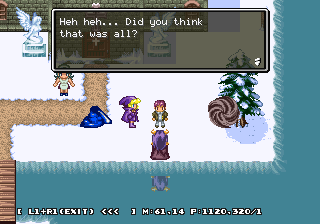
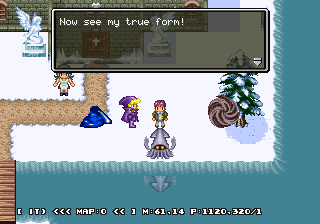
Event State → Graphic changes the event's look on the spot, between the two fights. It does nothing if the new graphic is the one already shown, not even a new facing or colour (Limits). As written, a party that loses the second fight meets the first form again next time. To have the rematch start at the second form, turn on a switch just before the second Fight Monsters and give that switch a page of its own with the new graphic and only the second fight. For a monster that changes in the middle of a single battle, give it a spell with the Transform effect instead (Magic and special moves) Guidebook p. 97.
An earthquake#
A talk sets it off; the quake leaves rubble in front of the church.
GIRL, Normal Event, two pages. Page 1: a Person, Examined: Dialogue "It has been rumbling all day..." and Switch 33 ON. Page 2: Switch 34 ON, the same graphic, Examined: Dialogue "Thank goodness no one was hurt."
QUAKE, Normal Event with no graphic, three pages. Page 1: no condition, Never. Page 2: Switch 33 ON, At Once:
- Sky: Quake.
- Dialogue: "The ground is shaking!"
- Wait: 2 seconds.
- SE: Explosion: L.
- Screen Effect: Shake, then Flash, then Shake.
- Sky: Clear.
- Switch: 34 ON.
- Dialogue: "The church door is blocked!"
Page 3: Switch 34 ON, Never.
RUBBLE, Normal Event, two pages. Page 1: no graphic, Never. Page 2: Switch 34 ON, object 8 (a boulder), Examined: Dialogue "Rubble blocks the door."
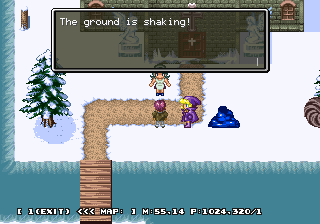
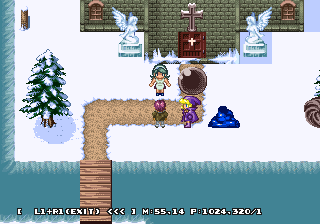
The Quake sky jolts the map at random moments, never more than two and a half seconds apart, each time with the Quake sound, until the Sky changes or the party changes place. Shake jolts it hard for about a second, and Flash whitens the screen for a moment. Like all the jolts, they move only the map's picture: the party and the events stay where they are, so no still picture can show them. The rubble appears only when the quake's page has ended, not at the Switch command: the game chooses every event's page again when an event's page finishes. So keep the last line of the scene after the switch, as here, and the player sees the change as soon as it closes.
For a town that is destroyed for good, end the scene with a Change Map to a second map drawn as the ruins, with sadder music in its Setup Event Guidebook p. 99.
Combining items#
A smith who brews two Herbs and an MP Potion into a Lifetree Seed. A chest beside him gives the MP Potion; the party starts with four Herbs.
SMITH, Normal Event, one page: a Person, Examined.
- Variable: 1 = Item: Herb.
- Variable: 2 = Item: MP Potion.
- 2-Way Branch, Variable: 1 ≥ 2
- Yes: 2-Way Branch, Variable: 2 ≥ 1
- Yes: Dialogue "Two Herbs and an MP Potion. Let me brew them...", Change Items: Lose Item Herb, Lose Item Herb, Lose Item MP Potion, Gain Item Lifetree Seed, then SE Item and Dialogue "Here: a Lifetree Seed!"
- No: Dialogue "I need an MP Potion too."
- No: Dialogue "Bring me two Herbs and an MP Potion."
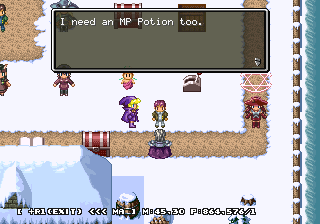
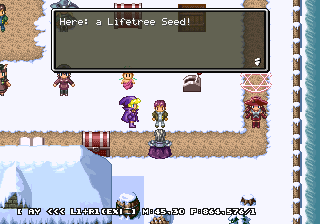
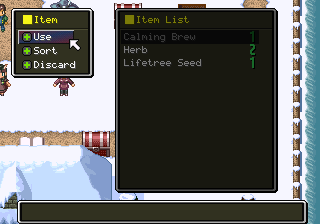
Each Lose Item and Gain Item moves one item, so two Herbs take two commands (with the patch, one command with a Count of 2). The variables are read afresh every time the smith is examined, so the counts are always the party's as it is then.
For a recipe book of many combinations, give each its own branch in turn, the rarest result first. A variable that counts how many the player has made is a handy story gate too Guidebook p. 93.
A person who walks up and talks#
Stepping onto a cell south of the square brings a villager running.
TRIP, Normal Event, two pages. Page 1: no graphic, Touches the Hero: Switch 35 ON. Page 2: Switch 35 ON, Never.
WALKER, Normal Event, three pages. Page 1: a Person, Never. Page 2: Switch 35 ON, the same Person, At Once:
- Event State: Move to a Spot, the cell beside the trip cell, speed Fast.
- Event State: Face, left (towards the party).
- Dialogue: "Wait! You are the travellers? The smith is asking for you."
- Event State: Move to a Spot, back home, Fast.
- Event State: Face, down.
- Switch: 36 ON.
Page 3: Switch 36 ON, the same Person, Examined: Dialogue "The smith is right there."
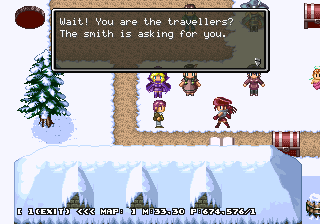
The trip cell has no graphic, so it can't be seen and the party walks onto it; in the test it started as the leader stepped onto it. While the walker's At Once page runs, nothing else moves, so the party waits for him. Move to a Spot goes straight through walls and other events, so lay out a clear line for the walk, or it looks wrong. Sending the walker home at the end keeps him out of the party's way; the switch then gives him an ordinary page. The guidebook makes the same villager walk up as soon as the party enters town, from the map's At Once page Guidebook p. 89.
A slot machine and a prize desk#
A fruit machine takes 10 G a spin and pays in tokens, and a desk beside it trades tokens for items. The tokens are a variable (here 1), so they don't show in the field menu. The test started the party with 100 G.
SLOT, Normal Event, two pages, an object (a fruit machine), Examined:
| Page | Condition | Commands |
|---|---|---|
| 1 | — | Dialogue: "A fruit machine. 10 G a spin. You have too little." |
| 2 | Gold: At Least 10 | below |
Page 2:
- Dialogue: "A fruit machine. 10 G a spin. Play?"
- 2-Way Branch, Yes / No
- Yes: Change Items: Gold −10.
- Slot Branch: Seven, Bell, Cherry, Blank, Blank
- Seven: SE Correct, Dialogue "Seven! 20 tokens!", Variable: 1 + 20.
- Bell: Dialogue "Bell! 5 tokens.", Variable: 1 + 5.
- Cherry: Dialogue "Cherry! 2 tokens.", Variable: 1 + 2.
- Blank, Blank: Dialogue "No luck."
- No: nothing.
PRIZES, Normal Event, one page: a Person, Examined.
- Dialogue: "Tokens for prizes!"
- Multi-Branch, Several Messages: "Herb: 5", "MP Potion: 20", "Lifetree Seed: 50", "Nothing"
- Herb: 2-Way Branch, Variable: 1 ≥ 5
- Yes: Variable: 1 − 5, Change Items: Gain Item Herb, SE Item, Dialogue "One Herb. Enjoy!"
- No: Dialogue "That takes 5 tokens."
- MP Potion and Lifetree Seed: the same, with 20 and 50.
- Nothing: Dialogue "Come again!"
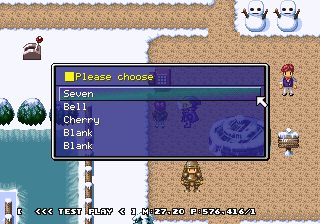
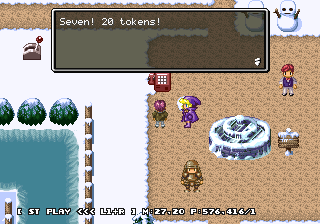
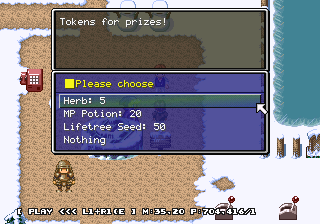
In the original, money is checked by a page condition, not a branch: no branch can test it. The Gold condition picks page 2 when the party has 10 G or more, and page 1, which only names the price, when it hasn't. The money is taken after the Yes and before the spin, because the player can't cancel a slot with ×. In the test the Seven paid 20 tokens and the money went from 100 G to 90 G. At the desk an MP Potion took the 20 tokens, and a Herb asked for next got "That takes 5 tokens."
Outside test play the slot's cursor runs down the lines, one a frame, and stops on the line 19 steps after the one it is on when the player presses ○. That is far too fast to aim, so the lines come up about equally often. Listing Blank twice makes a miss two chances in five.
A door opened by levers#
Three levers and a gate: the gate opens when all three are pulled, in any order. After it, a version where the order counts.
LEVER 1, LEVER 2 and LEVER 3, Normal Events, two pages each, objects, Examined:
| Page | Condition | Graphic | Commands |
|---|---|---|---|
| 1 | — | Object 46 (a lever, up) | SE Pulley, Switch: 1 ON |
| 2 | Switch 1 ON | Object 47 (the lever, down) | SE Pulley, Switch: 1 OFF |
LEVER 2 and LEVER 3 use switches 2 and 3.
GATE, Normal Event, two pages:
| Page | Condition | Graphic | Trigger | Commands |
|---|---|---|---|---|
| 1 | — | Object 14 (a door) | Examined | Dialogue: "It won't budge." |
| 2 | Switch 1 ON, Switch 2 ON, Switch 3 ON | None | Never | none |
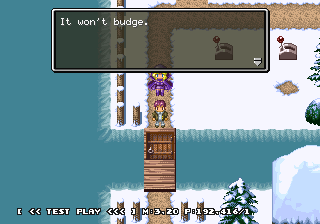
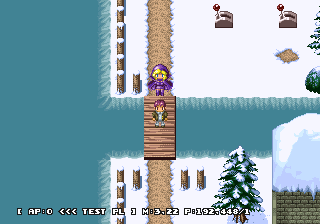
A page is chosen only when all its conditions hold, so the gate's page 2, with three switch conditions, waits for all three levers. Pages are chosen again when an event's page ends, so the gate went the moment the third lever's page ended. In the test, with two levers pulled the gate said "It won't budge."; a second look at a lever pushed it back up; with all three down the gate vanished. As set here, pushing a lever back up after the gate has opened brings the gate back (that follows from the page rules; it wasn't tried).
In order#
Now the gate says the order ("Middle, left, right.") and a wrong lever sends them all back up. One variable (here 3) counts how many have been pulled in the right order.
LEVER M (first), page 1: an object, Examined: SE Pulley, Variable: 3 = 1.
LEVER L (second), page 1: an object, Examined:
- SE: Pulley.
- 2-Way Branch, Variable: 3 = 1
- Yes: Variable: 3 = 2.
- No: Variable: 3 = 0, SE Crash, Dialogue "Clunk! The levers spring back."
LEVER R (third) is the same, testing 3 = 2 and setting 3 = 3. Each lever's page 2 has the condition Variable 3 ≥ its place in the order (1, 2 or 3), the lever's down graphic, and no commands.
GATE: page 1, the door, Examined: Dialogue 'Carved on the gate: "Middle, left, right."'. Page 2: Variable 3 ≥ 3, no graphic, Never.
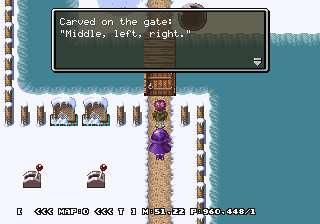
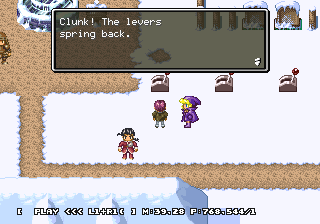
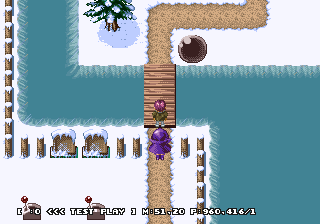
Setting the variable back to 0 is all a wrong lever does: every pulled lever's page 2 condition then fails, so they all go back up together. In the test the left lever first gave the Clunk; then middle, left and right took the variable to 3 and the gate went. A Variable command costs 16 bytes against a Switch command's 80, so the counter is the cheaper way for a long sequence too.
An arena#
A master takes 50 G, then the party fights three rounds in a row. Each round won gives a prize and the choice to stop; winning the last makes the party champion. Losing ends the run, not the game. The test used the sample's forest units, and switch 4 and variable 2.
ARENA, Normal Event, three pages, a Person, Examined:
| Page | Condition | Commands |
|---|---|---|
| 1 | — | Dialogue: "The arena! Three rounds, 50 G to enter. Come back with the money." |
| 2 | Gold: At Least 50 | below |
| 3 | Switch 4 ON | Dialogue: "Hail, champion of the arena!" |
Page 2:
- Dialogue: "The arena! Three rounds, 50 G to enter. Fight?"
- 2-Way Branch, Yes / No
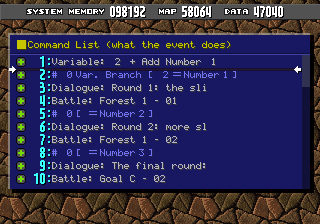
- Yes: Change Items: Gold −50, Variable: 2 = 0, Call Event: ROUNDS.
- No: Dialogue "Come back any time."
ROUNDS, Normal Event, one page, no graphic, trigger Never:
- Variable: 2 + 1.
- Multi-Branch, Variable 2: 1, 2, 3
- 1: Dialogue "Round 1: the slimes!", Fight Monsters: Forest 1 - 01.
- 2: Dialogue "Round 2: more slimes!", Fight Monsters: Forest 1 - 02.
- 3: Dialogue "The final round: the Succubus!", Fight Monsters: Goal C - 02.
- 2-Way Branch, Battle Won / Lost
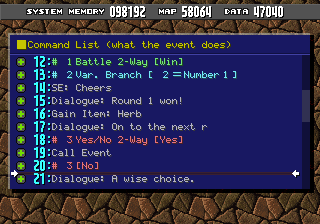
- Won: Multi-Branch, Variable 2: 1, 2, 3
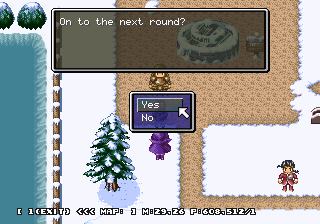
- 1: SE Cheers, Dialogue "Round 1 won! Your prize: a Herb.", Change Items: Gain Item Herb, Dialogue "On to the next round?"
- 2-Way Branch, Yes / No
- Yes: Call Event: ROUNDS.
- No: Dialogue "A wise choice. Come back any time."
- 2: the same, with "Round 2 won!" and an MP Potion.
- 3: SE Cheers, Dialogue "You are the champion! Your prize: a Lifetree Seed.", Change Items: Gain Item Lifetree Seed, Switch: 4 ON.
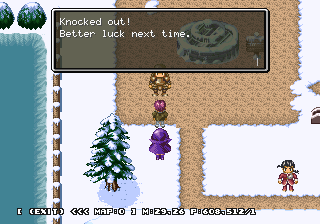
- Lost: Dialogue "Knocked out! Better luck next time."
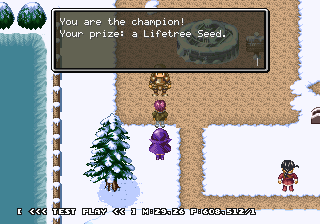
ROUNDS calls itself to start the next round, and the variable says which round it is. Call Event is a jump, not a call: nothing after it runs, so it comes last in its branch. The master sets the variable to 0 before the first call, so every entry starts at round 1. The champion page is the last, so it wins over the Gold page once switch 4 is on.
In the test the entry took 50 G. The party beat the slimes twice and got the Herb, then the MP Potion, and each battle's own gold and EXP as well. HP carries over from one round to the next: nothing heals in between. The Succubus beat the party; it came back with 1 HP each, the master said "Knocked out!", and the game went on, with switch 4 still off. In a second run with the heroes made stronger by a test event, the Succubus fell, the Lifetree Seed was given and the master hailed the champion.
The Lost branch runs only with the Hero Party's On Death set to Revive, as the sample's is. With No Revive a lost round is game over, as in A battle you can lose.
A church#
A priest who, for 200 G, brings fallen heroes back and heals everyone. An inn won't do this: it heals only the living.
PRIEST, Normal Event, two pages, a Person, Examined:
| Page | Condition | Commands |
|---|---|---|
| 1 | — | Dialogue: "An offering of 200 G and I will raise your fallen. You have too little." |
| 2 | Gold: At Least 200 | below |
Page 2:
- Dialogue: "For 200 G I will raise the fallen and heal the hurt. Shall we pray?"
- 2-Way Branch, Yes / No
- Yes: Change Items: Gold −200, SE Light, Screen Effect: Flash.
- Hero Condition: Crest, Cure Conditions.
- Hero Condition: Crest, Change HP +9999.
- The same two for each other hero who can join the party.
- Dialogue "Rise, and go in peace."
- No: Dialogue "May the light guide you."
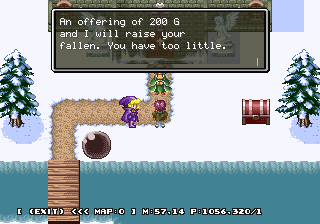
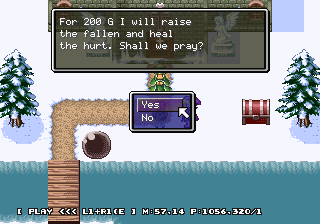
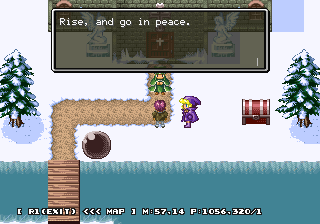
Hero Condition works on one hero at a time and has no entry for the whole party, so the church needs a pair of lines for every hero in the game. Heroes out of the party are healed too, which does no harm: the test listed all five of the sample's with two in the party. Change HP can't go past a hero's maximum, so +9999 fills it. In the test a fallen Crest (0 HP, set by hand in the emulator) came back at his full 78 HP, and Vanilla, turned to stone, was cured. The money went from 400 G to 200 G.
With the sample's On Death (Revive), every hero is back on his feet after each battle, so a hero stays fallen only in a game set to No Revive. There the church is the only way back besides items and spells; with Revive it still cures stone. To test the church, turn a hero to stone with Hero Condition: Change HP can't make a hero fall, as it stops at 1 HP.
A ship voyage#
A ship waits at a harbour on the world map and carries the party to another island.
A vehicle runs only on a field map (Field maps), so the test drew one: two desert islands with six cells of sea between them, reached from the town by a road.
SHIP, Normal Event on the field map, one page: object 87 (a ship), trigger Examined, placed on the sea beside the harbour's shore.
- Vehicle: BGM Ship, Vehicle Kind Ship, graphic 7 (Ocean Ship), speed 3.
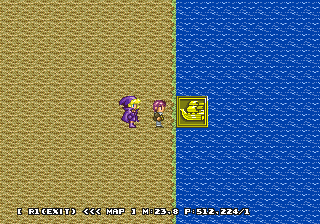
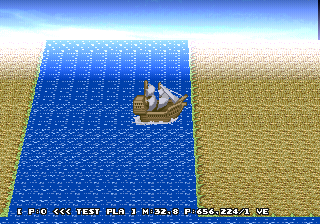
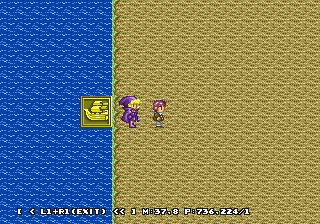
○ facing the ship boards it: the party slides on, the map tilts into the riding view and the ship's song plays (Vehicles). A ship has no button for getting off: it lands when it is steered at a shore the party could walk onto, and the party steps one cell on, onto the beach, while the ship stays where it touched land. The map's own song comes back.
- While riding, no event runs. In the test an event with no graphic and the trigger Touches the Hero lay on the ship's course, and it never started. So a harbour can't greet the party on arrival with an event on the water; put that event on the shore instead.
- Boarding again. Since a ship lands the party a cell away, the party can turn round and board again at once. A land vehicle or an aircraft sets the party down on its own spot, and ○ does nothing until the party has stepped off it.
- The ship stays where it was left, also after the party leaves the map. In the test the party sailed to the far island, took a road back to the town and came out again at the first island: the ship was still at the far shore, not at the harbour where the editor placed it.
A fetch quest#
A cook wants three Snow Mushrooms, which grow about the town. Each one found adds to a count, and the cook pays once.
MUSHROOM 1, Normal Event, two pages. Page 1: object 56 (a mushroom), Examined:
- SE: Search.
- Variable: 11 Add 1.
- Switch: 42 ON.
- Multi-Branch, Variable: 11 = 1, = 2, = 3
- = 1: Dialogue "A Snow Mushroom! Two more to find."
- = 2: Dialogue "A Snow Mushroom! One more to find."
- = 3: Dialogue "A Snow Mushroom! That makes three."
Page 2: Switch 42 ON, no graphic, Never.
MUSHROOM 2 and 3 are the same, each with its own switch (43, 44).
COOK, Normal Event, four pages, each a Person and Examined:
| Page | Condition | Commands |
|---|---|---|
| 1 | — | Dialogue "My stew needs three Snow Mushrooms. Could you find them for me?" and Switch 45 ON |
| 2 | Switch 45 ON | Dialogue "No mushrooms yet? There are three about the town." |
| 3 | Variable 11 ≥ 3 | Dialogue "All three! Thank you, dear.", SE Item, Change Items Gain Item: Lifetree Seed, Dialogue "Received a Lifetree Seed!" and Switch 46 ON |
| 4 | Switch 46 ON | Dialogue "The stew is on. Thank you!" |
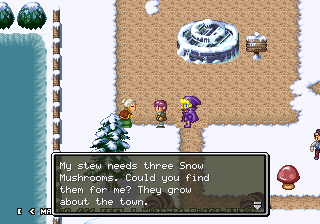
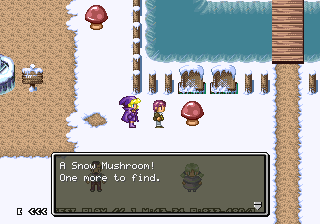
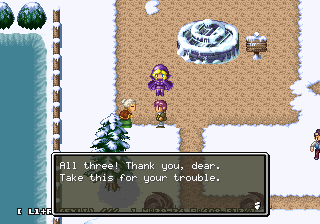
The count is a variable, so the mushrooms can be found in any order, and the Multi-Branch reads it to say how many are left. Each mushroom's own switch takes it off the map: its page 2 has no graphic, and is chosen when page 1 ends, so the mushroom goes as its message closes.
The cook's pages do the rest, since the game uses the last page whose conditions hold. Page 2 takes over once she has asked, page 3 once the count reaches three, and page 4 once she has paid, so the reward is given once. In the test, a second talk after the reward got only the thanks, and the bag held one Lifetree Seed. A party that finds all three mushrooms before ever speaking to her is paid at the first talk, because page 3 wins over page 1.
For a longer errand, keep to the same plan: one variable for the count, one switch for each thing found, and pages for asked, done and paid. Every errand needs numbers of its own, so keep a list of the variables and switches each one uses.
Day and night#
Resting at the inn brings the night: the town turns dark blue, a quieter song plays, a girl goes home to bed and a guard comes out to stand at the church path. Resting again brings the morning.
The time of day is a variable, 12 here: 0 by day, 1 at night. A variable rather than a switch, because the map's Setup Event (below) has to test it, and the 2-Way Branch can test a variable but not a switch.
INN, Normal Event, two pages, each a Person and Examined. Page 1:
- Dialogue: "Rest until nightfall?"
- 2-Way Branch, Yes / No
- Yes: Screen Effect, Tint: R 0, G 0, B 0, Slowly, Map Color, Event Color and Party Color.
- Variable: 12 = 1.
- BGM: Crystal.
- Screen Effect, Tint: R 4, G 6, B 13, Slowly, all three ticked.
- No: nothing.
Page 2: condition Variable 12 = 1:
- Dialogue: "Rest until morning?"
- 2-Way Branch, Yes / No
- Yes: Screen Effect, Tint: R 0, G 0, B 0, Slowly, all three ticked.
- Variable: 12 = 0.
- BGM: Memories (the town's own song).
- Screen Effect, Tint: R 16, G 16, B 16, Slowly, all three ticked, then Screen Effect, Clear Tint.
- No: nothing.
GIRL, Normal Event, two pages. Page 1: a Person, Examined: Dialogue "What a lovely day!". Page 2: Variable 12 = 1, no graphic, Never: she is in bed.
GUARD, Normal Event, two pages. Page 1: no graphic, Never. Page 2: Variable 12 = 1, a Person, Examined: Dialogue "The church is shut for the night. Come back in the morning."
The town's Setup Event:
- 2-Way Branch, Variable: 12 = 1
- Yes: BGM: Crystal, and Screen Effect, Tint: R 4, G 6, B 13, Instant, all three ticked.
- No: nothing.
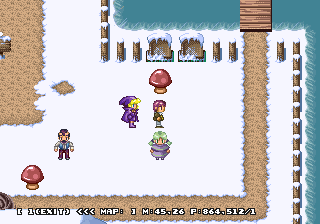
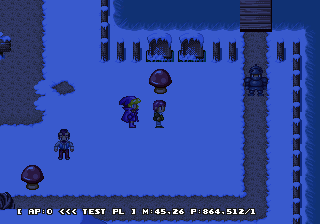
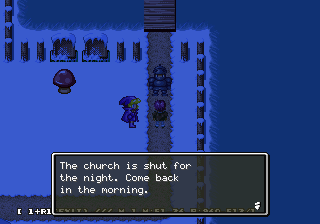
The first tint fades the screen to black, the variable changes while it is dark, and the second tint fades in the night. The girl and the guard change pages when the inn's page ends, since the game chooses every event's page again then; the screen is already dark blue by that time. The morning page fades through black back to the true colours, and Clear Tint at the end stops the game carrying a tint of 16, 16, 16 about. Each slow tint takes about 3 seconds, and the game runs at a few frames a second while it does (Screen effects).
The Setup Event keeps the night through doors. Every change of place starts the map's own song again, so without it the town would play its day song at night. Nor does the night's colour: a tint lasts only until the next change of place (What lasts past a door), so after a trip out to the field map the town comes back in its day colours until the Setup Event's Tint puts the night back. So every map the party can reach at night needs the same branch in its Setup Event, with its own night song and tint; a house can leave the tint out, so that indoors stays lit. In a Setup Event a tint is always instant.
The inn here is a person with a question rather than the Shop / Inn command, because the Inn window can't tell the event what happened: the event goes on after it whether the party stayed, chose Leave or was short of money. A question, as here, says plainly what the player chose.
An opening cutscene#
A prologue rolls up the screen; then the party walks into the village, the elder walks out to meet it, they talk, the screen fades, and the player takes over.
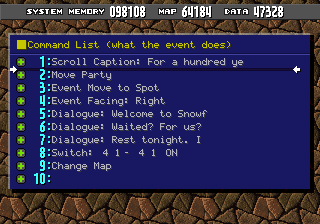
ELDER, Normal Event, two pages. Page 1: a Person, trigger At Once:
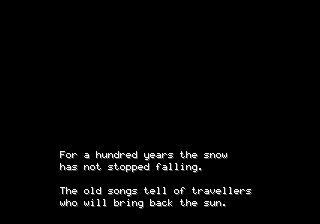
- Message, Scroll Caption, Backdrop Black: "For a hundred years the snow has not stopped falling. / The old songs tell of travellers who will bring back the sun. / This winter, two of them came down the north road..."
- Move Party: Move, up, 10 steps.
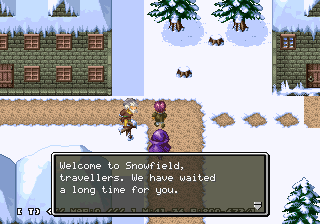
- Event State: Move to a Spot, beside the party, speed Normal.
- Event State: Face, right (towards the party).
- Dialogue: "Welcome to Snowfield, travellers. We have waited a long time for you."
- Dialogue, Speaker Crest, Speaker's Face, Show Name: "Waited? For us?"
- Dialogue: "Rest tonight. I will tell you everything in the morning."
- Switch: 41 ON.
- Change Map: this map, the party's own cell, Black Fade Out.
Page 2: Switch 41 ON, the same Person, Examined: Dialogue "Rest well. We will talk in the morning."
Put the elder on the map where the party starts, with the Party Start at the map's entrance: the At Once page starts as soon as the screen has opened. (The test put it on a second map, reached from the town by a road, so the other recipes could be played without sitting through it.) While it runs nothing else moves, so the party walks only when Move Party says, and the player can't steer it.
- Move to a Spot goes straight through walls and events, across first, then up or down, so give the elder a clear line (Waiting and moving). Move Party by steps stops at the first obstacle.
- The page must turn its own switch on, or it starts again as soon as it ends, for ever. Here switch 41 gives the elder page 2, an ordinary talk.
- The Change Map at the end is the fade. It brings the map back as placed: the elder is at his own spot again, on page 2, and the party stands where the Change Map put it, free to move. In the test, leaving the village and coming back in didn't start the scene again.
- Crest's line uses the Speaker and Speaker's Face, so it shows his face and name plate (Dialogue).
A Scroll Caption can't be skipped or hurried by the player: in the game ○ does nothing to it. Only in test play does holding ○ speed it up five times, so time it in the game. It rolls a line a second from the bottom of the screen until its last line has gone off the top, so it takes a second for each line and about 20 seconds more: this eight-line prologue, blank lines included, takes about half a minute (Captions and balloons). Keep a prologue short, and save the history for the elder to tell.
With the patch's commands#
The four recipes below use commands only the patch has, so a game built with them needs the patch to play (More in events). They were built on the same town with the sample's System Data, with the party set to Crest and Vanilla, and played through in test play on the patched disc.
A count on screen#
A herbalist wants three Snow Herbs. Once she has asked, the number the party holds stays at the top left of the screen until she is paid.
HERBALIST, Normal Event, four pages, each a Person and Examined:
| Page | Condition | Commands |
|---|---|---|
| 1 | — | Dialogue "Snow Herbs grow about the town. Could you bring me three?", Show Timer: Show Variable, Variable 40, Slot 1, Label Snow Herb, and Switch 41 ON |
| 2 | Switch 41 ON | Dialogue "Three Snow Herbs, please." |
| 3 | Variable 40 ≥ 3 | Dialogue "Three! Thank you.", Change Items Lose Item: Snow Herb, Count 3, Show Timer: Show Variable, Slot 1, Hide, SE Item, Change Items Gain Item: Lifetree Seed, Dialogue "Received a Lifetree Seed!" and Switch 42 ON |
| 4 | Switch 42 ON | Dialogue "My remedy is brewing. Thank you again!" |
SNOW HERB 1, Normal Event, two pages. Page 1: object 18 (a plant), Examined:
- SE: Search.
- Change Items: Gain Item Snow Herb.
- Variable: 40 = Item: Snow Herb.
- Dialogue: "Found a Snow Herb!"
- Switch: 43 ON.
Page 2: Switch 43 ON, no graphic, Never. SNOW HERB 2 and 3 are the same, with switches 44 and 45.
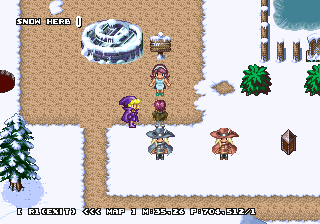
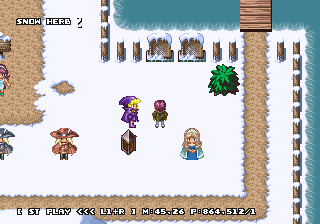
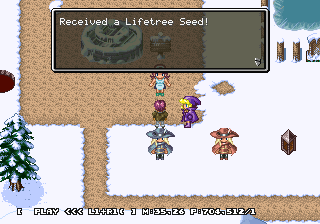
The display shows the variable, not the bag: each herb sets variable 40 from the bag's count just after adding one, so the two always agree here. If the player could also use or sell Snow Herbs, set the variable again wherever the bag changes, or the count would show the old number until the next herb. The count isn't drawn in battles or in the field menu, and comes back after them; it is saved with the game.
Page 3 holds once the variable reaches 3, so the herbs can be picked before she has asked, in any order. Her page 4 wins over page 3 once she has paid, even though variable 40 still says 3.
A shared innkeeper#
Two innkeepers who run the same kind of inn. The inn's line and the Inn command are written once, in a common event, and both innkeepers call it.
Common 0, on the event editor's Common events map (Common events): a Normal Event named INN, one page, no graphic, Never:
- Dialogue: "Welcome, traveller! A bed is 10 G a night."
- Shop / Inn, Inn: price 10.
INNKEEPER A, one page, a Person, Examined: Call Event, Common event, Number 0, Page 1.
INNKEEPER B, one page, a Person, Examined:
- Dialogue: "My sister keeps the other inn. Same beds, same price!"
- Call Event: Common event, Number 0, Page 1.
- Dialogue: "Sleep well."
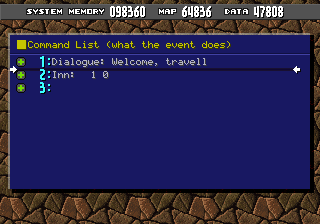
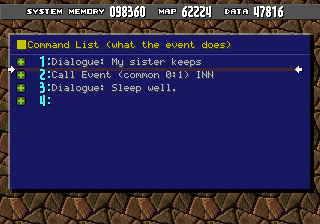
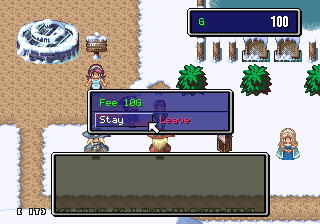
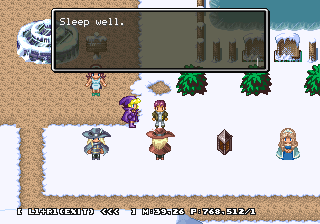
A common event runs as part of the event that called it, and the caller then goes on with its next command, which is how innkeeper B gets her last word. Change the price in the common and every innkeeper who calls it charges the new one.
- Save the System Data after editing a common event: commons belong to the System, not the Scenario.
- A common has no place of its own. Commands in it that move or change "this event" act on the innkeeper who called it.
- A common can't tell the caller what happened in the Inn window, any more than the Inn command can (Day and night uses a question instead).
A waystone that brings you back#
A crystal in town remembers where the party stood when it was touched. A crystal deep in the forest sends the party back there, to whichever waystone it touched last.
WAYSTONE, Normal Event, one page: object 52 (a crystal), Examined:
- Variable: 50 = Map.
- Variable: 51 = X.
- Variable: 52 = Y.
- SE: Warp.
- Dialogue: "The waystone glows. It will remember this place."
RETURN, on the forest map, Normal Event, one page: the same object, Examined:
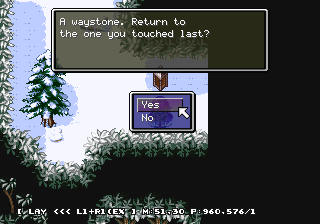
- Dialogue: "A waystone. Return to the one you touched last?"
- 2-Way Branch, Yes / No
- Yes: SE Warp, Change Map: By Variables, Vars From 50, White Fade Out.
- No: nothing.
The test reached the forest through the hole of A dungeon where magic is off.
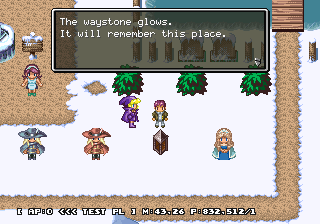
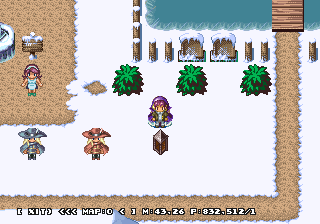
X and Y are the leader's cell, the one the party stood on, so the return lands where it can walk. Put a waystone in every town, each with the same three Variable commands, and the forest's stone (or a common event that any map's events call) takes the party to the last one touched. Change Map by variables takes the three in a row: the map, then the column, then the row. Before any waystone has been touched all three are 0, which is map 0's top-left cell: give the return stone a page that needs a switch the waystones turn on.
A hero who joins at the party's level#
Brownie joins late in the story. Rather than at level 1, or at a level fixed when the game was written, she joins at the leader's level, whatever it is by then.
BROWNIE, Normal Event, two pages. Page 1: a Person (hero graphic 16, colour 1, Brownie's own look), Examined:
- Dialogue: "I've heard of you! Let me come along."
- Variable: 60 = Level 16.
- Party Members: Add a Hero, Brownie.
- Hero Stats: Brownie, Level, Set Value, By Variable, Variable 60.
- Switch: 46 ON.
Page 2: Switch 46 ON, no graphic, Never.
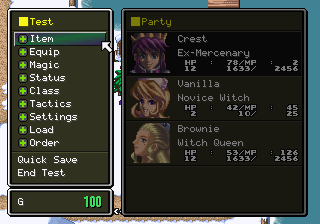
In the Variable command's Level row, 1 to 15 name a hero by number and 16 to 19 the party's places 1 to 4, so 16 is the leader, whoever that is. For the party's average instead, add up the members' levels and Divide by the Party size. Level works through EXP: the hero is given the EXP her new level starts at. Set a level only upwards: a hero set lower keeps the stats she grew.
Testing your game#
Test play#
△ in the editor's top menu opens Test Play:
- From the Start begins a new game at the Party Start.
- Continue loads a save made in test play from the memory card.
- From the quick save starts where you last quick-saved (below). It is greyed until there is one.
The game runs as it will for the player, with these differences:
| In test play | |
|---|---|
| L1 + R1 | Ends test play at once, also in a battle: the Game Over screen, then the editor |
| □ held | The party walks through walls and events (not in a vehicle) |
| L2 | Draws a box round each event on screen with its event number, as the editor numbers them; # beside one that a touch has started, until it stops overlapping what touched it |
| ○ | Closes a timed message early and speeds up a scrolling caption |
| The bar at the bottom | MAP: a map number, written once as test play starts (From the Start shows 0, whatever the start map; from the quick save, the map the last test play ended on); M: the camera's position; P: the leader's position in pixels and the layer; during a Wait, WA, WP or WE (what waits) and the frames left |
| Slot Branch | Doesn't spin, so you can pick the branch you want to test |
| Change Scenario | Doesn't work ("Test play can't change the Scenario."); the event goes on |
The field menu (△) has two more rows, Quick Save and End Test, and its Settings has five more:
| Setting | |
|---|---|
| Random Battles | Off: no random encounters, and the steps aren't counted |
| Invincible | Heroes at 0 HP don't fall: only a win (or L1 + R1) ends a battle |
| Max Money | The money counts as 999,999, and nothing changes it |
| Switches | Turn any switch on or off, one by one, to jump to a point in the story |
| System Check | Shows which of the game-wide rules (magic, levels, gear, classes, gold, encounters) are on |
Three more things to know:
- □ and doors. While □ is held the party walks over Transfer Events without taking them. Let go of □ while standing on one and it is taken at once, without another step.
- Continue replaces your work. Test Play → Continue loads a Test Data save, and with it the System and Scenario the save was made with, fetched from the card by name, in place of the ones you are editing. It warns first, and the game in memory is already replaced by the time it asks for the card. Save your System and Scenario before you use it (Limits).
- A deleted map's events stay. Deleting a map from the System's map list removes only the map: its events stay in the Scenario, and use up room there. A quick save on the deleted map still starts, without a word, on whatever is left of it.
Quick saves#
Quick Save writes nothing to the card. It remembers the map, the leader's place (to the half cell), the switches, the opened chests and the variables, until the power goes off. From the quick save starts again there with those. The party, its items and the heroes are as at the start of a new game; the money and the Settings are whatever the last test play ended with. Opening a unit in the Monster Unit editor clears what a quick save start keeps of the last test play, though not the quick save itself.
So a quick save is for coming back to a place with the story where it was: before a boss, or at a puzzle you are working on.
Test battles#
Test Battle in the Monster Unit editor fights the unit as you have it, even before OK, without leaving the editor. Choose up to four heroes, each with his own Equipment and Level, then Start the Test Battle. The panel shows each hero's HP, MP, AP, attack and defence at that level and gear.
- QUIT on the party ring, or L1 + R1, ends it. R1 held shows the monsters' gauges.
- It is always fought on the Plains, Day backdrop, to the songs Battle 4, Fanfare 2 on a win and Defeat on a loss, whatever the unit will meet in the game.
- The bag holds the Hero Party's starting items, filled again at each start, so items used up in one test are back for the next.
- ESCAPE works, by the usual roll, and so does Get, which ends the battle as a win. Unlike Fight Monsters, a test battle can be run from.
- A win gives no EXP, gold or items, and a loss is no game over. Nothing that happens in the battle is kept: a monster caught by Get isn't kept either.
- Invincible doesn't apply.
- The heroes are forgotten each time the unit is opened again.
- Coin Toss freezes a test battle and crashes the game: try it in test play.
Before you save#
- Play the game from the start at least once, with Random Battles on.
- Every At Once page turns something off at its end (see Reusable events), or the game hangs.
- Every Change Map and Transfer Event lands on ground the party can walk off.
- Shops, inns and chests give what you meant; the money and item rules of the System command are on where they should be.
- Every way out of a map whose Setup Event changes a System rule (magic off, say) puts the rule back.
- Every Save event asks first, and nothing after it does harm when a save is loaded.
- Save both the System Data and the Scenario: they are separate saves.
Balancing battles#
The battle formulas, read from the game's code and checked in play. The stat names are the Hero and Monster editors'.
Hits#
- Damage from a weapon is the attacker's attack minus the target's defence, with no random spread: a hero with attack 55 hits a defence 10 slime for 45, every time. If it comes to less than 2, it is a random 0, 1 or 2. So a monster whose attack is no higher than a hero's defence + 1 can barely hurt him.
- Criticals: a hero's attack is a critical 6% of the time (16% with the capacity More Criticals), for double damage. A monster's only through its Critical action.
- Guarding halves the damage; a hero guarding with a shield takes 0–2. A counter-attack does half damage.
- Dodging: monsters dodge 5% of the heroes' attacks, whatever their stats. A hero dodges a monster's attack with chance luck × 100 ÷ the monster's agility − 95, at least 5% and at most 90%. So luck only starts to count past the monster's agility: at 1.5 times it, 55%; at 1.85 times, the 90% cap.
Elements:
| The target | Damage |
|---|---|
| Neither has nor is weak to the element | 100% |
| Weak to it | 150% |
| Has it | −100%: the attack heals |
| Both | 50% |
With an element, the damage varies by ±10%.
Magic and special moves: the spell's points, plus its bonus points once for each level the caster is above his magic level for it, then ±10%, then the target's damage % for that spell (a monster's resistance), and the element.
- Spells can miss too. The same dodge (5% for a monster, the luck roll for a hero) is tried before a spell's or special move's damage, and guarding halves magic as it does a blow.
- 2x Magic Effect doubles the damage of the hero's spells, not of his special moves.
- No hit or heal goes past 9,999. A monster can have up to 999,999 HP, so a boss with that much needs at least a hundred hits; a hero's own maximum HP is 9,999.
Speed and the turn#
Each fighter's gauge fills and he acts when it is full. Vigor, not agility, sets the speed: a gauge fills in 10,000 ÷ (vigor ÷ 2 + 1) frames, 3.3 seconds at vigor 99, 9.3 at 35, nearly three minutes at 0. Agility counts for dodging, escaping and the first strike.
- Escape: the party's total agility × 100 ÷ the monsters' total, minus 50, as a percentage from 10 to 90. With equal totals, 50%. The capacity Run Away always escapes. No battle started by Fight Monsters can be escaped.
- First strike: 5%, or 10% if the party's total agility is at least the monsters'; +20 with the capacity First Strike. Otherwise an ambush (the monsters' gauges start full): 10%, or 3% if the party is as fast.
Rewards and levels#
The EXP and class points are split evenly among the heroes still standing; the gold isn't split. EXP Up gives one hero 120% of his share. Each reward needs its game-wide rule on (the System command).
- The caps: EXP 9,999,999, class points 9,999, gold 999,999, and 99 of any one item. A monster's dropped item is skipped when the bag already holds 99 of it.
- A Fight Monsters battle ended by its own condition (so many turns, or a named hero falling) counts as lost and pays no EXP or gold, though the heroes still standing stay standing and play goes on (the Lost branch runs).
The EXP for each level is the same for every hero:
| Level | EXP | Level | EXP | Level | EXP |
|---|---|---|---|---|---|
| 2 | 10 | 9 | 474 | 16 | 8,317 |
| 3 | 25 | 10 | 718 | 17 | 12,481 |
| 4 | 47 | 11 | 1,084 | 18 | 18,727 |
| 5 | 80 | 12 | 1,633 | 19 | 28,096 |
| 6 | 129 | 13 | 2,456 | 20 | 42,149 |
| 7 | 202 | 14 | 3,690 | 21 | 63,228 |
| 8 | 311 | 15 | 5,541 | 22 | 94,846 |
Each level from 23 on costs 32,768 more, so level 99 needs 2,617,982. A hero's stats are his figures × his level, so each level adds the same to every stat: plan the monsters along the route by the level the party should have reached there.
Reading a test battle#
Since weapon damage has no spread, the numbers in a test battle are the formula: the damage a hero deals is his attack less the monster's defence, and what he takes is the monster's attack less his. Give the heroes the level and gear the player will likely have at that point, and watch for these:
- Damage of 0–2 on a side: its attack is too low for the other's defence.
- One side acting far more often: its vigor is far higher.
- Use R1 to see the monsters' gauges.
- A boss fight should take a few rounds of healing, not one; a field battle a few attacks.
When something goes wrong#
| What happens | Why, and what to do |
|---|---|
| The game seems to freeze as a map opens | An At Once page that never stops applying runs for ever. End it with a switch that its own next page tests (a page with that switch as its condition and trigger Never) |
| An event never runs | Another page of it applies: the game tries the pages from the last back to page 2, and a later page whose conditions hold wins. A page after page 1 with no conditions is never used |
| An Examined event won't answer | Its Contact sides don't include the side the hero stands on, or the hero isn't facing it |
| An event can't be seen | The guidebook warns that an event on layer 1 is hidden under the parts of layer 2 |
| The party is stuck after a Change Map | It landed on ground it can't walk off. In test play hold □ to walk out, then fix the destination |
| Item Used never fires | Only items of genre Other can be used on an event, from the field menu, facing it |
| A timed event never follows up | The party left the map: a count's follow-up belongs to the map it was started on |
| A rock won't go where it should | Another event is in the way, even one with no graphic |
| An inn didn't revive someone | Inns heal only the living |
| A Call Event's next commands never run | Call Event is a jump: the caller ends there. With the patch, tick Call (return) |
| A lost battle ends the game | The Hero Party's On Death is No Revive: the Lost branch only runs with Revive |
| A test battle freezes | Coin Toss: test it in test play instead |
| The music starts again at every door | Every change of place starts the map's song from the top, and a song set by BGM lasts only until the next one. To keep an event's song going, play it again from the next map's Setup Event (Where music plays). With the patch, the same song already playing plays on |
| The weather or background comes back after a door | Sky and Background last until the next change of place, even a Change Map onto the same map. Set them in the map's Setup Event, behind a switch branch if they should change with the story (Sky) |
| One of two events side by side won't answer | Of two events in reach of ○, only the lower-numbered one runs. Space them a cell apart (Examining and touching) |
| An event stops at a Counter 0 branch | With no Show Timer counting, Counter 0 waits for ever (Events in play) |
| A card question after a door, for a file with a strange name | The map before had a background and this one has none. Answer No, or give the second map a background too (Events in play) |
| A card song goes quiet at every door | Each change of place reads the song from the card again: some seconds of silence, then the song from the top. Use card songs where the party stays put (Memory cards and external data). With the patch, a map with the same song doesn't read it again |
| Magic stays off after a dungeon | One of its ways out skips System: Magic ON. Turn magic back on in every exit, warps and Change Maps included (A dungeon where magic is off) |
Fan-made reference material, one of the Eschaton Games Tsukuru guides. Not affiliated with the publishers of the titles it covers.