Music and sound#
RPG Tsukuru 4 has 40 songs and 80 sound effects on the disc, and up to 15 more songs of your own from Music Tsukuru 3. This chapter lists them all with a player for each, explains how the game plays music, and goes through the two event commands, BGM and SE, with what their settings sound like.
Numbers in the lists#
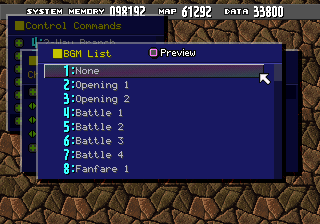
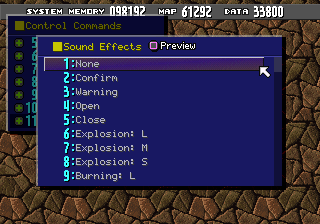
Every song and sound list in the editor starts with 1:None. So the first song, Opening 1, is number 2, the disc's songs run from 2 to 41, and the 15 song slots of your own are 42 to 56. The sounds run from 2 (Confirm) to 81 (Shutter). This chapter uses the lists' numbers.
The songs#
All 40 songs play from two banks of instruments that stay in the console's sound memory the whole time, so a song starts as soon as it has been read from the disc. Every song but four loops for ever: it plays through, then jumps back to its loop point (the Loops back to column) and plays on from there. The three fanfares and Defeat play once and stop.
| No. | Song | Japanese | Length | Loops back to | Tempo | Listen |
|---|---|---|---|---|---|---|
| 2 | Opening 1 | オープニング1 | 1:35 | 0:06 | 76 | |
| 3 | Opening 2 | オープニング2 | 0:56 | 0:11 | 117 (written 115) | |
| 4 | Battle 1 | 戦闘1 | 0:54 | 0:01 | 141 (written 138) | |
| 5 | Battle 2 | 戦闘2 | 1:00 | 0:01 | 137 (written 135) | |
| 6 | Battle 3 | 戦闘3 | 0:45 | 0:01 | 133 (written 130) | |
| 7 | Battle 4 | 戦闘4 | 1:01 | 0:04 | 137 (written 135) | |
| 8 | Fanfare 1 | ファンファーレ1 | 0:08 | plays once | 120 | |
| 9 | Fanfare 2 | ファンファーレ2 | 0:07 | plays once | 137 (written 135) | |
| 10 | Fanfare 3 | ファンファーレ3 | 0:09 | plays once | 120 | |
| 11 | Defeat | 全滅 | 0:14 | plays once | 75 (written 74) | |
| 12 | Castle 1 | 城1 | 0:53 | 0:00 | 100 | |
| 13 | Castle 2 | 城2 | 1:19 | 0:00 | 94 (written 93) | |
| 14 | Egypt | エジプト | 0:48 | 0:00 | 100 (written 98) | |
| 15 | Evil Forest | 邪悪な森 | 0:59 | 0:00 | 100 | |
| 16 | Crystal | クリスタル | 0:58 | 0:00 | 78 | |
| 17 | Fire Cave | 炎の洞窟 | 1:04 | 0:00 | 120 | |
| 18 | Inside a Creature | 生物の内部 | 1:00 | 0:03 | 84 | |
| 19 | Holy Church | 神聖な教会 | 0:55 | 0:00 | 80 | |
| 20 | Evil Church | 邪悪な教会 | 1:09 | 0:15 | 80 | |
| 21 | Home 1 | ホーム1 | 1:14 | 0:00 | 111 (written 110) | |
| 22 | Home 2 | ホーム2 | 1:03 | 0:02 | 78 | |
| 23 | Airship | 飛行艇 | 0:53 | 0:01 | 120 | |
| 24 | Ship | 船 | 0:40 | 0:01 | 111 (written 110) | |
| 25 | Ethnic | エスニック | 0:33 | 0:01 | 120 | |
| 26 | Pirate Ship | 海賊船 | 0:59 | 0:00 | 82 | |
| 27 | Ruins | 廃虚 | 1:04 | 0:04 | 64 | |
| 28 | Comedy 1 | ギャグ1 | 1:06 | 0:02 | 120 (written 118) | |
| 29 | Comedy 2 | ギャグ2 | 0:32 | 0:00 | 120 | |
| 30 | Memories | 回想 | 0:58 | 0:03 | 75 (written 74) | |
| 31 | Escape | 脱出 | 0:37 | 0:00 | 145 | |
| 32 | Dance | ダンス | 0:41 | 0:05 | 160 (written 158) | |
| 33 | Casino | カジノ | 0:54 | 0:03 | 150 | |
| 34 | Arena | 闘技場 | 1:09 | 0:00 | 111 (written 110) | |
| 35 | Japanese | 和風 | 0:56 | 0:03 | 90 | |
| 36 | Laboratory | 研究所 | 0:44 | 0:08 | 120 | |
| 37 | Six Months in Space | 宇宙の半年 | 1:00 | 0:02 | 100 | |
| 38 | Wasteland Gunman | 荒野の用心棒 | 0:42 | 0:00 | 137 (written 135) | |
| 39 | Ending 1 | エンディング1 | 1:23 | 0:07 | 73 | |
| 40 | Ending 2 | エンディング2 | 0:52 | 0:01 | 90 | |
| 41 | Pop | ポップス | 0:49 | 0:01 | 120 (written 118) |
The Tempo is in beats a minute. The game works out each song's speed with its own rounding, so 17 of the songs play a little faster than they were written, by up to 2.2%; the column gives both where they differ.
Where music plays#
| Where | Which song |
|---|---|
| The title screen | the song chosen in the Title editor |
| A map | the map's own song, set in its Settings, every time the party arrives |
| A random battle | the battle, victory and defeat songs of the map's Monster Placement |
| Fight Monsters | the command's own battle, victory and defeat songs |
| Vehicle | the vehicle's song while the party rides it |
| Ending | its song, if Change BGM is ticked |
| BGM | the command's song, until the party next changes place (below) |
| The Game Menu | always Opening 2 |
| The editor | the song chosen in Editor Settings (SELECT in the top menu) |
How the game handles music:
- One song at a time. A new song fades the old one out in about a fifth of a second, then starts once it has been read from the disc.
- Every change of place starts the map's song again from the top, even a Change Map onto the same map, and even if that song was already playing.
- After a battle the map's song starts again from the top. There are no jingles over a song: the victory fanfare replaces the battle music, and a victory or defeat song set to None leaves silence.
- Maps play their songs dry, with no reverb. Battles, vehicles, the ending and the Game Menu play theirs at reverb level 4. The echo is one setting for all the sound, so it changes with each new song.
- A vehicle with no song stops the music while it is ridden. Game over stops it too.
- The movies of magic and summons have their own sound, recorded with them. The music plays on underneath at its normal volume.
The BGM command#
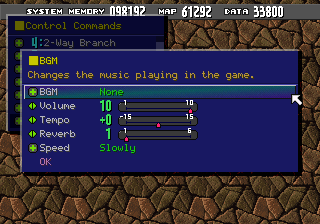
BGM (Control Commands, 10) changes the music from an event.
| Setting | Range | What it does |
|---|---|---|
| BGM | None, or any song | The song. None fades the music out (but still sets the reverb) |
| Volume | 1–10 | Ten even steps; 10 is full volume. 0 can't be set |
| Tempo | −15 to +15 | Each step adds or takes away 3 beats a minute from the song's own tempo: Battle 1 (141) at +5 plays at 156, at −4 at 129 |
| Reverb | 1–6 | The echo on the music: 1 none (as on maps), 2 and 3 a little, 4 as in battle, 5 and 6 more |
| Speed | Instant, Slowly | Slowly fades the song in over 4 seconds |
□ in its BGM list previews a song, always at volume 10, tempo +0 and reverb 4, whatever the dialog says.
These clips show what Reverb and Tempo do:
The sound effects#
| No. | Sound | Japanese | Length | The game's own use | Listen |
|---|---|---|---|---|---|
| 2 | Confirm | 決定 | 0.4 s | ||
| 3 | Warning | 警告 | 0.2 s | the card screens' warnings; a vehicle that can't set down here | |
| 4 | Open | 開 | 0.4 s | a menu opening | |
| 5 | Close | 閉 | 0.3 s | a menu closing | |
| 6 | Explosion: L | 爆発:大 | 1.0 s | ||
| 7 | Explosion: M | 爆発:中 | 0.7 s | ||
| 8 | Explosion: S | 爆発:小 | 0.4 s | ||
| 9 | Burning: L | 燃える:大 | 1.7 s | ||
| 10 | Burning: M | 燃える:中 | 0.9 s | ||
| 11 | Burning: S | 燃える:小 | 0.6 s | ||
| 12 | Stairs Up | 上る | 0.4 s | ||
| 13 | Stairs Down | 下る | 0.4 s | ||
| 14 | Falling | 落下中 | 0.6 s | ||
| 15 | Fall | 落下 | 0.2 s | ||
| 16 | Beam | ビーム | 0.6 s | ||
| 17 | Waves | 波 | 2.0 s | ||
| 18 | Crash | 衝突 | 0.1 s | Hit a Wall in a new project | |
| 19 | Dog | 犬 | 0.2 s | ||
| 20 | Cat | 猫 | 0.9 s | ||
| 21 | Cheers | 歓声 | 1.3 s | ||
| 22 | Sword 1 | 剣1 | 0.5 s | ||
| 23 | Sword 2 | 剣2 | 0.5 s | ||
| 24 | Doorknob | ノブ回す | 0.2 s | ← or → paging a list | |
| 25 | Chest | 宝箱 | 0.1 s | ||
| 26 | Bump Wall | 壁衝突 | 0.2 s | ||
| 27 | Bump Person | 人衝突 | 0.1 s | ||
| 28 | Next Page | 改ページ | 0.2 s | the message sound in a new project | |
| 29 | Warp | ワープ | 0.7 s | ||
| 30 | Attack | 攻撃 | 0.2 s | a hit in battle | |
| 31 | Laugh | 笑い | 0.8 s | the drain animation (Energy Drain) | |
| 32 | Murmur | どよめき | 1.2 s | ||
| 33 | Correct | 正解 | 0.7 s | ||
| 34 | Rain | 雨 | 1.6 s | over and over while it rains (the Rain sky) | |
| 35 | Thunder | 雷 | 1.4 s | the Thunder sky, after the flash | |
| 36 | Wind | 風 | 1.9 s | ||
| 37 | Dripping | 水滴り | 0.3 s | ||
| 38 | Carriage | 馬車 | 1.0 s | ||
| 39 | Push Crate | 木箱押す | 1.1 s | ||
| 40 | Metal Door Open | 金属扉開 | 0.4 s | ||
| 41 | Metal Door Shut | 金属扉閉 | 0.4 s | ||
| 42 | Wood Door Open | 木製扉開 | 0.7 s | ||
| 43 | Wood Door Shut | 木製扉閉 | 0.2 s | ||
| 44 | Dragon | ドラゴン | 1.1 s | ||
| 45 | Item | アイテム | 0.7 s | Level Up in a new project | |
| 46 | Propeller | プロペラ | 0.7 s | ||
| 47 | Jet | ジェット | 1.4 s | ||
| 48 | Bird | 鳥 | 1.2 s | ||
| 49 | Light | 光 | 0.5 s | a hero's gauge filling in battle | |
| 50 | Glass Break | ガラス割れ | 0.7 s | ||
| 51 | Search | 探す | 0.4 s | ||
| 52 | Pulley | 滑車 | 0.3 s | ||
| 53 | Phone | 電話 | 0.5 s | ||
| 54 | Poison | 毒 | 0.6 s | each poisoned step on the field (with reverb) | |
| 55 | Clock | 時計 | 0.5 s | ||
| 56 | Fast Clock | 早い時計 | 0.5 s | ||
| 57 | Smoke | 煙 | 1.9 s | ||
| 58 | Gentle | ほんわか | 1.1 s | ||
| 59 | Shock | ショック | 1.9 s | ||
| 60 | Menu Open | コマンド開 | 0.2 s | battle | |
| 61 | Menu Close | コマンド閉 | 0.2 s | battle | |
| 62 | Cursor | カーソル | 0.1 s | a menu cursor moving | |
| 63 | Select | 選択決定 | 0.2 s | choosing in battle | |
| 64 | Cancel | キャンセル | 0.3 s | cancelling in battle | |
| 65 | Fist Attack | 拳攻撃 | 0.1 s | ||
| 66 | Sword Attack | 剣攻撃 | 0.3 s | a hit in battle | |
| 67 | Claw Attack | 爪攻撃 | 0.5 s | ||
| 68 | Bow Attack | 弓攻撃 | 0.5 s | ||
| 69 | Spear Attack | 槍攻撃 | 0.3 s | ||
| 70 | Gun Attack | 銃器攻撃 | 0.4 s | ||
| 71 | Enemy Attack | 敵攻撃 | 0.1 s | ||
| 72 | Shield | シールド | 0.4 s | battle | |
| 73 | Magic | 魔法 | 2.7 s | battle | |
| 74 | Dodge | 攻撃回避 | 0.1 s | a dodged attack | |
| 75 | Run Away | 逃げる | 0.6 s | running away | |
| 76 | Button | ボタン | 0.2 s | ||
| 77 | Zoom | 拡大縮小 | 0.1 s | ||
| 78 | Slide | スライド | 0.2 s | ||
| 79 | Quake | 地震 | 1.4 s | the Thunder sky's flash and the Quake sky's shakes | |
| 80 | Water | 水中 | 1.3 s | ||
| 81 | Shutter | シャッター | 0.2 s | Snapshot's shutter (with reverb) |
The game's own use is where the game plays a sound by itself, at pitch 11. Every sound can also be used by your events and settings. The three marked in a new project are the System's Basic Sounds until you change them; the menu sounds and the battle's are fixed. The Length is at pitch 11.
Most of the sounds were recorded at low sample rates, between 2 and 13 thousand samples a second.
The SE command#
SE (Control Commands, 11) plays a sound effect.
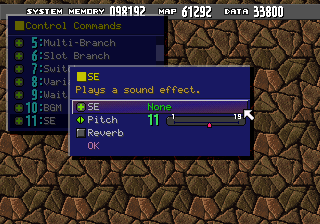
- Pitch is 1 to 19. 11 plays the sound as recorded, and each step is a semitone: 12 is a semitone higher, 10 a semitone lower. A higher pitch also makes the sound shorter, a lower one longer. 1 is ten semitones down (at a little over half speed), 19 eight up.
- Reverb adds the music's echo to the sound. The echo's strength is the music's: maps play with none, so on a map the tick does nothing until a BGM command sets a Reverb above 1. A BGM command with the song None and a Reverb sets the echo without any music.
- Up to three sound effects sound at once. A fourth, asked for while three are still sounding, is skipped. Nothing stops a sound once it has started; it plays to its end.
- □ in the sound list previews a sound, always at pitch 11 and without reverb.
Only the SE command has a pitch: every other place that takes a sound (the Basic Sounds, a battle's starting sound, the Effect command, a magic animation's frames) plays it at 11. Of the sounds the game plays by itself, only Hit a Wall, the poison steps and the snapshot's shutter have reverb, so they echo only where the music has some.
Songs from Music Tsukuru 3#
Music Tsukuru 3 (音楽ツクール3) is a separate PlayStation program for writing music, in Japanese, on its own disc. It can convert its songs into files RT4 plays, which fill the song slots 42 to 56.
Making a song#
- Write the song in Music Tsukuru 3 on its STANDARD voice set. Only STANDARD songs convert: STANDARD's instruments are RT4's own music bank, with a few more. Any other set gives 音色セットが適していません。 ("the voice set isn't suitable").
- Choose DATA (the card icon, upper left of the ring menu) → CONVERT → NEW → OK.
- It asks ループデータにしますか? ("make it loop?"). YES makes the whole song loop from its start; there is no loop point to choose. NO makes it play once.
- The conversion takes a while, about 40 seconds for a long song. Then it saves the file to the card in slot 1 (2 blocks).
The converted song can be at most 48,884 bytes, which is RT4's room for a song: a song of 2 minutes 41 seconds with 4,817 notes fitted with 135 bytes to spare. A longer one gives コンバートデータの容量が上限をオーバーしています。 ("the converted data is over the limit").
Using it in RT4#
Memory Card → External Data → Music Tsukuru 3 → BGM, choose a slot (42 to 56), then the file. The slot takes the song's name, and from then on the song is in every song list of the editor under that name.
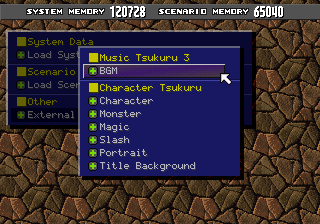
Like Character Tsukuru's graphics, the song stays on the card: the System keeps only its name. The game reads the card each time the song starts:
- A window says the song is loading, and the game goes on in silence for about 6 to 10 seconds while the card is read. On a map the party can walk meanwhile.
- Every change of place reads it again, even onto the same map, since every change of place starts the map's song from the top. So a card song suits a map the party stays on, or an event scene, better than a town with many doors.
- The card must stay in while the game is played (Sharing a game).
- Two conversions of one song have the same title on the card, and RT4 finds the file by its title, so it always plays the first one it finds. Rename the song in Music Tsukuru 3 before converting a second version of it.
Fan-made reference material, one of the Eschaton Games Tsukuru guides. Not affiliated with the publishers of the titles it covers.