Covers the guidebook's pages 51–84.
Scenario Data#
The Scenario is the game's story: the events placed on its maps. A person to talk to, a door, a treasure chest, a cut-scene, a trap: each is an event. A Scenario is saved to the memory card apart from the System Data; the sample game's takes three blocks in the original and two with the patch.
Scenario Settings#
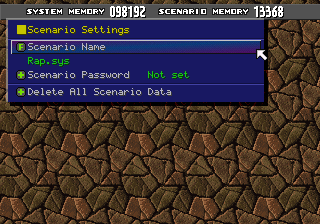
Scenario Settings in the top menu has three rows:
- Scenario Name: the name the game finds this Scenario by. New Game loads the Scenario named in the System's First Scenario Name (System settings), and Change Scenario the one named in the command, so the names must match exactly. Keep it to 16 letters (8 Japanese characters in the original): that is what the memory card's lists show and what the game compares. A new project's is New Scenario.
- Scenario Password: up to eight buttons. Loading this Scenario into the editor then asks for it, but a game in play loads it by name without asking (How the files find each other). Not set means none.
- Delete All Scenario Data: erases the whole Scenario, every event on every map, after a warning. The System Data, maps included, isn't touched.
Where a new game begins isn't set here but in the event editor, with the Party Start (below).
The event editor#
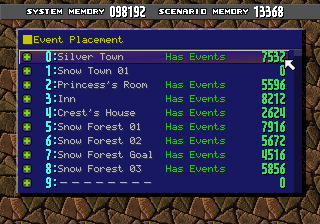
Events in the top menu lists the maps, with how many bytes of events each holds. Choose a map to place and edit its events.
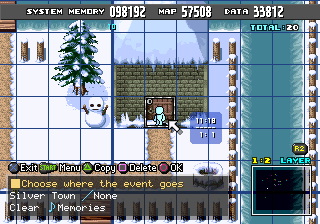
The map is shown as in the map editor, with each event as an icon on its cell. Move the cursor to a cell and:
- ○ on an empty cell places an event: the menu asks its kind (below).
- ○ on an event opens its pages.
- △ on an event copies it. A normal event offers Copy or Clone; then each ○ on an empty cell places one, until ×.
- □ on an event deletes it, after asking.
- L1 and R1 jump the cursor to the previous or next event on the map.
Only one event can stand on a cell, and a map holds up to 120 events. An event is placed on the layer being shown, and walks on that layer in the game.
Copy makes a full, independent copy, with its own name. Clone makes an event with no pages of its own: it looks and acts like its source, and changes when the source is edited. A clone takes 28 bytes, where a copy takes as much as the source, so clones suit a crowd of identical guards or a row of torches. Deleting an event deletes all its clones with it.
The map list#
The list of maps works like the System Data lists (The list), but on all of a map's events at once, its Setup Event included. It is the only way to move events from one map to another.
| Button | On a map |
|---|---|
| △ | Copies every event on it |
| ○ after a copy | Pastes them onto this map. A map that already has events asks first, and its own are replaced |
| □ | Deletes every event on it, after asking |
One copy can be pasted onto several maps; × leaves pasting. The events keep their cells, so paste onto a map of the same shape, or check each event's place afterwards. To move a map's events, copy them, paste them and delete the originals. A paste that doesn't fit the Scenario's room is refused with Out of Memory.
The kinds of event#
| Kind | What it is |
|---|---|
| Normal Event | Anything: people, signs, doors, traps, cut-scenes. Up to 30 pages, each with its own look, movement, trigger, conditions and commands |
| Chest Event | One page with two looks, Before and After. Once its page has run, the game remembers it: the chest shows the After look and never starts again, also after saving and loading. For chests, and for switches and levers that stay pulled. A Scenario holds up to 256 |
| Transfer Event | A doorway: when it starts (usually as the hero walks onto it) it takes the party to a cell on another map (or the same one), with a fade. It has pages for conditions, so a door can stay shut until a switch is on, but no commands |
| Party Start | Where a new game begins. There is one in the whole Scenario; placing it again moves it |
| Setup Event | One per map, with commands but no look. It runs each time the party enters the map, before the screen opens: for the weather, the music, or resetting variables. Commands that need the screen aren't allowed in it (see the table below) |
An event's pages#
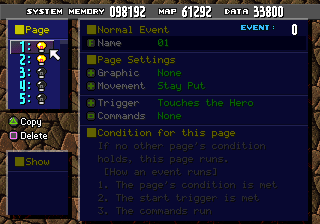
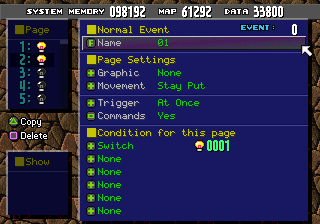
An event is a stack of pages. Each page has its own graphic, movement, trigger and commands, and up to six conditions (a switch on, a variable's value, an item held, a hero in the party, and so on). In the page list, △ copies a page onto another (which it replaces whole, after asking if that page is in use) and □ deletes one. Page 1 can't be deleted.
A new page has no graphic, faces down, Stays Put at Normal speed and starts on Touches the Hero from all sides. So an event you have just placed already runs its commands when the hero walks onto it.
When it is stored. The page screen's changes, and an event's new Name, are written into the Scenario only when you close the page list with ×, not when you move from page to page. The memory counter moves then.
Which page is used. The game tries the pages from the last to page 2, and uses the first whose conditions all hold. If none does, it uses page 1. Page 1 has no conditions, and a later page with no conditions is never used: give every page after the first at least one.
This is how an event changes over the course of a game: a guard who blocks the gate on page 1 and has stepped aside on page 2, once the switch for having the king's permission is on. The game chooses the pages again whenever an event finishes, so a change shows as soon as the event that made it is over.
Graphic#
None, a Person (any hero graphic, 1–135, in one of four colours, or one of the ten made in Character Tsukuru, 136–145, which have no colours; facing one way) or an Object (1–92: chests, doors, signs, barrels and the like). Either can be See-Through, and an object can be Pushable: the party pushes it half a cell by walking into it, for block puzzles. An event with no graphic can be walked through.
A map can show 32 events with a Person graphic at once, counting each event even when several share a graphic. A 33rd isn't drawn in the game.
Movement#
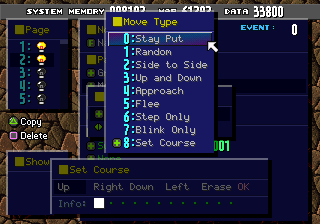
Stay Put, Random, Side to Side, Up and Down, Approach, Flee, Step Only (marks time on the spot), Blink Only, or Set Course: a route of up to twelve cells, walked over and over. A blocked step waits and tries again.
| Speed | Slowest | Slow | Normal | Fast | Fastest |
|---|---|---|---|---|---|
| Seconds a cell | 1 | ¾ | ½ | ¼ | ⅛ |
The party walks at Fast, and twice that when the player dashes. Random walks a random number of steps (1 to 20 half cells) one way, then picks again, without pausing. Side to Side and Up and Down turn round when they meet something.
Nothing walks while an event is running, apart from what the event moves itself (see Wait below).
Trigger#
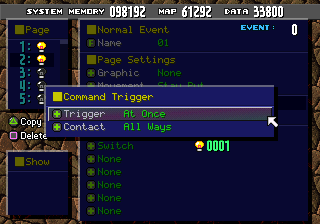
What starts the page's commands:
| Trigger | Starts when |
|---|---|
| Never | It doesn't start on its own. Another event can still run it with Call Event |
| Examined | The hero faces it and presses ○ |
| At Once | As soon as the page applies, and again every time it ends, for as long as it applies. So the page must change something that makes it stop applying, usually a switch its own conditions test, or it runs for ever |
| Touches an Event | It walks into the event chosen on the map, or that event stands on it. It doesn't start when the other event walks into it |
| Touches the Hero | The hero walks into it, or it walks into the hero |
| Item Used | The hero faces it and uses the chosen item from the field menu. Only items of the Other genre can be chosen, and the item isn't used up |
| Variable | A variable meets a test (as a page condition). Checked all the time, like At Once |
| Switch | A switch is ON or OFF. Checked all the time, like At Once |
Contact limits the sides an Examined or touch trigger answers from: all of them, or any of top, right, bottom and left. A counter clerk examined only from the front is From B (the hero stands below the event). How the game judges a side is under On the map.
An event that is examined or touched by the hero turns to face the opposite way to the hero. When the hero walks up to it, that is toward him; when it walks into a hero who is looking elsewhere, it isn't. Touches an Event doesn't turn it.
Conditions#
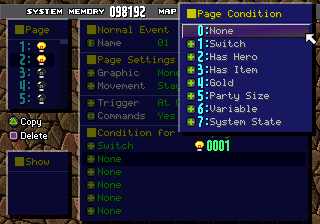
| Condition | Holds when |
|---|---|
| Switch | The switch is ON, or OFF |
| Has Hero | The hero is in the party, or isn't |
| Has Item | The party has the item, or hasn't. An item a hero has equipped counts |
| Gold | The party's money is at least, or at most, an amount (0 to 999,999) |
| Party Size | The party has exactly that many members (1 to 4), or doesn't |
| Variable | A variable is equal to, not equal to, at least or at most a number or another variable |
| System State | The game-wide rules (magic, levels, gear, classes, money and encounters) are each on or off exactly as ticked |
All of a page's conditions must hold together. For "either of these", use two pages with the same commands.
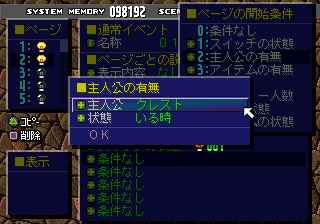 Original (Japanese)
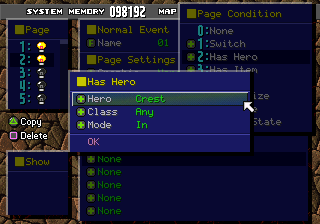 English patch
On the map: walking, touching and arriving#
Everything on a map, the hero and each event, takes up a box one cell square, and moves in steps of half a cell. What the hero can examine, what stops him and which side he touched from all follow from those boxes.
Walking and blocking#
- A step is blocked by any event whose box it would overlap, so an event half a cell off the hero's line still stands in his way. An event with no graphic, and every transfer, can be walked through.
- The other party members never block anything, and nothing blocks them: they follow the leader's trail, a cell behind him (two when dashing).
- An event's own walking is blocked by the hero and by other events in the same way, and by the map.
- A Pushable object moves half a cell when the hero walks into it straight on, lined up with it exactly. It keeps its facing and moves at its own speed.
Examining and touching#
- ○ examines what is one cell ahead of the hero, or half a cell to either side of that; not further. It works only between steps, and only when ○ is pressed on its own.
- Of two events in reach, only the lower-numbered one runs, and the other is forgotten for that press.
- Contact sides go by the way the hero faces, not where he stands: From T passes when he faces down, From R when he faces left, From B up and From L right, and in each case he must be exactly in line with the event (the same column, or the same row). With all sides allowed, half a cell off still counts. The same holds when an event walks into a standing hero: it is his facing that decides.
- For Touches an Event the sides go by the way the named event last moved. An event that has never moved counts as facing down, whatever its graphic shows.
Arriving#
After any change of place, the hero ignores whatever he is standing on until he has stepped clear of it. That covers Change Map, transfers, teleport and escape, the start of a game and getting off a vehicle. Until he is clear he can't examine, walks through events, and doesn't take a transfer. So a door can bring the party in on the return door's own cell without sending it straight back, and a Change Map onto a transfer's cell doesn't set the transfer off.
A transfer is taken when one of the hero's steps ends on it, or within about half a cell of it.
The commands#
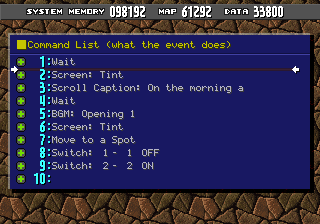
A page's commands run from top to bottom. In the command list, ○ on a line opens the command picker, and the new command goes in before that line. □ on a line offers Copy, Cut and Paste: mark the first and the last line with ○, then paste before another line. A marked range always takes in whole branches. What you copy can only be pasted on the same page, and is gone once you leave the command list.
Two pastes go wrong in the original. Pasted on the empty last line, the commands go in before the page's last command, not after it. And a branch with another branch inside it, pasted onto a page that already has it, gets its branches tangled: the list shows the broken lines in red, and the wrong branches run (Limits).
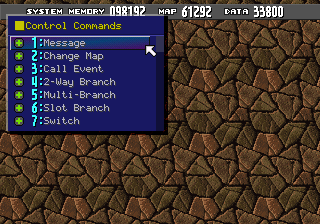
| No. | Command | Its forms | What it does | Setup Event |
|---|---|---|---|---|
| 1 | Message | Dialogue, Hero Balloon, Event Balloon, Scroll Caption, Fixed Caption | Shows text: a message window, a speech balloon over a party member or over the event, a caption that rolls up the screen, or one that stands in the middle | No |
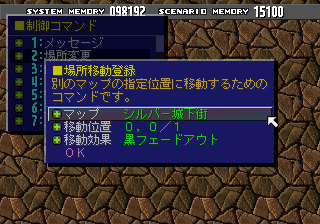
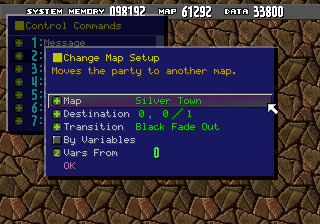
| 2 | Change Map | — (and with the patch By Variables) | Moves the party to a cell on any map, on either layer, with a fade | No |
| 3 | Call Event | — (and with the patch Call (return), Common event) | Runs a page of another event (below) | Yes |
| 4 | 2-Way Branch | Yes / No, Two Messages, Battle Won / Lost, Counter 0, Odds, Variable | Two branches, chosen by the player, by the last battle, by the timer, by chance or by a variable | Yes |
| 5 | Multi-Branch | Several Messages, Odds, Variable | Up to five branches, chosen by the player, by chance or by a variable's value | Yes |
| 6 | Slot Branch | — | Up to five choices on a spinning wheel that the player stops | No |
| 7 | Switch | — | Turns a switch, or a run of switches, ON or OFF. A description can be written beside it | Yes |
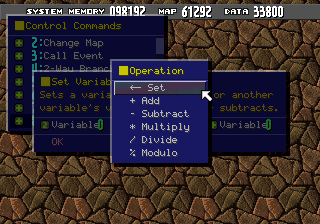
| 8 | Variable | Set, Add, Subtract (and with the patch Multiply, Divide, Modulo) | Sets a variable from a number, another variable or a random number, or adds or subtracts | Yes |
| 9 | Wait | — | Pauses the event for up to 30 seconds, in half seconds, and says what may move meanwhile | No |
| 10 | BGM | — | Changes the music, with its volume, tempo and reverb, at once or fading in | Yes |
| 11 | SE | — | Plays a sound effect at a pitch, with or without reverb | No |
| 12 | Shop / Inn | Shop, Inn | Opens a shop of up to eight goods, or an inn at a price | No |
| 13 | Change Items | Gain Item, Lose Item, Gold +/- (and with the patch a Count or a variable's value) | Gives or takes an item, or money | Yes |
| 14 | Screen Effect | Shift the Screen, Shift Back, Flash, Shake, Tint, Clear Tint, Sandstorm, Widescreen, Widescreen Off, Screen Wave | Effects over the whole screen | Yes |
| 15 | Add Class | — | Gives a hero another class, if the class's change conditions are met | Yes |
| 16 | Force Class | Force a Class, Bar Changes, Allow Changes | Changes a hero's class, or stops or allows class changes | Yes |
| 17 | Hero Stats | Learn Magic, Learn Special Move, Remove Gear, Change Power … Change Luck (and with the patch Level, Set Value, By Variable) | Teaches a spell or move, takes off a piece of gear, or raises or lowers a stat | Yes |
| 18 | Rename Hero | — | Gives a hero a new name | Yes |
| 19 | Party Members | Add a Hero, Remove a Hero, Reorder Party, Make Leader | Changes who is in the party and in what order | Yes |
| 20 | Party Display | Erase, See-Through, Show All, Reset Display, Blink, Change Hero Graphic, Change Hero Face | Changes how the party looks on the field | Yes |
| 21 | Hero Condition | Poison, Paralyze, Petrify, Cure Conditions, Change HP / MP / AP, Gain EXP, Gain CCP, Forget or Recall Magic and Special Moves (and with the patch Set Value, By Variable) | Changes a hero's condition and points | Yes |
| 22 | Move Party | Turn Hero, Move, Move to a Spot, Gather Party (and with the patch At Once, By Variables) | Walks the party, or turns a hero | Yes |
| 23 | Event State | Stop Running, Turn, Move, Move to a Spot, Blink, Spin, Graphic (and with the patch At Once, By Variables) | Moves or changes the event itself | No |
| 24 | System | Magic, Level, Gear, Class, Gold, Encounters, each ON or OFF | Turns game-wide rules on and off | Yes |
| 25 | Effect | 22 effects, and Clear Effect | Plays an animated effect from one place on the screen to another | No |
| 26 | Sky | — | Changes the weather | Yes |
| 27 | Background | — | Changes the backdrop behind the map (not on field maps) | Yes |
| 28 | Add Teleport | — | Adds a place that teleport magic and items can go to (up to 32) | Yes |
| 29 | Remove Teleport | — | Takes one off the list | Yes |
| 30 | Teleport State | Block Teleport, Allow Teleport | Stops or allows teleporting | Yes |
| 31 | Escape Point | Set, Clear | Sets the place that escape magic leads to from a dungeon map | Yes |
| 32 | Vehicle | — | Makes the event a vehicle the party can board (field maps only) | No |
| 33 | Fight Monsters | — (and with the patch Random Battles) | Starts a battle with a monster unit, with its own music, end condition and a message | No |
| 34 | Show Timer | — (and with the patch Show Variable) | Starts a countdown on the screen and waits for it to run out; with the patch, or shows a variable's value in a corner slot | No |
| 35 | Stop Timer | — | Stops the countdown | No |
| 36 | Password | — | Asks the player for a password of up to four characters, and branches on it | No |
| 37 | Title | — | Shows the game's title screen, then goes on | Yes |
| 38 | Ending | — | Plays the staff roll, then ends the game or goes on | No |
| 39 | Change Scenario | — | Loads the next Scenario from the memory card and plays it | No |
| 40 | Save | — | Opens the save screen | No |
| 41 | Vibrate | — | Shakes the controller at a strength and rhythm, for up to 5 seconds | Yes |
| 42 | Snapshot | — | Remembers the view, to be shown behind the staff roll | No |
Setup Event says whether a command is allowed in a map's Setup Event. Every dialog's settings, ranges and defaults are in Command options at the end of this chapter. Guidebook pp. 60–81
Timing and order#
Only one event runs at a time. While it runs, the game waits for it: other events don't start, and nothing on the map moves except what the running event moves. The game runs at 60 frames a second.
| Command | Takes |
|---|---|
| Switch, Variable, Change Items, System, Party Members and the other commands that only change the game's data | No time: a run of them happens within one frame |
| A branch | A frame for the branch command, and one more for an [End Branch] the event runs into |
| Wait | Exactly its time: 30 frames each half second |
| Dialogue, a balloon, a caption | Until it closes. The next command starts about a fifth of a second after the last press, or at once when it carries on in the same window (below) |
| A page on Auto (Dialogue, Fixed Caption) | Its time, and about 0.4 seconds more to open and close |
| Scroll Caption | About a second a line, plus 20 seconds for the last line to cross the screen, plus 2: 18 lines take 40 seconds |
| Move Party by steps | 8 frames a step (16 a cell); dashing, about 5 a step |
| Event State's Move and Move to a Spot | 58, 44, 30, 16 or 8 frames a cell, from Slowest to Fastest |
| Move Party's Move to a Spot | The same as an event's at the speed chosen: 30 frames a cell at Normal |
| Spin | A quarter turn each half second: 2 seconds for a full turn |
| Fight Monsters | About 2½ seconds from the command to the battle's first frame |
| Change Map | About 4 seconds; under 3 onto the same map |
| Title | About 8 seconds, with no press |
| Slot Branch | Until ○, then 5 seconds as it slows and stops |
| Call Event | The called page starts in the next frame (see below) |
| Vibrate | Its time, like a Wait |
Who goes first.
- Each frame the game checks the events in order of their numbers, and the first that should start takes over. So of two At Once events, the lower-numbered one runs first. When one event ends, the next to start begins two frames later.
- The Setup Event runs to its end while the screen is still dark, before the map's other events are set up. They start once the screen has opened.
- Call Event sends its page off to start in the next frame in which nothing is running. An event that starts by itself in the same frame goes first, and the called page waits for it.
- A Variable or Switch trigger starts the frame after its value is set, or as soon as the event that set it ends.
- When Show Timer's count runs out, the event that started it carries on only once no other event is running, so it can come seconds late.
- Move Party or an event's move as the last command of a page: the page ends at once and the move goes on with no event running, so other events can start meanwhile.
Messages#
Every message command waits for its window to close before the event goes on.
Dialogue#
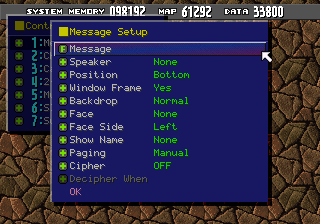
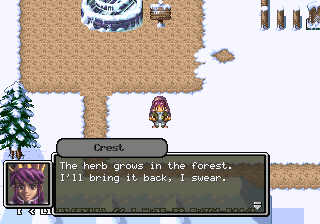
The message window: four lines of text a page, up to 40 lines in all (ten pages). It stands at the same size wherever it is put.
| Setting | Choices |
|---|---|
| Speaker | None (the default), or a hero: his name for the name plate and his face for Speaker's Face |
| Position | Top, Middle, Bottom (the default), Left or Right (below) |
| Window Frame | On (the default), or off: the text alone, with no frame and no fill |
| Backdrop | Normal, Shaded, Black or See-Through |
| Face | None, Speaker's Face (the speaker's face as it is now, so it follows Change Hero Face) or Choose Graphic (any face, by number and colour) |
| Face Side | Left or Right of the window |
| Show Name | A plate with the speaker's name over the window's top left corner. At Top, the window moves down a little to make room |
| Paging | Manual: each page waits for ○. Auto: each page turns by itself after a time, and ○ does nothing |
| Cipher, Decipher When | Scrambles the text until a condition holds (below) |
The face rule. The face is a small picture beside the window, level with its middle. Left and Right windows are pushed to the side to leave room for a face on the other side. A face on the same side as a Left or Right window moves the window back to the middle. So for a window at the left with a face, set Left and put the face on the Right.
When a Dialogue is followed straight away by another Dialogue, it carries on in the same window. A question (Yes / No, Two Messages, Several Messages), a Slot Branch, a Password, a shop or an inn opens at once, with the message still showing.
Captions and balloons#
- Scroll Caption rolls its text up the screen from the bottom, a line a second, over the map: for an opening or an epilogue. It closes by itself once its last line has gone off the top. Backdrop is Normal, Shaded or Black. Its text may be as long as a Dialogue's; about 20 of its lines fit on the screen at once.
- Fixed Caption shows its text in the middle of the screen, four lines a page, with no window: over Black or over the map (See-Through). Paging is Manual, or Auto after up to 30 seconds, in half seconds.
- Hero Balloon and Event Balloon put one short line in a speech balloon over a party member or over the event. The hero is chosen by place in the party, 0 for the leader to 3; if that place is empty the balloon is skipped.
In test play ○ closes a page on Auto at once, and holding it makes a scrolling caption five times faster. In the game neither works, so try your timings in the game too.
The Cipher#
Cipher (Dialogue, both balloons and a Fight Monsters message) shows the text scrambled, each character replaced by a symbol, until its Decipher When condition holds; from then on it reads as written. For a language the party can only read once it has the dictionary.
| Decipher When | Holds when |
|---|---|
| Variable | A variable is equal to, not equal to, at least or at most a number or another variable |
| Item | The party has the item, in the bag or equipped |
| Class | A party member has the class |
| Switch | A switch is ON, or OFF |
Turning Cipher on without setting Decipher When leaves a test that always holds, so the text is never scrambled.
How much text fits#
Every field holds a fixed number of bytes. A Japanese character takes two, and with the patch a letter takes one, so the patch doubles the room for English.
| Field | The original | With the patch |
|---|---|---|
| Names: heroes, classes, items, spells, special moves, monsters, maps, events | 8 Japanese characters | 16 letters |
| Rename Hero's new name | 8 | 16 |
| An item's description | 20 | 40 |
| Parameter Names | 4 | 8 |
| Command Names | 7 | 14 |
| The four staff roles and names (the staff roll) | 12 each | 24 each |
| Title Name | 18 title-font characters | 18 |
| Subtitle Name | 21 | 41 |
| A line of Dialogue, Scroll Caption or Fixed Caption | 16, up to 40 lines | 32, wrapped at spaces, up to 40 lines |
| A Hero Balloon or Event Balloon | 8, one line | 16 |
| An answer of Two Messages, Several Messages or Slot Branch | 16 (15 fit beside the cursor) | 32 (30 fit beside the cursor) |
| A Password | exactly 4 hiragana | 1 to 4 capitals, digits or signs |
| Scenario Name, Next Scenario | 8 | 16 |
| A Switch command's Description (seen only in the editor) | 32, on two lines | 64 |
In the original, a line that fills all 16 characters and then has a line break shows an empty line after it. The patch drops that empty line in English text, and wraps lines at spaces instead of in the middle of words. So a break typed straight after a full line of 32 letters is swallowed: to leave an empty line there, type two breaks. Japanese text draws as boxes with the patch (The font).
Branches#
A branch command puts its branches straight into the list, each ending in a marker line, with [End Branch] after the last. Commands go between the markers, and branches can be nested.
- 2-Way Branch: Yes / No, Two Messages (two choices of your own), Battle Won / Lost (the last battle's result, so put it straight after the Fight Monsters), Counter 0 (has the timer run out?), Odds (a percentage chance) and Variable (a test against a number or another variable).
- Multi-Branch: Several Messages (up to five choices), Odds (up to five chances, which always total 100%) and Variable (up to five values; the branch whose value the variable equals runs, and if none matches, none does).
- Slot Branch spins a cursor over up to five choices until the player presses ○, and runs the branch it stops on. It isn't random: the stop depends on when the player presses, 19 steps on. In test play it doesn't spin, so you can choose.
- Password shows a window of four characters, each changed with up and down, and runs its first branch if the player enters the password, the other if not. Wrong answers can be tried again only if the event asks again.
The player can't cancel a question, a slot or a password with ×: they must answer.
Switches and variables#
Switches are ON or OFF and variables hold whole numbers from −9,999 to 9,999. Both are shared by the whole game: every event on every map sees the same ones, and they are saved with the game. They are how one event leaves word for another: a switch for "the bridge is fixed", a variable for "how far the main story has got".
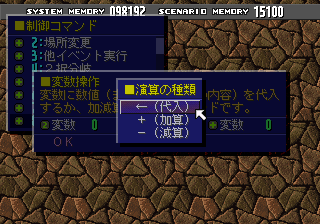
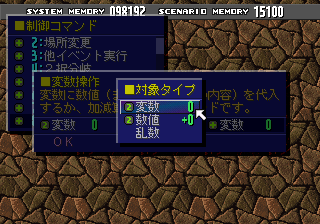
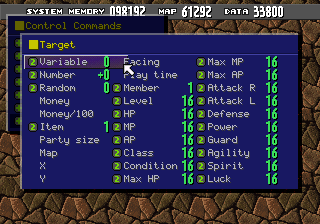
Variable sets a variable to a number, to another variable or to a random number, or adds or subtracts one of those. In the original, the random number has no range: about seven times in ten it comes out as 9,999, and adding or subtracting it can wrap a variable from one end to the other. The patch makes it 0–999, as the book promised.
 Original (Japanese)
 English patch
 Original (Japanese)
 English patch
Call Event#
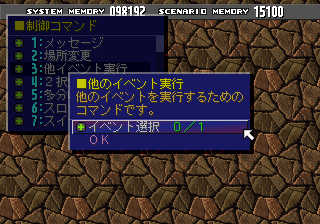
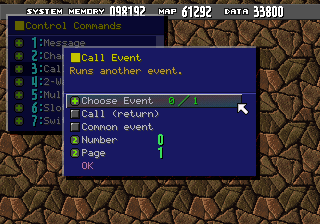
Call Event names another event, or another page of the same one, and runs that page from its first command, whatever its conditions and trigger. The calling event ends there: anything after the Call Event is never reached. Think of it as "go to" rather than "do this, then come back". The event that is called keeps the graphic its own conditions give it.
Most fan games use it to share commands: an event with the trigger Never holds the shop's opening lines once, and every shop clerk ends with a Call Event to it.
 Original (Japanese)
 English patch
Common events#
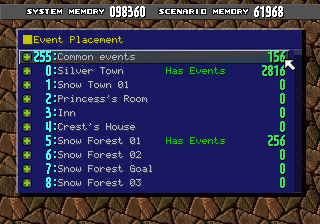
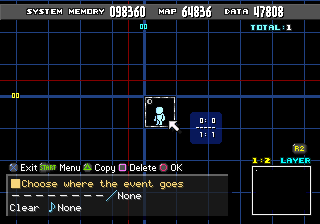
Event recipes builds one, an inn called by two innkeepers.
Waiting and moving#
Wait pauses the event for up to 30 seconds and its Stop says what stands still meanwhile: All (everything but this event), Hero Party (the party stands still and the other events move) or All but the Party (the events freeze and the player can walk).
Move Party walks the party by steps (with dash, fixed facing and no stepping as options), to a spot, or gathers it after Show All spread it out. Event State does the same for the running event, which can only move itself; it can also turn, blink, spin, change its graphic, or Stop Running, after which it never starts again until the party leaves the map.
- A step is half a cell. A move by steps stops at the first obstacle and drops the rest; a Move to a Spot walks across first and then up or down, through anything in its way.
- Nothing else moves during a move: the event waits for it to finish before its next command.
- A page that ends with the party spread out gathers it by itself. Show All puts the other members round the leader by the way he faces: the second at his left, the third at his right, the fourth behind.
- Event State's Graphic does nothing when the event already shows that graphic, not even a new facing or colour.
- A graphic changed by Event State stays through a battle and the field menu, but any change of place puts the page's own graphic back, even a Change Map onto the same map (What lasts past a door). To keep the new look, give the event a page for it, chosen by a switch.
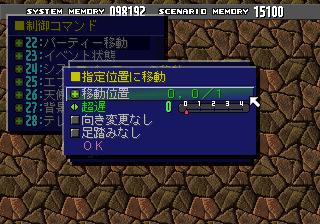 Original (Japanese)
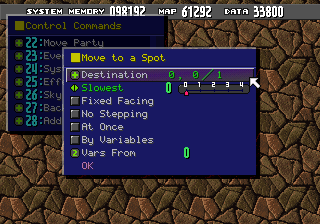 English patch
The screen and the map#
Screen effects#
Screen Effect holds ten effects over the whole screen. Each holds the event until it has finished, except Widescreen.
| Screen Effect | Settings | How long | What it does |
|---|---|---|---|
| Shift the Screen | Steps 1–80 (opens at 1) and a direction | 4 pixels a frame: about a sixth of a second for 2 steps | Slides the view half a cell a step. The party and the map stay where they are; only the view moves |
| Shift Back | – | the same pace | Slides the view back by all the shifts together |
| Flash | – | about a sixth of a second | A white flash over the whole screen |
| Shake | – | about a second | Shakes the map's own picture. The party, the events and a background stay still |
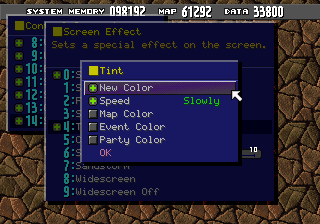
| Tint | R, G, B (each 0–31, opening at 16), or Grayscale, Sepia, White; Slowly or Instant; Map Color, Event Color, Party Color | Instant: a few frames. Slowly: about 3 seconds | Recolours the map, the events and the party (below) |
| Clear Tint | – | a few frames | Back to the true colours, at once |
| Sandstorm | – | about 6 seconds | Rows of the picture jitter and glare, more and more of them, then fewer again |
| Widescreen | – | (see the patch box) | Dark grey bars 32 pixels high over the top and bottom of the screen |
| Widescreen Off | – | (see the patch box) | Takes the bars away |
| Screen Wave | a strength, 1–10 | about 3½ seconds at 4 | A sideways wave over the picture that builds up, holds for 3 seconds and dies away |
Tint recolours three things, each with its own tick: Map Color, Event Color and Party Color. None is ticked when the dialog opens, and a tint with nothing ticked changes nothing. With R, G and B, each channel is multiplied by its value and divided by 16: 16, 16, 16 leaves the colours as they are, and 0, 0, 0 is black. Grayscale and Sepia do what they say, and White is in fact a hard three-level contrast, not white. Some settings that work:
| For | R | G | B |
|---|---|---|---|
| Night | 4 | 6 | 13 |
| A red glow (fire, alarm) | 16 | 10 | 10 |
| Fading to black | 0 | 0 | 0 |
| Back to normal | 16 | 16 | 16 |
Slowly fades the tint in over about 3 seconds, and the game runs at a few frames a second while it does. A tint lasts only until the next change of place: every door, Change Map or teleport, even onto the same map, brings the new map up in its own colours. To keep a tint (a night, a cave's gloom), tint again from the arriving map's Setup Event, at once rather than slowly. The widescreen bars do stay through changes of place until Widescreen Off.
Sky#
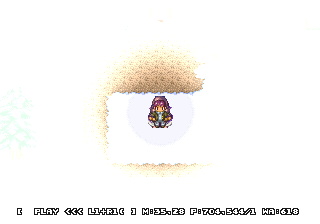
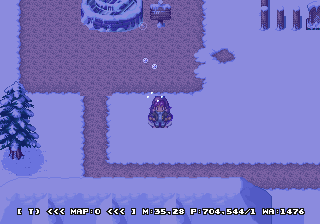
Sky sets the weather. Each map has its own in its Settings (The map editor), and the command changes it until the party next changes place.
| Sky | What it looks like | Sound |
|---|---|---|
| Clear | No weather | – |
| Rain | Streaks of rain fall across the screen | Rain (34), over and over |
| Fog | A grey haze closes in from the edges, leaving the middle of the screen clear | – |
| Snow | Snowflakes fall | – |
| Water | Under water: the whole screen is tinted deep blue, and bubbles rise from the people and things on the map | Water (80), now and then |
| Thunder | Every few seconds a pale yellow flash, and a rumble soon after | Quake (79) with the flash, Thunder (35) after it |
| Quake | Every second or two the map jolts for a moment | Quake (79) with each jolt |
The weather is drawn over the map and the events. The rain and snow carry on through the fades of a door. Thunder's flash and Quake's jolts, like Shake, move only the map's picture: the party and the events stay still.
Background#
Background sets the picture behind the map. It shows only where no part of the map is drawn: past the map's edge, or where both layers are left empty. It is fixed to the screen and doesn't scroll with the view. On a map that fills the screen it shows nothing, and so it is never seen on a field map. The ◆Base backgrounds tile one of the map set's own parts. Like the weather, it lasts until the next change of place.
What lasts past a door#
Every change of place puts the new map back as its Settings have it. That catches out many a game: a BGM, a Sky or a Background command lasts only until the next door, the next Change Map, a teleport or an escape, even a Change Map onto the same map.
| Undone by a change of place | Kept |
|---|---|
| The music (each map's song starts again from the top), the weather, the background, a Tint | The widescreen bars |
| Every event on the new map: it starts afresh as placed, on the page its conditions choose, so moves, Event State changes and Stop Running are forgotten | <Circle> and <Torch> |
| Switches, variables, the party, the bag, the timer, vehicles where they were left |
So anything that should stay goes in the map's Settings, or in its Setup Event, which runs every time the party arrives.
Effect#
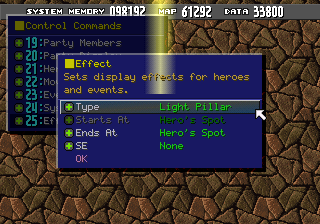
Effect plays one of 22 animations, or ends a lasting one. It plays a sound first if one is chosen, and it holds the event until it has finished, except Circle and Torch. Effects are drawn over the map, the events, the weather and the screen effects, but under the message window.
| Effect | Places it uses | What it shows |
|---|---|---|
| Blast (One) | Start | An explosion |
| Blast (Many) | Start | 32 explosions scattered round the start over about two seconds |
| Blast (Big) | Start | One explosion that swells |
| Light Pillar | End | A column of yellow light from the top of the screen down to the end, fading out |
| Light Orb | Both | A glowing, pulsing ball that drifts from the start to the end, a pixel a frame |
| Spotlight | Start | A beam from the top of the screen onto the start, held two seconds, then gone |
| Skeleton | Start | A skeleton that swells, then spins as it fades |
| Birds | Neither | 32 birds fly up and across the screen from the bottom right |
| Radiation | Start | A ring of blue and yellow rays spreading out from the start |
| Lightning | End | A flash, then a bolt striking down onto the end |
| Gas | Neither | Grey gas drifting across the screen from the left |
| Dragon | Start | A dragon that swells and fades |
| Tornado (One) | Both | A tornado that travels from the start to the end |
| Tornado (Many) | Start | 64 small tornadoes wheeling round the start |
| Smoke (One) | Start | A puff of smoke that swells and fades |
| Smoke (Many) | Start | Many puffs round the start |
| Smoke (Big) | Start | One large puff |
| Confetti | Neither | Coloured confetti falling and fluttering over the screen |
| Laser | Both | A blue-white beam from the start to the end, held almost two seconds |
| Converge | Start | Specks of light drawn in from all round onto the start |
| <Circle> | Neither | The screen goes dark but for a disc in the middle. It stays (below) |
| <Torch> | Neither | Darkness round a soft-edged circle of light in the middle, as if by torchlight. It stays (below) |
| Clear Effect | Neither | Takes away a Circle or Torch |
The places are the Hero's Spot, the Event's Spot (the running event), Random (anywhere on the screen), Screen Top, Bottom, Left and Right (the middle of that edge), and Random Top, Bottom, Left and Right (anywhere along it). The dialog greys the start or end when the effect doesn't use it.
<Circle> and <Torch> stay while the event goes on, and come back after every change of place, until Clear Effect. They suit a dark cave lit by the party's torch.
The party and the heroes#
Party Members adds and removes heroes, reorders the party and chooses its leader. Nothing stops it removing the last member: the party then vanishes from the map and the field menu shows no one, so always leave one in. Hero Stats, Hero Condition and Rename Hero change a hero's spells and moves, stats, condition, points and name. Forget Magic takes all of a hero's magic away until Recall Magic, not a single spell. Add Class and Force Class both need the class's change conditions to be met, as set in the Class Editor: Force a Class doesn't override them, and under Bar Changes it only adds the class to the hero's list.
Change Items gives or takes one item, or an amount of money. With the system rule for gold turned off, money doesn't change.
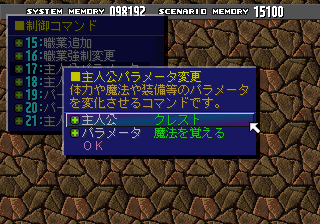 Original (Japanese)
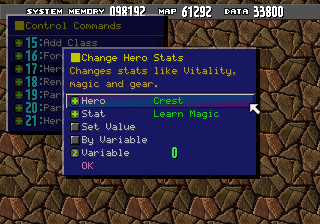 English patch
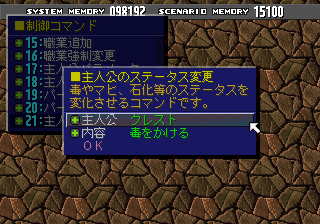 Original (Japanese)
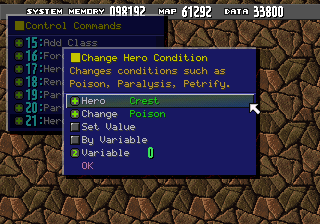 English patch
Shop / Inn: a shop sells up to eight items (one at a time, at their prices) and buys what the party carries. An inn restores the HP, MP and AP of every living member, at the price you set. A member who has fallen stays fallen, and the full price is charged all the same.
Travel#
- Add Teleport and Remove Teleport keep the list of places that teleport magic and items offer (up to 32; a place already listed isn't added twice). The spot has no layer, so a teleport always lands on layer 1 (Limits). Teleport State blocks or allows teleporting: while it is blocked, the teleport list's places are greyed and choosing one does nothing (no MP is spent). Escape Point sets where escape magic leads; the editor offers it for dungeon maps.
- Vehicle turns the running event into a vehicle (below).
 Original (Japanese)
 English patch
Vehicles#
Vehicle works on field maps only; anywhere else it does nothing. The event that runs it becomes the vehicle: give it an Object graphic (81–92 are small vehicles) and the Examined trigger. The command sets the Vehicle Kind, the graphic the party rides (1–12, Vehicles), the speed and a song for the ride.
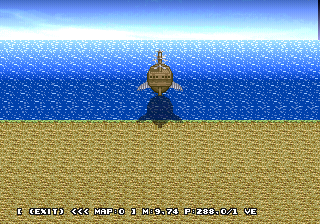
- Boarding. The party slides onto the vehicle, and the map tilts into a view in perspective, with a sky behind it. Only the vehicle is drawn, not the party. The tilted view draws layer 1 alone.
- Where it goes. Land goes wherever the party could walk. Ship sails on water. Aircraft flies anywhere, drawn above its shadow. A vehicle bumping a corner slides round it. Land vehicles and ships pass under clouds and floating islands drawn as sky parts.
- Speed 0 to 4 is a quarter of walking pace, a third, a half, walking pace and twice walking pace.
- While riding no event runs.
- Getting off. Land vehicles and aircraft set down with ○ wherever the party could stand; anywhere else a warning sound plays and the ride goes on. A ship has no button: it lands when steered at a shore the party could walk onto, and the party steps off onto it. The view flattens and the map's own song comes back.
- Afterwards the vehicle stands where the party left it, on a half cell, and the party can't board it again until it has stepped off its place. The game remembers one place for each kind, land, ship and aircraft, so a vehicle stays where it was left across maps and in saves: a ship left on a far shore is still there when the party comes back from another map.
Battles#
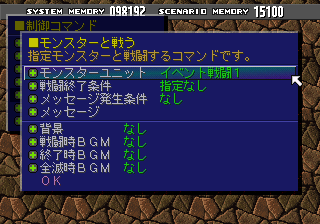
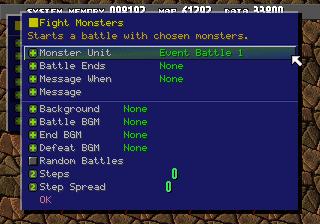
Fight Monsters starts a battle with a monster unit, with its own backdrop and its own music for the battle, the victory and the defeat. It can't be run from. It can end the battle after some turns or when a chosen hero falls, and show a message during it: before or after the battle, when every monster's HP is at or below its own figure, after a time, or when a hero falls. The battle stands still while the message shows, and its Backdrop dims the battle (Shaded) or blacks it out meanwhile. Each message shows once.
A battle ended by its end condition counts as lost: the heroes still standing stay standing, the game goes on (not game over), and nothing is paid. Follow it with a Battle Won / Lost branch to act on the result.
 Original (Japanese)
 English patch
The timer#
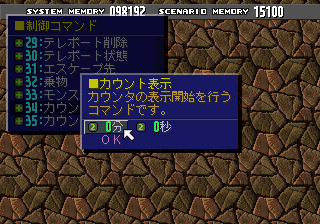
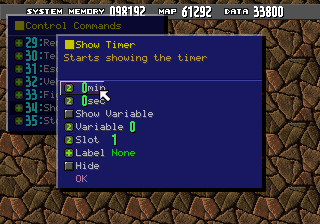
Show Timer starts a countdown, in minutes and seconds, at the top right of the screen. It turns yellow under 30 seconds and red under 10, and stays at 0:00:00 when it runs out. The event that started it waits for it to run out, while the player plays on and other events run. The count stops while a message is open, during battles and the fade-in after them, in the field menu and during changes of place. Stop Timer ends it; Counter 0 (a 2-way branch) asks whether it has run out.
 Original (Japanese)
 English patch
The end of the game#
- Title shows the game's title screen, waits for a button, and then goes on (The title screen).
- Snapshot remembers the current map and view, with a shutter sound (Shutter, 81) and a quick flash of the screen if you like. It keeps ten: an eleventh replaces the first.
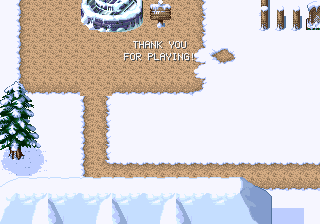
- Ending plays the staff roll: a heading, your four roles and names from System Settings, THANK YOU FOR PLAYING!, then RPG Tsukuru 4's own credits, about 4 minutes in all. START skips it. Behind the credits it draws the snapshots' maps at their views, each for an equal share of the roll, in the order of their slots (so after an eleventh, the newest comes first). With no snapshots the roll runs over black. Change BGM plays a song with it (None stops the music). Without Keep Playing the game ends there; with it, the map, the view and the weather come back and the event goes on.
- Change Scenario loads the Scenario of that name from the memory card and starts it. It doesn't work in test play: a message says so and the event goes on.
- Save opens the save screen, for a save point.
Reusable events#
A few patterns cover most of what a game needs.
- One event, many pages. Let a story switch or variable pick the page: the villager who says one thing before the dragon falls and another after. Number story variables in steps of 10, so a step can be added later between two others.
- Shared commands. Put commands used in many places (the inn's welcome, a recurring cut-scene) on a page of an event whose trigger is Never, out of the way, and end each caller with a Call Event to it. In the original that is the caller's last command; with the patch's Call (return) it can come anywhere. That event serves its own map only; with the patch, a common event serves every map (Common events).
- Run once. An At Once event that should happen only once turns its own switch ON as its last command, and its next page (with that switch as its condition) does nothing. Without that, it runs for ever and the game seems frozen.
- The Setup Event sets each map's weather, music and background, so they are right however the party arrives.
- A count that ends on another map. The book warns that a countdown's follow-up won't run once the party has left the map it was started on, since the waiting event belongs to that map; this hasn't been tried. To be safe, put the check (a Counter 0 branch) on every map the party can reach before it ends, on a page that needs a switch you turn on with the Show Timer and off when the count is over: a Counter 0 met with no count running waits for ever.
The Event recipes build several of these step by step, with shots: an event whose page a switch picks (the guard), a page that stops once it has run (the chest, the door) and a count kept on one map (the timed escape).
Command options#
Every command's dialog, with its ranges and defaults. The English names are the patch's; ranges are the original's unless the patch is named.
| No. | Command | Settings, ranges and defaults | Good to know |
|---|---|---|---|
| 1 | Message | Dialogue, Hero Balloon, Event Balloon, Scroll Caption, Fixed Caption: see Messages | Each waits for its window to close |
| 2 | Change Map | Map; Destination, a cell picked on that map (R2 in the pick switches the layer); Transition: Black Fade Out, White Fade Out, Black Fade + Melt, White Fade + Melt. With the patch, By Variables and Vars From (0–1,021): the map number, x and y from three variables | About 4 seconds. The new map's Setup Event runs before the screen opens. The party lands "latched" (Arriving) |
| 3 | Call Event | Choose Event: an event on this map, then one of its pages. The same page of the same event can't be chosen. With the patch, Call (return), and Common event with its Number (0–119) and Page (1–32) | A jump: the calling event ends here (Call Event) |
| 4 | 2-Way Branch | Yes / No; Two Messages (two answers); Battle Won / Lost; Counter 0; Odds, 0–100% (opens at 0); Variable: a variable, Equal To, Not Equal, At Least or At Most, and another variable or a number, −9,999 to 9,999 | Yes / No, Battle Won / Lost and Counter 0 have no settings and go in at once, with their marker and end. Counter 0 with no timer running waits for ever (Limits) |
| 5 | Multi-Branch | Several Messages: answers 1–3, and 4 and 5 if ticked; Odds: Odds 1–4 on sliders, Odds 5 the rest of 100 (it opens 0, 0, 0, 0, 100); Variable: a variable and up to five cases, each a number or a variable | Variable only tests "equal to". If no case matches, no branch runs |
| 6 | Slot Branch | Choices 1 and 2, and 3 to 5 if ticked | Not allowed in a Setup Event. Doesn't spin in test play |
| 7 | Switch | The first and last switch (1–500; 2,048 with the patch), ON or OFF (opens ON), a Description | The description is a note for you; the game never shows it. One command for a run of switches costs the same as for one |
| 8 | Variable | The variable (0–255; 0–1,023 with the patch), ← Set, + Add or - Subtract, and Variable, Number (−9,999 to 9,999) or Random | Values stay within ±9,999. The original's Random has no range, and Add or Subtract with it can wrap from one end to the other; the patch adds operations and sources (Switches and variables) |
| 9 | Wait | Stop: All, Hero Party or All but the Party; Time, 0–30 seconds in half seconds | See Waiting and moving |
| 10 | BGM | BGM, Volume 1–10 (opens at 10), Tempo −15 to +15, Reverb 1–6 (opens at 1), Slowly or Instant | Lasts until the next place change. The BGM command |
| 11 | SE | The sound, Pitch 1–19 (opens at 11), a Reverb tick | Up to three sounds at once. The SE command |
| 12 | Shop / Inn | Shop: eight Goods, each an item or none; Inn: the Inn Price, 0–9,999 | The shop sells one at a time and won't take the bag past 99. The inn restores the living only, and takes the full price |
| 13 | Change Items | Gain Item or Lose Item: one item; Gold +/-: −999,999 to 999,999. With the patch, Count 0–99 (opens at 1; 0 takes the count from the variable) and Variable 0–1,023 | One item a command, no count (the patch adds one). The bag stops at 99. Money stays within 0 to 999,999, and doesn't change at all while the System's gold rule is off |
| 14 | Screen Effect | Ten effects: see Screen effects | A Tint with no target ticked changes nothing (Limits) |
| 15 | Add Class | Hero, Class | Only if the class's change conditions are met |
| 16 | Force Class | Force a Class (a hero and a class), Bar Changes, Allow Changes (a hero) | Force a Class also needs the conditions. Under Bar Changes it adds the class to the hero's list but leaves him in his old one |
| 17 | Hero Stats | Hero; Learn Magic or Learn Special Move (the spell or move); Remove Gear (Head, Body, R.Hand, L.Hand, Feet, Accessory 1, Accessory 2); Change Power, Guard, Vitality, Wisdom, Agility, Vigor, Luck by −9,999 to 9,999. With the patch, Level (after Luck), Set Value, By Variable and Variable 0–1,023 | Removed gear goes back in the bag |
| 18 | Rename Hero | Hero, the New name | A name the event fixes; the player can't type one. With the patch, a name starting ? lets the player type it, starting from the rest of the name (? alone: the hero's name now) |
| 19 | Party Members | Add a Hero, Remove a Hero, Make Leader: a hero; Reorder Party: four places, each a hero or none | Add a Hero puts him in the first empty place, and does nothing if he is already in or the party is full. Reorder Party moves empty places to the end. Nothing stops the party being emptied |
| 20 | Party Display | Erase, See-Through, Show All, Reset Display; Blink, 0.5–25.5 seconds; Change Hero Graphic and Change Hero Face: a hero, a graphic (1–145) and a colour (0–3) | Show All spreads the members round the leader, as he faces. Reset Display undoes Erase and See-Through. A new face shows in the next Dialogue that uses the Speaker's Face |
| 21 | Hero Condition | Hero; Poison, Paralyze, Petrify, Cure Conditions; Change HP, Change AP, Change MP by −9,999 to 9,999 (HP never drops below 1, so it can't make a hero fall); Gain EXP, 0–9,999,999; Gain CCP, 0–9,999; Forget or Recall Magic, Forget or Recall Special Moves. With the patch, Set Value, By Variable and Variable 0–1,023, for HP, AP, MP, EXP and CCP | Forget Magic takes away all of the hero's magic until Recall Magic, not one spell. There is no "all heroes" |
| 22 | Move Party | Turn Hero: one hero or all, and a facing; Move: Steps 1–120, a direction, Dash, Fixed Facing, No Stepping; Move to a Spot: a cell on the map, a Speed (opens at Slowest), Fixed Facing, No Stepping; Gather Party. With the patch, Move to a Spot adds At Once, By Variables and Vars From (0–1,022) | A move by steps stops at the first obstacle. A move to a spot goes across, then up or down, through anything |
| 23 | Event State | Stop Running; Turn; Move and Move to a Spot (as Move Party); Blink, 0–25.5 seconds; Spin, Left or Right; Graphic: none, a person or an object, its number, colour and facing, Pushable, See-Through | Only the running event, never another. Not allowed in a Setup Event. A Graphic the event already shows changes nothing, not even its facing or colour (Limits) |
| 24 | System | Magic, Level, Gear, Class, Gold, Encounters, each ON or OFF | Goes in as soon as it is chosen |
| 25 | Effect | Effect Type (23), Starts At and Ends At (11 places), and a sound played first | Places an effect doesn't use are greyed. Effect |
| 26 | Sky | Clear, Rain, Fog, Snow, Water, Thunder, Quake | Goes in as soon as it is chosen. Lasts until the next place change (Sky) |
| 27 | Background | A background, or none | Goes in as soon as it is chosen. Lasts until the next place change |
| 28 | Add Teleport | Map, and a spot picked on it | Up to 32 places; a place already listed isn't added twice, and a full list ignores the command. There is no layer: a teleport always lands on layer 1 (Limits) |
| 29 | Remove Teleport | Map, and the spot | Takes that place off the list |
| 30 | Teleport State | Block Teleport, Allow Teleport | A new game starts allowed |
| 31 | Escape Point | Set Escape Point: a map and a spot (no layer); Clear Escape Point | The editor marks it as for dungeon maps |
| 32 | Vehicle | The BGM while riding (none for silence), Vehicle Kind (Land, Ship, Aircraft), the graphic (1–12, opens at 1), the speed (0–4, opens at 0) | Field maps only. Vehicles |
| 33 | Fight Monsters | Monster Unit, a background (none keeps the map's), Battle BGM, End BGM, Defeat BGM; Battle Ends: None, Turns Passed (0–99) or Hero Dies (a hero); Message When: None, Before Battle, After Battle, Enemy HP (at or below: one figure a monster, up to 999,999), Time Passed (0–300 seconds) or Hero Dies; the message and its window, its backdrop and a cipher. With the patch, Random Battles, Steps 0–300 and Step Spread 0–10 | It can't be run from. With Random Battles ticked it doesn't fight but sets the random battles. Battles |
| 34 | Show Timer | min 0–99, sec 0–59. With the patch, Show Variable, Variable 0–1,023, Slot 1–2, Label (an item, or None) and Hide | The timer |
| 35 | Stop Timer | – | – |
| 36 | Password | The password | Exactly four hiragana in the original; one to four letters, digits or signs with the patch |
| 37 | Title | – | About 8 seconds |
| 38 | Ending | Change BGM and its song (none stops the music), Keep Playing | The end of the game |
| 39 | Change Scenario | Next Scenario | In test play it only shows a message |
| 40 | Save | Set Save Point | Opens the save screen |
| 41 | Vibrate | Strength 0–5 (opens at 0), Tempo 1–5 (opens at 1), Duration 0–5 seconds in half seconds (opens at 0) | It buzzes in pulses, faster at a higher Tempo. The Strength reaches the controller only when it is a DualShock in analog mode; otherwise every strength feels the same. The player can turn vibration off in the field menu's Settings |
| 42 | Snapshot | A shutter sound, a flash: each ticked or not | The end of the game |
Fan-made reference material, one of the Eschaton Games Tsukuru guides. Not affiliated with the publishers of the titles it covers.