Covers the guidebook's pages 11–50.
System Data#
System Data is everything about a game that isn't its story: what its magic and items do, who its heroes and monsters are, and what its maps look like. It is saved to the memory card as one file of one block, separately from the Scenario. One System can be shared by several Scenarios, so a long game can be split into parts that all use the same heroes, items and maps.
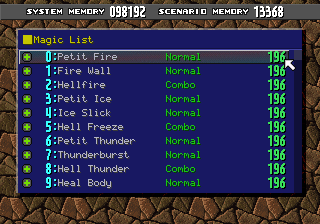
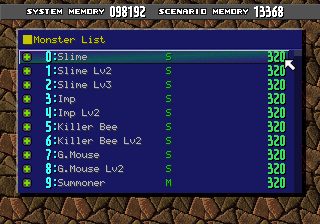
Every System Data editor starts from a record list: numbered rows, empty ones shown as dashes, with a figure on the right (a record's size in bytes, or its kind). Choose a row to edit it; choose an empty one to make something new.
How much fits#
Each kind of record has a fixed maximum, and all of them share the System room (120,728 bytes in an empty project). In the original game the room runs out before most of the maximums are reached: a monster takes 320 bytes, a spell 196, an item 116. The figures here were read from the game's code, and the largest were tried in the editor.
| Records | Original | Patched | Notes |
|---|---|---|---|
| Magic | 150 | 150 | Normal, summon and combo spells together |
| Special moves | 50 | 100 | |
| Items | 200 | 255 | Weapons, armour and accessories included |
| Classes | 30 | 30 | |
| Heroes | 15 | 15 | Four in the party at a time |
| Monsters | 250 | 250 | |
| Monster units | 200 | 200 | Up to four monsters each |
| Maps | 250 | 255 | Dungeon, default and field maps together |
| Monster placement | 250 | 255 | One per map |
| Events | 120 per map | 120 per map | Plus each map's Setup Event |
| Event pages | 30 per event | 90 per event | |
| Commands | 250 per page | 1,000 per page | |
| Chests | 256 per Scenario | 256 per Scenario | |
| Switches | 500 | 2,048 | |
| Variables | 256 | 1,024 | |
| Goods in a shop | 8 | 8 |
System settings#
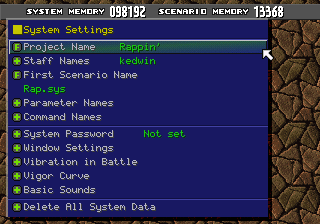
System Settings in the top menu holds the game's name, its credits, the words it uses for things and how its windows look. Like a record, the page works on a copy: nothing changes until you leave it and choose to save. Its rows:
- Project Name, up to 16 letters (8 Japanese characters in the original). The memory card's lists show it for the System, and for every game saved from it (Memory cards). A new project is called MY RPG4.
- Staff Names: the credits (below).
- First Scenario Name: the Scenario that New Game loads with this System. It must match that Scenario's own name exactly (Scenario Settings).
- Parameter Names and Command Names: the words the game shows (below).
- System Password, Window Settings, Vibration in Battle and Basic Sounds (below).
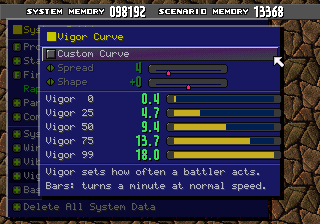
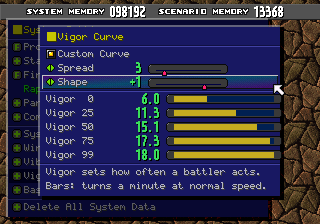
- Vigor Curve, with the patch: how much Vigor speeds a battler up (below).
- Delete All System Data: after a warning, erases every record, maps included, empties Hero Party and the title screen, and puts these settings back to a new project's.
Staff names#
Four roles and four names, each up to 24 letters with the patch (12 Japanese characters). The ending's staff roll (The end of the game) starts with them: each role in dim letters with its name under it, then THANK YOU FOR PLAYING!, then RT4's own credits. There are always exactly four slots. A new project has Game Design and Name 1, and the memory card's lists give the first name as the author of the System and Scenario files.
Parameter names#
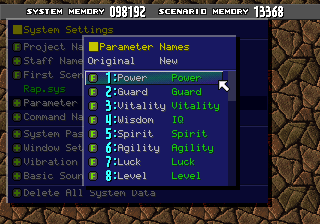
Thirty-one words: the stats, the currency, the elements and a few menu words. The left column is the new-project word, the right what this game shows; change the right one. Each holds up to 8 letters with the patch (4 Japanese characters), so EXP fits where Experience wouldn't.
| No. | New project | Where the game shows it |
|---|---|---|
| 1–7 | Power, Guard, Vitality, Wisdom, Vigor, Agility, Luck | The field menu's Status screen, and the message a seed gives. Vitality to Luck also label the Equip comparison |
| 8 | Level | The Status screen; the level-up line after a battle |
| 9 | Equip | The field menu's command |
| 10 | Magic | The field menu's command; the title of the magic list in battle; the battle message when every spell is nullified |
| 11 | Special | The title of the special-move list in battle; the battle message when special damage is halved |
| 12 | Item | The field menu's command; the title of the item list in battle |
| 13–15 | HP, MP, AP | The Status screen; Scan's message in battle; not enough MP (or AP) |
| 16 | CCP | The Status screen; the results after a battle |
| 17, 18 | Attack, Defense | The Status screen and the Equip comparison (Attack once for each hand) |
| 19 | Gold | The money in the field menu, in shops and at the inn (the price of a night); the results after a battle |
| 20 | EXP | The Status screen; the results after a battle |
| 21–31 | None, Fire, Water, Wind, Earth, Thunder, Light, Dark, Heaven, Ground, Demon | The element names in See Through's messages in battle |
The sample calls Wisdom IQ and its money G. A fan game of the time renamed its items Deck and its money CP: the field menu's Item command and the battle's item list followed. Labels the game draws itself (the battle's party bar, the shop's comparison panel) don't change.
Command names#
The names of the 22 special commands, the capacities a class can give for use in battle (Capacities). The battle's EXTRA list shows each command a hero has learnt under the name in its slot. A new project has these:
| Slot | Command | Slot | Command |
|---|---|---|---|
| 1 | Steal | 12 | Release |
| 2 | Guard | 13 | Frenzy |
| 3 | Charge | 14 | Scan |
| 4 | Self-Heal | 15 | See Through |
| 5 | Run Away | 16 | Heal |
| 6 | Plunder | 17 | Revive |
| 7 | Absorb | 18 | Rest a Turn |
| 8 | Levy | 19 | Mimic |
| 9 | Coin Toss | 20 | Enemy Magic |
| 10 | Attack All | 21 | Double Magic |
| 11 | Get | 22 | Quick Draw |
Each name holds up to 14 letters with the patch (7 Japanese characters).
The password#
System Password: up to eight buttons, from ← ↓ → ↑ □ △ L1 R1 L2 R2 START and SELECT; ○ ends the entry and × takes back a button. It is asked for before the System can be loaded into the editor, and also by New Game, so a player can't start the game without it. A game save's Continue doesn't ask, and nor does the game when it loads a Scenario by name. The editor warns you before you set one: forget it and the data can't be opened again. Not set means none.
Windows#
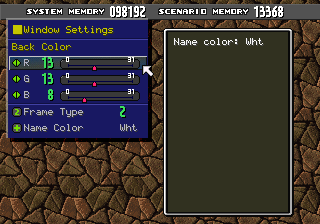
Window Settings has three rows:
- Back Color: the windows' fill, as red, green and blue, each 0–31. The sample's is 13, 13, 8, a dark olive.
- Frame Type: one of five frames, below.
- Name Color: one of eight colours (white, red, green, blue, yellow, cyan, pink, black) for the heroes' names on the party bar in battle. That is all it colours: names in the field menu and over messages stay white. In the preview, black is drawn dark grey so that it shows; in battle it is black.
The preview on the right shows the window as you change it. The colour and the frame are used by the field menu and by the windows events open: messages, choices, the shop, the inn, the slot machine and the password. The battle, the editors and the card screens keep their own looks.
| Frame | Look | Also used by |
|---|---|---|
| 1 | A blue double line | |
| 2 | A thin grey-white line with rounded corners | The Start Menu, and the memory card Utility and External Data screens, always; the sample game's choice |
| 3 | A green double line | |
| 4 | A thick white line with rounded corners | |
| 5 | A gold rope | The save screen, always |
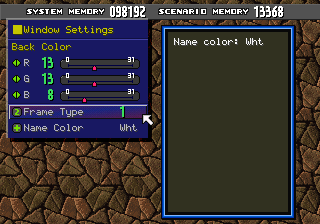
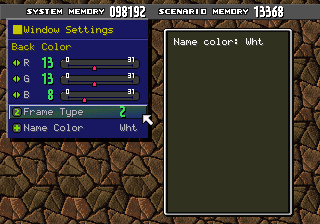
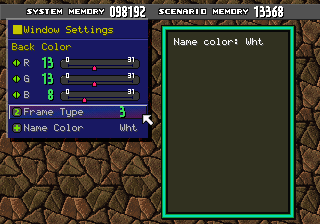
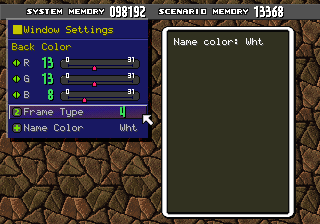
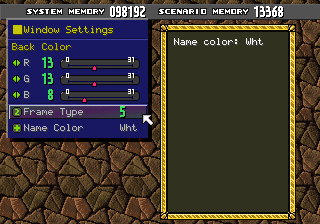
The frame is drawn round the outside of a window, so it changes nothing inside: every window holds the same text under every frame.
Vibration and sounds#
- Vibration in Battle: Strength 0–5, Tempo 1–5 and Duration 0–5 seconds in half seconds. The player can turn it off with Vibration On in the field menu's Settings.
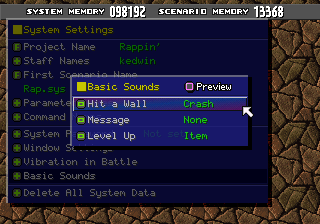
- Basic Sounds: three sounds of your own choosing. Hit a Wall plays when the party walks into something, Message as a message page opens, and Level Up for each level or class level gained. A new project has Crash, Next Page and Item; the sample turns the message sound off. The menus' cursor, confirm and cancel sounds are fixed (Music and sound lists every sound and what the game uses it for).
The Vigor curve#
The title screen#
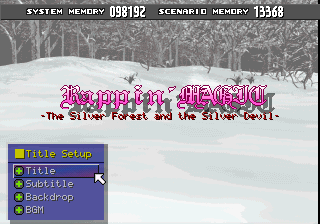
Title Setup in the top menu makes the game's title screen: a name in large letters, a subtitle under it, a background picture and a song. The game shows it when an event runs the Title command, usually the first thing the opening event does (The end of the game). There is no title screen otherwise: New Game goes straight into the game.
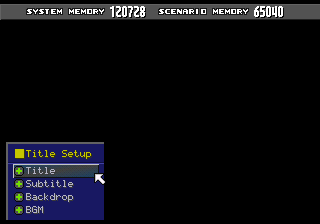
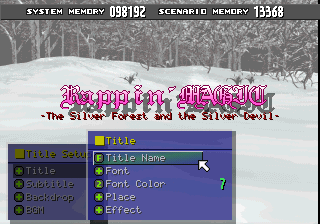
The editor shows the title screen behind its windows, and plays it again from the start after every change, so you see each setting as the player will. The name and subtitle hide while you type them.
Title Setup has four rows:
- Title: the name and how it looks (below).
- Subtitle: a line of ordinary text under the name, with its own colour, place and timing.
- Backdrop: the picture behind, one of the disc's backgrounds (Backgrounds), or a title picture of your own from Character Tsukuru, which is listed after them (Titles). None leaves the screen black.
- BGM: the song that plays with it (Music and sound). When the title closes, the map's own song starts again.
The name#
The Title page:
- Title Name: up to 18 characters, which fill the screen's width.
- Font: one of three lettering styles.
- Font Color: 0 to 15. The colours are eight hues twice over: 0 to 7 grey, red, green, blue, purple, yellow, cyan and pink, shaded from white highlights; 8 to 15 the same hues flatter. Every letter has a soft shadow.
- Place: Top, Middle or Bottom of the screen.
- Effect: how the letters arrive (below).
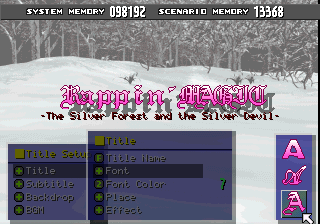
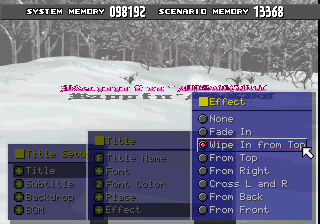
The title font is a picture of 100 characters, not the game's text font: the letters A–Z and a–z, the digits, the Roman numerals Ⅰ–Ⅹ, the signs & ! ? + − = . / $ # ' ~ < > @ : and a few symbols such as ♪ ☆ ♂ ♀ ○ 【 】. A space leaves a gap. Anything else, kana and kanji included, is left out, so even a Japanese game's title was written in Latin letters.
| Effect | The letters… |
|---|---|
| None | are there at once |
| Fade In | brighten from black, glowing as they come |
| Wipe In from Top | are drawn downward from their top edge |
| From Top | fall from above the screen |
| From Right | slide in from the right |
| Cross L and R | slide in from both sides, alternate letters from the left and the right |
| From Back | grow from the centre of the screen |
| From Front | shrink into place from three times their size |
Each effect takes about a second.
The subtitle#
The Subtitle page: Subtitle Name (up to 41 letters with the patch, 21 Japanese characters in the original), Font Color (eight colours: white, red, green, blue, purple, yellow, cyan, pink), Place, and Effect, which here sets when it fades in:
- Show First: the subtitle fades in first, and the name follows a second later;
- Show Last: the name first, then the subtitle (the sample's choice);
- Together: both at once.
The subtitle is drawn in the ordinary text font, so it can hold any character.
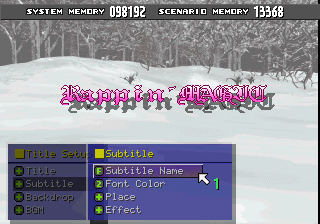
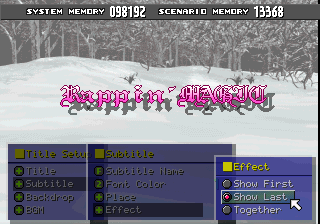
In play#
The Title command fades the field out, shows the title screen with its song, and waits there until the player presses a button. Then the screen fades and the event goes on with its next command. The command can be used again later, for a second part's title, or the title over a closing scene.
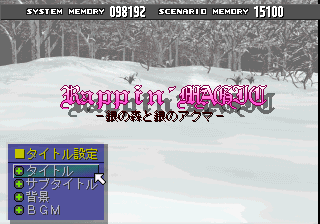 Original (Japanese)
 English patch
Magic and special moves#
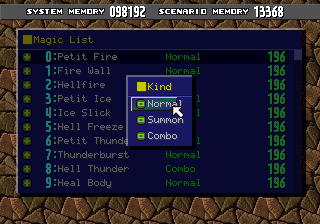
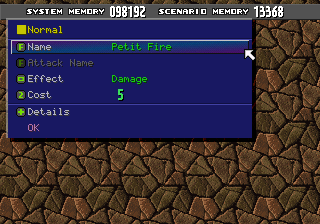
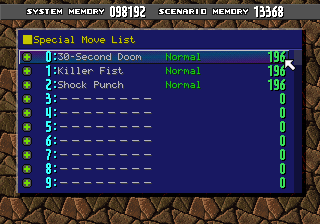
Spells (up to 150) and special moves (up to 50) are made in two editors that work the same way. Each one is one of three kinds:
- Normal: one effect, with its cost, range and animation.
- Summon (magic only): one of the disc's 29 summon movies, from Ifrit to the Kaboom Kid. Choosing the summon writes its name over the spell's, and gives it the summon's attack name, which the battle shows as the movie starts.
- Combo: up to three other spells or moves (A, B and C) cast one after another (Combos, below). A part can't be a combo or a summon, nor the combo itself.
Spells cost MP. Special moves cost HP or AP, as set in Hero Party (Hero Skill Cost) for heroes and for monsters. A special move has no cast time and no cast sound, and can't be reflected.
Effects#
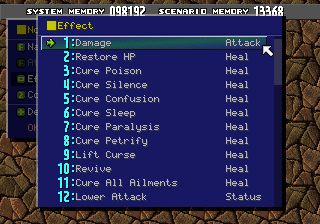
| No. | Effect | Kind | What it does |
|---|---|---|---|
| 1 | Damage | Attack | Damage of its points, plus the level bonus, varied by ±10%, then scaled by the target's damage rate for the spell and its elements |
| 2 | Restore HP | Heal | Heals its points of HP |
| 3–8 | Cure Poison, Cure Silence, Cure Confusion, Cure Sleep, Cure Paralysis, Cure Petrify | Heal | Ends one ailment. Cure Confusion also wakes; Cure Paralysis also ends sleep and confusion; Cure Petrify all four |
| 9 | Lift Curse | Heal | Field only: frees cursed equipment |
| 10 | Revive | Heal | Brings back a fallen hero: with a twentieth of his max HP in battle (30% if he uses Restore 30% HP), a tenth from the field menu |
| 11 | Cure All Ailments | Heal | Ends poison, silence, confusion, sleep, paralysis and petrify |
| 12–15 | Lower Attack, Lower Defense, Lower Agility, Lower Vigor | Status | Takes its points off the stat for the rest of the battle (not below 0) |
| 16–22 | Poison, Silence, Confuse, Sleep, Paralyze, Petrify, Instant Death | Misc. | Inflicts the ailment, if it beats the target's status effect rate |
| 23–26 | Raise Attack, Raise Defense, Raise Agility, Raise Vigor | Status | Adds its points to the stat. Vigor stops at 99, and speeds the gauge |
| 27 | Drain MP | Status | Takes its points of MP from the target (at most what it has) and gives them to the caster |
| 28 | Reflect Magic | Status | The chosen spell (or every spell) bounces off the target for the rest of the battle (Reflect and Nullify) |
| 29 | Nullify Magic | Status | The chosen spell (or every spell) has no effect on the target for the rest of the battle |
| 30 | Halve Magic Damage | Status | Halves the magic damage the target takes |
| 31 | Halve Special Damage | Status | Halves the special move damage the target takes |
| 32 | See Enemy HP | Status | Shows the target's HP and max HP in a battle message |
| 33 | Dispel Support | Status | Ends every stat change on the target |
| 34 | Teleport | Other | Field only: warps the party to a place on the teleport list. The list is greyed while the Scenario forbids teleporting |
| 35 | Escape | Other | Field only: takes the party to the escape point an event has set. With none set, nothing happens and nothing is spent |
| 36 | Fewer Encounters | Other | Field only: for 300 steps, random battles come half as often. A change of map ends it |
| 37 | Identify Item | Other | Field only: reveals an item whose abilities are hidden |
| 38 | Halve Physical Damage | Status | Halves the physical damage the target takes |
| 39 | Change Element | Status | The target's element becomes the one chosen |
| 40 | Self-Destruct | Attack | The caster falls, and the damage is shared among the targets |
| 41 | Transform | Status | A monster below 10% of its HP turns into another monster graphic, with a twentieth of its stats (Transform) |
| 42 | Death in 30 Seconds | Status | The target falls after 30 seconds of battle, the seconds counted down over it in red. A monster that falls this way pays its rewards. No effect on a target already counting |
| 43 | Life for Full Heal | Heal | The caster falls; the target is healed in full |
| 44 | Death by Level | Status | The target falls if its level is a multiple of the death level |
Effects marked Field only do nothing in battle, and special moves and summons can't have them: they are greyed in the list. From the field menu a hero can use only the effects that make sense there: Restore HP, Cure Poison, Cure Paralysis, Cure Petrify, Revive, Cure All Ailments and the five field-only ones. Cure Silence, Cure Confusion and Cure Sleep are battle only (those ailments end with the battle anyway), a summon can never be cast from the menu, whatever its effect, and nor can a Healing item that restores AP be used there.
Status effect rates#
Some effects land only if they beat the target's status effect rate for that effect, the chance in % set for each hero and monster (Battle Settings, below). There are 20, in this order in both editors, and a new hero or monster starts with the figures shown:
| No. | Rate | New record | What it guards |
|---|---|---|---|
| 1–7 | Poison, Silence, Confuse, Sleep, Paralyze, Petrify, Instant Death | 100, 90, 80, 70, 60, 50, 40 | The seven ailment effects, and a monster's Poison, Silence, Paralyze, Sleep, Confuse and Death attacks |
| 8–11 | Lower Attack, Lower Defense, Lower Agility, Lower Vigor | 100 each | The four stat drops |
| 12 | Death in 30 Sec. | 40 | Death in 30 Seconds |
| 13 | Halve Physical Damage | 100 | Halve Physical Damage |
| 14 | Halve Magic Damage | 100 | Halve Magic Damage |
| 15 | Nullify Magic | 100 | Nullify Magic |
| 16 | Reflect Magic | 100 | Reflect Magic |
| 17 | Halve Special Damage | 100 | Halve Special Damage |
| 18 | See Enemy HP | 100 | See Enemy HP |
| 19 | Drain MP | 100 | Drain MP (the effect) |
| 20 | Transform | 100 | Transform. Monsters only: the Hero Editor greys this row |
The rate counts even when the spell is cast on an ally. A Reflect Magic or Halve Magic Damage on your own hero must beat his rate for it, so a hero with a low rate is hard to protect as well as hard to harm. Every effect not in the table always lands.
Details#
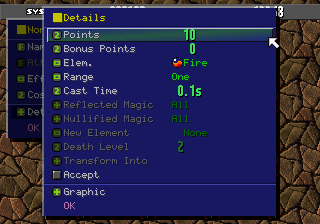
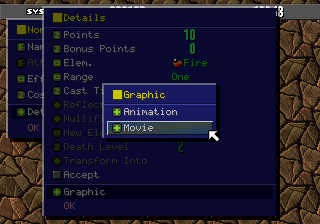
| Setting | Range | Notes |
|---|---|---|
| Cost | 0–99 | MP for a spell; HP or AP for a special move, as Hero Party says |
| Points, Bonus Points | 0–9,999 | 0–99 for Lower Vigor and Raise Vigor |
| Range | One, Group, All | A combo takes part A's |
| Elem. | None, or one of the ten | |
| Cast Time | 0.1–30.0 seconds | Magic only |
| Accept | on or off | Normal spells only, not special moves or summons; a combo has it when all its parts do |
| Death Level | 2–99 | Death by Level |
| Reflected Magic, Nullified Magic | one spell, or all | Reflect Magic, Nullify Magic |
| New Element | None, or one of the ten | Change Element |
| Transform Into | a monster graphic (0–126) and its colour (0–3), and two checks: no special moves, no magic | Transform |
| Graphic | an animation of up to ten frames, or one of the 32 movies | A summon's is its summon movie |
- Points is the spell's power, and Bonus Points what it gains per level: a hero's spell adds the bonus once for each level he is above his magic level for it (set in the Hero Editor). A hero at level 5 casting a spell of 20 points, bonus 20, that he knows from level 1, casts it at 20 + 4 × 20 = 100. Monsters get no bonus.
- Elem.: one of ten elements (fire, water, wind, earth, thunder, light, dark, heaven, ground, demon), or none. See Through's messages give the elements the System's names (Parameter names).
- Range: one target, a group of the same monster, or all.
- Cast Time: the spell goes off this long after it is chosen. The caster's gauge waits meanwhile, and sleep, paralysis or petrification cancels it.
- Accept: a hero with the Accept capacity who is hit by this spell learns it, if he hasn't already. Classes can't teach an Accept spell and weapons can't cast it: the editor takes it off them when you save.
- Reflected Magic, Nullified Magic, New Element, Death Level and Transform Into are the settings of the effects that need them.
- Graphic: an animation of up to ten frames built from the disc's effect graphics (with size, place, spin, fade and sound for each frame, and 16 samples to start from), or one of the 32 elemental movies (Graphics).
A new spell's animation is one frame: effect graphic 1, Blaze, Tiny, at the Center of the screen, for one second, with no sound. A spell nobody animated shows just that, which is why so many spells in fan games of the time look alike. Load a sample, or build your own, for every spell the player will see often.
Combos#
A combo casts its parts one after another, each as if cast alone:
- Each part is charged its own cost. The combo's own cost, shown in the list (its parts' costs added up, at most 99), is never charged. A part the caster can't pay for fails on its own, and the others still go off.
- Each part shows its own animation and name. The combo's own name and animation never appear in battle.
- The cursor takes part A's range, and the cast time is the combo's own.
- A combo has Accept when all its parts do, and a hero who learns it that way learns the combo, not its parts.
Reflect and Nullify#
Reflect Magic and Nullify Magic are set on a target for the rest of the battle, for the one spell chosen in their settings or for every spell. A reflected spell bounces: cast by the other side, it hits the caster; cast by the target's own side, it hits a random enemy. The animation still plays on the target it was aimed at. A nullified spell misses. Special moves can be nullified but never reflected. Two effects get through both: Self-Destruct and Life for Full Heal.
The Nullify capacity (Capacities) works the same way, for the one spell or move, or all of them, set in the class.
Transform#
Transform works only on monsters, and only on one below a tenth of its max HP; it must also beat the monster's Transform rate. The monster takes the graphic and colour set in Transform Into, and loses its magic or its special moves if those checks are set. Its HP drops to a twentieth of its max, and its MP, AP and stats to a twentieth of its record's. Its name, its rewards and its attack pattern stay its own.
The new graphic needs room on the battle screen beside the other monsters. If there is none the spell misses quietly, with one exception: a transform into an LL graphic in a battle with other monsters removes the monster instead, with no message and no rewards. Use LL graphics only for a monster that fights alone.
Items#
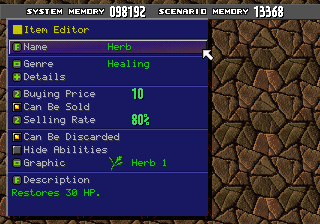
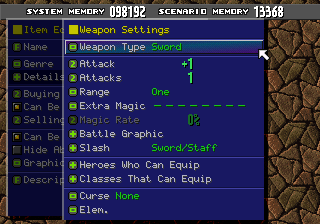
Up to 200 items. Every item has a price, a selling rate (the shop pays the price × this %), an icon and a description of up to 40 letters (20 Japanese characters), and can be marked Can Be Discarded and Hide Abilities. A hidden item's description shows as ????? in the field menu until a spell or item with Identify Item reveals it; the shop shows the real description. A new item is a weapon priced 0, sold at 50%, and can be discarded.
The item's genre decides the rest:
| Genre | Its settings |
|---|---|
| Weapon | The kind (bare hands, sword, staff, claw, bow, spear, small or large gun), attack (it can be negative), hits per attack, range (one, group, all), elements, the battle graphic and slash, and an extra magic attack: a spell that fires on a hit at a set rate |
| Armor | The slot and what it adds. Only the slot's own stats count: armor adds defence and vitality, a shield defence, a helm defence, wisdom and vigor, shoes defence and agility. |
| Accessory | One ability raised (attack, defence, agility, vigor or luck) by an amount, which can be negative, or immunity to one ailment (poison, silence, confusion, sleep, paralysis, petrify) |
| Magic | Casts a spell when used, at no cost |
| Healing | Heals HP, MP or AP, or cures an ailment, or all of them (which also brings a fallen hero back at full) |
| Seed | Changes one stat, EXP or CCP for good. A negative amount lowers the stat |
| Other | Nothing by itself: keys, letters, quest items. Only these can start an event with the Item Used trigger |
| Setting | Range |
|---|---|
| Price | 0–999,999 |
| Selling rate | 0–200% of the price |
| Weapon attack | −9,999 to 9,999 |
| Weapon hits per attack | 1–10 |
| Weapon extra magic rate | 0–100% |
| Weapon battle graphic | 1 to the kind's count: bare hands 1, sword 21, staff 15, claw 5, bow 5, spear 10, small gun 5, large gun 5 |
| Armour defence, vitality, wisdom, agility | −9,999 to 9,999 |
| Armour vigor | −99 to 99 |
| Accessory and seed amount | −9,999 to 9,999; vigor −99 to 99; a seed's EXP or CCP 0–9,999 |
| Breaks by Chance | 1–100% each use |
| Breaks After Uses | 1–99 uses |
| From Level, for each class | class level 1–10 |
Equipment says which heroes and which classes can wear it, and from which class level. Weapons, armour and accessories can carry one of four curses: it can't be taken off, random ailments in battle, damage while walking, or every stat cut to 60%.
Breaking. Magic, healing, seed and other items can break: never, by a chance each use, or after a number of uses. A broken item is one fewer in the bag. Three things follow:
- An item set never to break is never used up, in battle or in the field. It is a reusable item, not a mistake.
- The count of uses belongs to the party's stock of that item, not to one hero: two heroes using a three-use potion share its three uses.
- A magic item that teleports, escapes, keeps monsters away or identifies is never used up, whatever its setting.
Equipment never breaks, and nor does an Other item used from the field menu, whatever its setting, with or without the patch. The sample's herbs break after one use.
Classes#
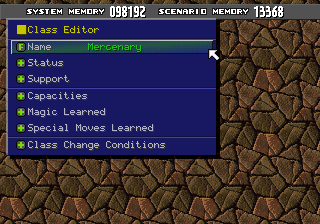
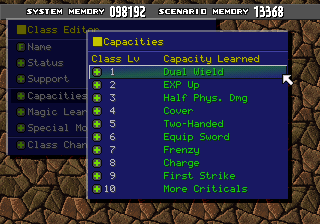
Up to 30 classes. A class adds its status bonuses to its heroes' stats and gives them a support element. Its class level is the hero's CCP in that class ÷ 1,000 + 1, up to 10, and each level can bring a capacity, a spell and a special move. Equipment is checked against the class level, not the hero's.
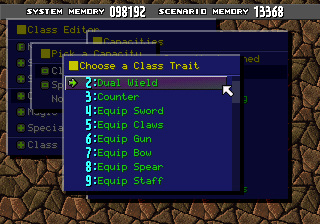
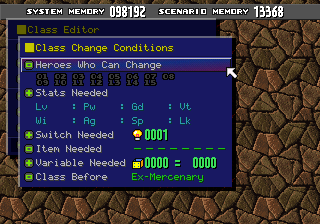
Class Change Conditions say who can take the class (the heroes allowed) and what they need: a level, stats, a switch, an item, a variable, and a class held before. A condition left unticked isn't required. The event commands that add or force a class need the same conditions. A new class allows every hero and needs nothing.
| Setting | Range |
|---|---|
| Status bonuses | −99 to 99 each |
| Capacity | one for each class level, 1–10 (Release isn't offered) |
| HP Regen in Battle | 1–100% of max HP |
| Nullify | one spell, all spells, one special move, or all special moves |
| Stats Needed: level | 1–99 |
| Stats Needed: vitality | 1–9,999 |
| Stats Needed: power, guard, wisdom, agility, luck | 0–9,999 |
| Stats Needed: vigor | 0–99 |
| Switch Needed | switch 1–500 (2,048 with the patch) |
| Variable Needed | variable 0–255 (1,023 with the patch), compared by =, ≠, ≥ or ≤ with a number (−9,999 to 9,999) or with another variable |
Capacities#
A capacity is either a class trait, always at work, or a special command the hero can choose in battle. A hero has one trait in use at a time, chosen in the field menu's Class screen from those his class levels have brought; he keeps every command he has learnt. The commands are shown in battle under the names in System Settings (Command names). Two traits take a setting for each class level: Nullify (which spell or move, or all) and HP Regen in Battle (how much).
| No. | Capacity | What it does |
|---|---|---|
| 1 | Cover | When an ally at a tenth of its HP or less is attacked, the hero may step in and take the blow (50%) |
| 2 | Two-Handed | The hand holding a weapon hits with double attack; the other hand doesn't strike |
| 3 | Dual Wield | Both hands strike |
| 4 | Counter | Strikes back after 80% of hits, not 5% |
| 5–14 | Equip Sword, Equip Claws, Equip Gun, Equip Bow, Equip Spear, Equip Staff, Bare Hands, Equip Shield, Equip Armor, Equip Accessory | The hero may equip that kind of item even when his class doesn't allow it |
| 15 | EXP Up | The hero's share of the battle's EXP is 120% |
| 16 | CCP Up | The same for CCP |
| 17, 18 | Restore 30% HP, Restore 30% MP | At the start of every battle the hero gets back 30% of his max HP (or MP), on top of what he has, rounded down (a hero with 2 max MP gets nothing). It comes again each time his battle record is rebuilt: a revive in battle brings a hero with Restore 30% HP back at 30% of max HP instead of a twentieth, and a hero with Restore 30% MP gets 30% of his MP back each time he falls. Dispel Support cast on him gives nothing with the patch, which keeps his HP and MP as they were (on the original disc it adds the 30% again). Nothing is added after the battle |
| 19–25 | Power +30% … Luck +30% | Adds 30% to one stat |
| 26 | 2x Magic Effect | The hero's magic does double damage |
| 27 | 2x Item Effect | A recovery item the hero uses in battle restores twice the amount |
| 28, 29 | Half MP Cost, 1/4 MP Cost | Spells cost a half or a quarter of their MP |
| 30–32 | Half Magic Dmg, Half Special Dmg, Half Phys. Dmg | Halves that kind of damage taken |
| 33 | Nullify | One chosen spell or special move, or all of them, has no effect on the hero |
| 34 | Non-Elemental | Elements don't change the damage the hero takes |
| 35 | HP Regen | Heals a set percentage of max HP each time the hero's gauge fills |
| 36 | Energy Drain | When the hero is hit, 25%: drains 10–25% of the attacker's max HP |
| 37 | Accept | Learns a spell marked Accept when it hits him (and he hasn't got it) |
| 38 | First Strike | Adds 20 points to the party's chance of a first strike |
| 39 | More Criticals | Criticals 16% of the time, not 6% |
| 40 | More Chests | Adds 10 points to every monster's drop rate |
| 41 | Random Action | Draws one order at random (never Manual) as each battle starts, and keeps it all battle: the player never commands the hero |
| 42 | Forced AI | The hero chooses his own order each turn, and can't be given commands |
| 43 | Steal | Steals the monster's stealable item, at its rate |
| 44 | Guard | No physical damage until the hero's next turn |
| 45 | Charge | Waits a turn; the next action is three times as strong. The hero's defence is 0 for the rest of the battle |
| 46 | Self-Heal | Heals 30% of max HP and cures poison |
| 47 | Run Away | The party escapes for certain (not from a battle that can't be fled) |
| 48 | Plunder | An attack, then a steal |
| 49 | Absorb | 20%: drains 10% of the target's max MP |
| 50 | Levy | 10%: drains 10–25% of the target's max HP and 10% of its max MP |
| 51 | Coin Toss | Damage of a twentieth of the party's money, which is spent |
| 52 | Attack All | Attacks every enemy |
| 53 | Get | 10%: captures a monster at half its HP or less (not in an event battle) |
| 54 | Release | The captured monster attacks once, then rejoins the monsters. The Class Editor never offers it, so no game can give it |
| 55 | Frenzy | Four rounds of attacks: four strikes, or eight with two weapons |
| 56 | Scan | Shows the target's HP and MP |
| 57 | See Through | Shows the target's elements and weaknesses |
| 58 | Heal | 50% for each hero: ends the six ailments |
| 59 | Revive | Brings back every fallen hero at a twentieth of max HP (30% for a hero using Restore 30% HP) |
| 60 | Rest a Turn | The target loses its next turn |
| 61 | Mimic | Repeats the last hero's action, with this hero's own stats, at no cost |
| 62 | Enemy Magic | Casts a spell learnt with Accept |
| 63 | Double Magic | Casts two spells one after the other |
| 64 | Quick Draw | One strike at four times the attack, ignoring defence |
Heroes and the party#
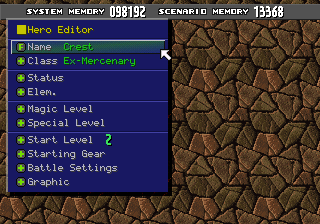
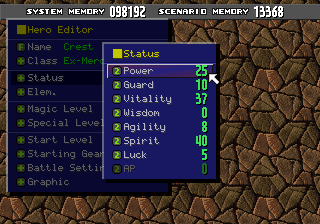
Up to 15 heroes, four of them in the party at a time.
- Status: power, guard, vitality, wisdom, agility, luck and vigor, all per level: a hero's stat is the figure × his level, plus his class's bonus and his equipment (vigor stops at 99, the rest at 9,999). Vitality is his maximum HP and wisdom his maximum MP. Attack is power plus the weapon in that hand; defence is guard plus armour. The sample's Crest, with power 25 at level 2, has 50.
- AP, his starting AP, is shown only when Hero Party says heroes' special moves cost AP. Saving Hero Party with HP sets every hero's AP to 0.
- Elem.: the elements he has and those he is weak to. An element he has and isn't weak to heals him; weak to it, he takes 150%; both, 50%.
- Magic Level and Special Level: the level at which he knows each spell and move (0 never). Above it, the spell gains its bonus points per level.
- Start Level, Starting Gear and Graphic (the field sprite and the face, each in four colours). Start Level shows the stats he will have at that level.
- Class: the class he starts in, or none. Choosing a class takes off any starting gear it can't wear at class level 1.
| Setting | Range |
|---|---|
| Power, guard, wisdom, agility, luck (per level) | 0–9,999 |
| Vitality (per level) | 1–9,999 |
| Vigor | 0–99 |
| AP | 0–9,999; shown only when heroes' special moves cost AP |
| Graphic No., sprite and face | 1–135 the disc's, 136–145 Character Tsukuru's ten |
| Color No. | 0–3, for the disc's graphics only |
| Magic Level, Special Level | 0–99 for each spell and move (0: never) |
| Start Level | 1–99 |
| BT Start | Random, or a set 0–100% |
| Status Effect Rates | 0–100% each (the 20th greyed) |
| Damage | 0–200% for each damage spell and move |
A new hero has vitality 1 and every other stat 0, no gear and no class, starts at level 1 with a random gauge, is right-handed, and has the default rates (above) and 100% damage from every damage spell.
Vigor, not agility, sets how fast a battler acts. The time gauge fills by vigor ÷ 2 + 1 each frame, and the battler acts when it is full: about 3 seconds at vigor 99, 9 at 35, nearly three minutes at 0. A hero's agility counts for escaping and the first strike; his luck, against the attacker's agility, for how often he dodges a monster's blow. A monster dodges a hero's blow 5% of the time whatever the stats.
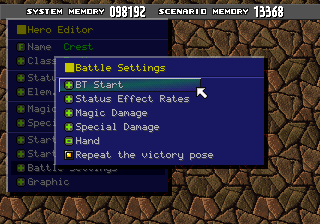
Battle Settings: where the gauge starts (at random or at a set %), the status effect rates (the chance each effect lands on him: the table above; the 20th, Transform, is greyed, since heroes can't be transformed), the damage he takes from each damage spell and move (0–200%; 0 makes him immune), his hand and whether he repeats his victory pose.
The hand is right, left or both. Changing it takes off at once what no longer fits: a right-handed hero keeps only a weapon in his right hand and a shield in his left, a left-handed one the reverse; both hands can hold anything.
Orders#
In battle a hero can follow an order: set it in the field menu's Tactics, or in battle under MEETING on the party ring. A hero on an order picks his own action when his gauge fills:
| Order | What the hero does |
|---|---|
| Give It Everything | Casts a damage spell or uses a damage special move |
| Use Magic Wisely | A spell a quarter of the time; otherwise attacks |
| Use Specials Wisely | A special move a quarter of the time; otherwise attacks |
| Use No Skills | Attacks only |
| Defend Yourself | At a tenth of HP, uses a healing item; otherwise guards (three times in four) or attacks |
| Stay Alive | At a tenth of HP, heals himself with a spell or an item; otherwise guards |
| Hit Them All | Attack All if he has it; otherwise spells and moves that hit every enemy |
| Finish Them Off | Frenzy if he has it; otherwise spells and moves on one enemy |
| Always Heal | Heals an ally under 70% of HP: a spell, then a special move, then an item |
| Heal When Needed | The same under 25% |
| Support Everyone | Raises attack or defence on himself or an ally, at most twice a battle |
| Use Your Capacities | A quarter of the time, one of his command capacities at random |
| Manual | The player chooses |
When an order's choice fails (no spell, no MP, no target), the hero attacks. An order chooses only among the spells and special moves ticked in Tactics' Use Magic and Use Special Moves, so unticking a costly spell keeps an AI hero from wasting MP on it; the ticks don't limit what the player picks by hand (Tactics).
Every hero starts a battle on Manual, whatever his order, unless the player has turned on AI from Battle Start in the field menu's Settings. Otherwise the orders take over only when the player chooses AI on the party ring. Holding × as an AI hero's turn comes puts the party back on Manual. Heroes with Random Action or Forced AI always choose for themselves.
Hero Party#
Hero Party sets who is in the party at the start (up to four) and what they carry (0–99 of each item). It also holds four party-wide rules: whether the field shows the whole party or only the leader, whether fallen heroes come back after a battle (with 1 HP; without it, a party that falls is game over), and whether heroes' and monsters' special moves cost HP or AP.
Monsters and monster units#
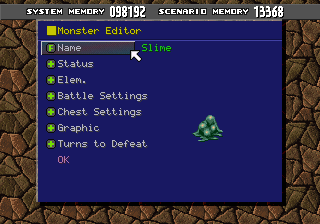
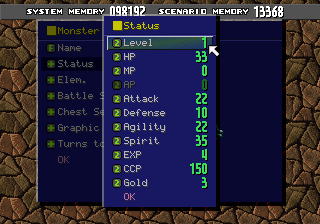
Up to 250 monsters, which fight in monster units of up to four (200 units). A monster has a level, HP, MP, attack, defence, agility and vigor, and gives EXP, CCP and gold. Its stats are its own, not per level. EXP and CCP are shared among the heroes still standing; the gold isn't shared.
The graphic decides its size, and the size how many fit in a unit: four S or M monsters, two L, or one LL. When a monster is made bigger, units it no longer fits in lose monsters from the end until it does. Its height (Hi, Mid or Lo) sets how it stands: Hi and Mid monsters bob up and down, Lo ones stand still.
| Setting | Range |
|---|---|
| Level | 1–99 |
| HP | 1–999,999 |
| MP, AP, EXP, CCP, attack, defence, agility | 0–9,999 |
| Vigor | 0–99 |
| Gold | 0–999,999 |
| Graphic | 0–111 the disc's, 112–126 Character Tsukuru's |
| Color | 0–3, for the disc's graphics only |
| Ht. (height) | Hi, Mid or Lo |
| BT Start | Random, or a set 0–100% |
| Counter Rate | 0–100% |
| Attack pattern chances | 0–100% each, together at most 100 |
| Critical | × 2 or 3 |
| Multi-Hit | 2–10 hits |
| Charged | 1–10 turns, then × 1–10 |
| Drain MP | 0–9,999 MP |
| Status effect rates, damage | 0–100% each, 0–200% each |
A new monster has level 1, HP 1, height Lo, no chest items, the default rates and 100% damage from everything.
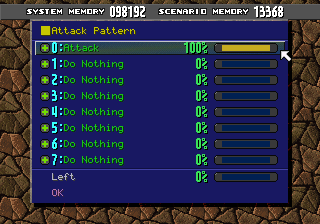
Battle Settings hold where its gauge starts, its height, its counter rate, its status effect and damage rates (as a hero's, with all 20 rates open), and its attack pattern: eight actions, each with a chance. Each turn the game rolls 0–99 and walks down the list. The chances can't add up to more than 100 (a slider that would pass it stops), and whatever is Left is a turn spent doing nothing.
| Kind | Actions |
|---|---|
| Physical | Attack, Charge (an attack that is always countered), Poison, Silence, Paralyze, Sleep, Confuse and Death attacks (each must beat the target's rate), Miss (always misses), Critical (× 2 or 3), Multi-Hit (2–10 hits), Charged (waits some turns, then hits × a multiplier), Aimed (at one chosen hero) |
| Action | Do Nothing, Wait and Counter (counters every hit that turn), Defend, Hide (can't be targeted; comes back half the time each turn), Flee, Self-Destruct (falls, and its max HP is shared out as damage to the heroes), Call for Help (80%: a chosen monster joins, if there is room on the screen for it), Drain MP (50%), Steal an Item (80%, a chosen item; a monster holds up to six) |
| Magic, Special | A spell or a special move |
If every monster left in a unit hides, the party has won.
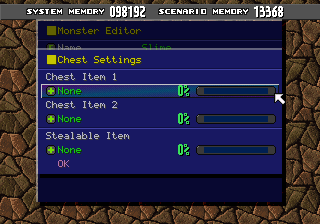
Chest Settings: two items it may drop and one that can be stolen, each with its rate.
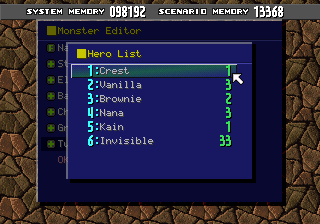
Turns to Defeat estimates how many plain attacks each hero needs at his starting level, class and gear: the monster's HP ÷ (the hero's attack − its defence), at least 1. It leaves out criticals, elements and growth, and it counts an accessory that raises luck or gives an immunity as if it raised attack, so take it as a rough guide to balance.
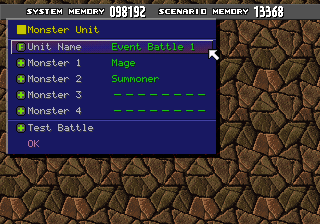
Test Battle in the unit editor fights the unit at once with a party of your choosing, each hero with his own gear and level, without leaving the editor. A test battle gives no rewards.
Maps#
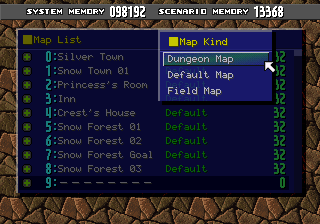
Up to 250 maps, of three kinds: dungeon maps drawn from scratch with the parts of one of 43 sets, ready-made default maps from the disc (273 of them), and field maps, the world map. Drawing a map, its settings, what its parts do in play and the random battles on it are on their own page, The map editor.
Fan-made reference material, one of the Eschaton Games Tsukuru guides. Not affiliated with the publishers of the titles it covers.